
Build a custom filter
A custom filter combines several conditions to find specific data, such as all Windows desktops for one customer. Each condition has a field, an operator and a value. You can put conditions into groups and join them with And or Or. After you apply the filter, you can export the results or save them in a view.
For the full list of operators and worked examples, see Custom filter operators and examples.
Before you begin
- Open an Ecoverse workspace.
Steps
- Select Create filter.

- Select And to choose either And, Or, Not And, or Not or as the logic for the top-level group.
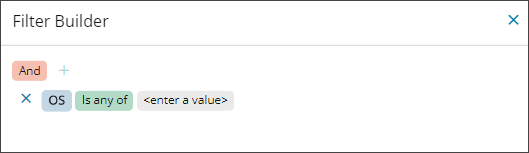
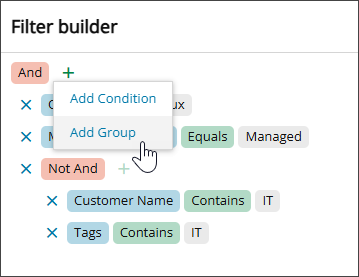
- Select +, and then select Add Condition or Add Group.
- Select a field, such as OS.
- Select an operator, such as Is any of.
- Enter a value, such as Linux.
- (Optional) Repeat the steps to add more conditions.
- (Optional) Add a group of conditions. We recommend at least two conditions in each group.
- Select Apply.
Result
The table shows only data that matches the filter. To reuse the filter, save it in a view. For more information, see Save a workspace view.
Related topics