

Network Discovery is enabled for all servers and workstations at all Clients and Sites by default.
We recommend disabling the Network Discovery Agent on DHCP servers to avoid potential conflicts on port 67. If the Network Discovery Agent acts as the network discoverer and runs scans, it may interfere with DHCP operations. For more information, see DHCP Servers and Network Discovery.
- Individual device settings can be inherited from the Site level (Use Policy Setting), or be set On or Off, ensuring device-specific control when needed.
How to enable or disable Network Discovery by Device type, Client and Site levels
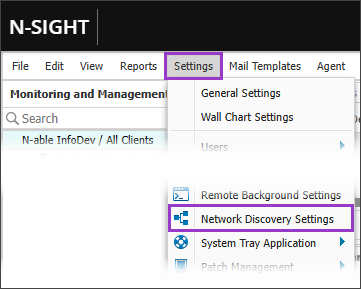
- In the All Devices view go to Settings > Network Discovery Settings.
- In the left menu, select the select the target entity: Device type, Client, or Site.
-
Choose the desired Setting: On, Off, or Use Parent (available at Client and Site levels).
- At the Server and Workstation levels, you can set Network Discovery On or Off by default for devices of that type.
- For each Client, choose Use Parent to inherit the Network Discovery setting from the Server and Workstation levels, or select On or Off.
- For each Site, choose Use Parent to inherit the Network Discovery setting from the from the Client, or select On or Off.
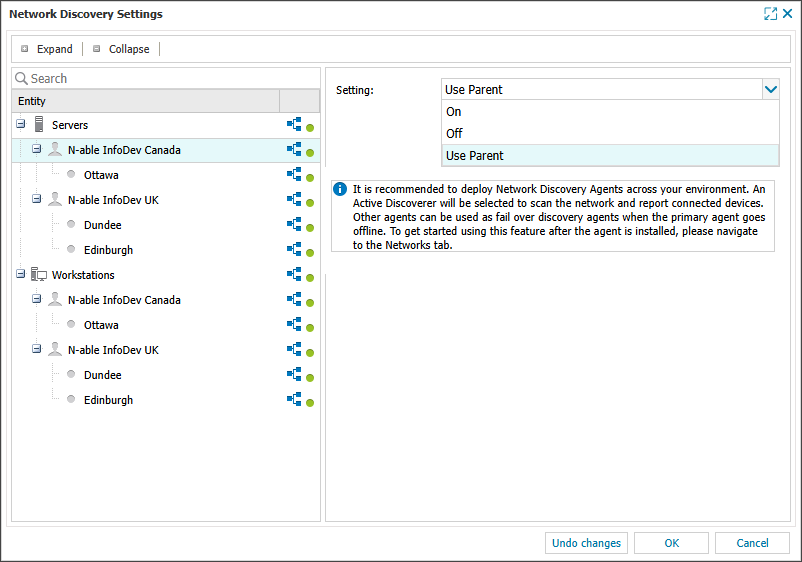
- Select OK to save and apply.
How to enable or disable Network Discovery at the individual device level
- All Devices view, locate and select the target
- Choose Edit <device type> from the <device type> drop-down menu, or double-click the device row.
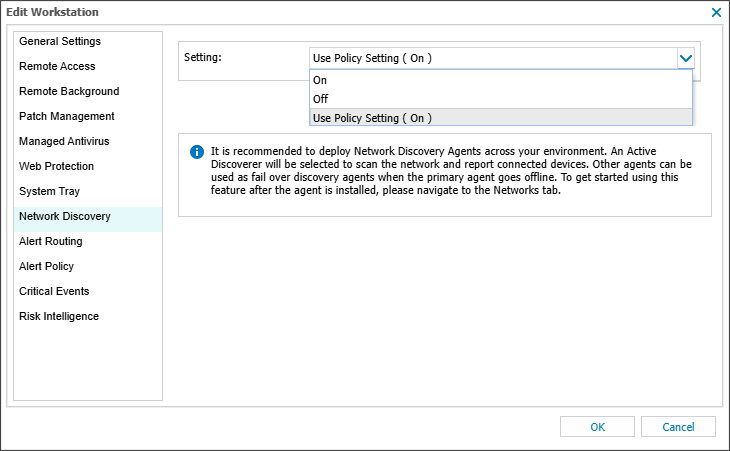
- In the Edit <device type> dialog, select the Network Discovery tab.
- Choose the desired Setting: On, Off or Use Policy Setting.
- Use Policy Setting inherits the configured default Network Discovery setting from the devices Site. Use On or Off for device-specific control when needed.
- Select OK to save and apply.
Disabling Network Discovery (whether at the Device type, Client, Site or Individual device level) only initiates the uninstall process for the Network Discovery Agent on any devices in the selection. It does not automatically remove any networks currently under management. Please see our article Unmanage a network for instructions to remove a network from management.
Related articles