
Run the check detection scan to automatically add checks
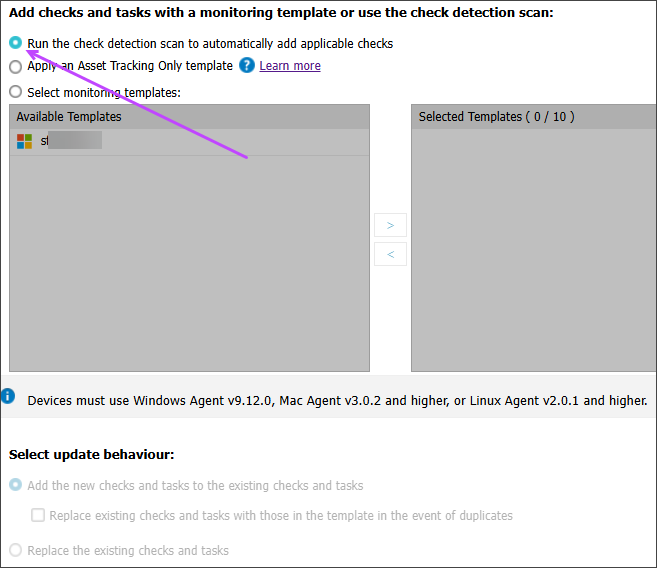
You can run the check detection scan to automatically add applicable checks to devices instead of applying a monitoring template. The check runs the default check discovery scan and automatically adds or replaces the Standard checks and supported product checks for the device type.
When a check is replaced, its settings are overwritten and all technical and client-facing notes are removed.
Checks are only added to servers and workstations capable of supporting that check. For example, a Windows check cannot be added to a Mac workstation, and a Mac monitoring template cannot be applied to a Windows computer.
- To run the scan for a client or site:
- In the Client List of the All Devices view, right-click a client or site.
- Select Apply Monitoring Template.
- In the Apply Monitoring Template dialog, select the type of devices to update: servers or workstations.
- To run the scan for devices:
- In the Servers or Workstations tab of the All Devices view, select one of more devices (Shift and left-click for a range, Control and left-click for specific devices).
- Right-click one of the devices and select Monitoring Templates > Apply Monitoring Template.
- Choose Run the check detection scan to automatically add applicable checks.
- Select Apply.
- Review the confirmation prompt about removing and replacing checks and their notes.
- Confirm and then select OK.
What do you want to do?