
Before creating the Cove Data Protection deployment script in Kaseya VSA, ensure you have:
- Reviewed the Requirements.
- Taken the Preparation steps.
- Generated Installation ID in Cove's Management Console.
- Created the custom field in Kaseya VSA
- Added the Custom Field Value in Kaseya VSA
Instructions
- Login to Kaseya VSA
- Navigate to Automation > Automation Hub
- Select the User Defined folder and select Create Folder

- Create a folder named Cove Data Protection deployment
- Select the newly created folder and select Create Script
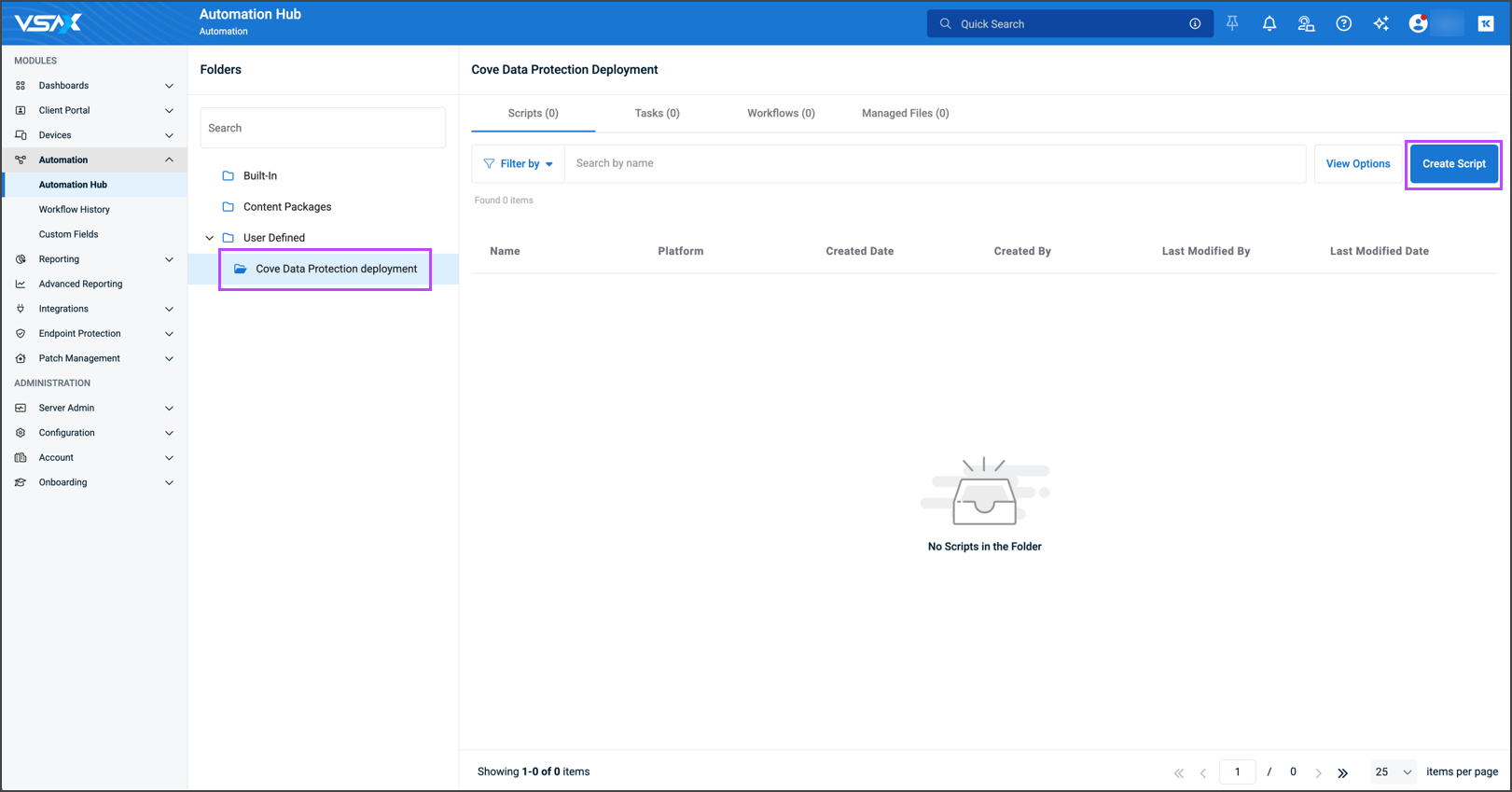
- Enter the script details:
- Name: Cove Data Protection deployment
- Description: Cove Data Protection deployment
- Inputs: In the inputs section,
- Click + New
- Name the variable CoveInstallationID
- Toggle Use custom field value to ON
- Select CoveInstallationID in the custom field value dropdown
- Select Save Variable
- Enable Windows
- Select PowerShell in the Script Type dropdown
The Custom Field Input Variable is automatically added into the script parameters field
- Copy and paste the following script parameters into the text box below the automatically added custom field input variable:
# Begin Install Script Cove Data Protection deployment for Kaseya VSA # Validate the property if ([string]::IsNullOrWhiteSpace($CoveInstallationID)) { Write-Output "InstallStatus=PropertyError" Write-Output "ErrorMessage=CoveInstallationID is not set." exit 1 } # Regex check: enforce GUID/UID format if ($CoveInstallationID -notmatch '^[0-9a-fA-F]{8}-[0-9a-fA-F]{4}-[0-9a-fA-F]{4}-[0-9a-fA-F]{4}-[0-9a-fA-F]{12}$') { Write-Output "InstallStatus=PropertyError" Write-Output "ErrorMessage=CoveInstallationID has invalid format: $CoveInstallationID" exit 1 } # --- Stop script if Backup Manager is already installed (check for config.ini) --- if (Test-Path "C:\Program Files\Backup Manager\config.ini") { Write-Output "InstallStatus=AlreadyInstalled" Write-Output "ErrorMessage=Found config.ini in C:\Program Files\Backup Manager" exit 1 } elseif (Test-Path "C:\Program Files (x86)\Backup Manager\config.ini") { Write-Output "InstallStatus=AlreadyInstalled" Write-Output "ErrorMessage=Found config.ini in C:\Program Files (x86)\Backup Manager" exit 1 } # Continue with installation $INSTALL = "C:\Users\Public\Downloads\cove#v1#$CoveInstallationID.exe" [Net.ServicePointManager]::SecurityProtocol = [Net.SecurityProtocolType]::Tls12 # Try HTTPS first, fallback to HTTP try { (New-Object System.Net.WebClient).DownloadFile( "https://cdn.cloudbackup.management/maxdownloads/mxb-windows-x86_x64.exe", $INSTALL ) Write-Host "Download succeeded via HTTPS." } catch { Write-Warning "HTTPS download failed. Attempting HTTP..." try { (New-Object System.Net.WebClient).DownloadFile( "http://cdn.cloudbackup.management/maxdownloads/mxb-windows-x86_x64.exe", $INSTALL ) Write-Host "Download succeeded via HTTP." } catch { Write-Output "InstallStatus=DownloadFailed" Write-Output "ErrorMessage=Installer could not be downloaded via HTTPS/HTTP." exit 1 } } Write-Output "Running installer..." Start-Process -FilePath $INSTALL -ArgumentList "/S" -Wait Remove-Item $INSTALL -Force # Begin check if install is successfully # --- Verify installation success --- Start-Sleep -Seconds 5 # allow installer to finish writing files $ConfigPaths = @( "C:\Program Files\Backup Manager\config.ini", "C:\Program Files (x86)\Backup Manager\config.ini" ) $Installed = $false foreach ($path in $ConfigPaths) { if (Test-Path $path) { $Installed = $true break } } if ($Installed) { Write-Output "InstallStatus=Success" Write-Output "ErrorMessage=None" } else { Write-Output "InstallStatus=InstallFailed" Write-Output "ErrorMessage=Backup Manager did not install or config.ini not found." exit 1 } # End Install Script Cove Data Protection deployment - Select Create
- Confirm the Cove Data Protection deployment script has been created by checking that it is showing in the Automation Hub

Now, run the Cove Data Protection deployment script in Kaseya VSA.