View asset details

Use the Asset details overlay to view system information, hardware specifications, performance metrics, and patch status (Linux only), and recent activity for a selected asset.

To open the Asset details overlay:

  1. Go to the Assets view.
  2. Select the row for the asset you want to view (not a link).

  3. The overlay opens from the right side of the screen.

Asset details overlay tabs

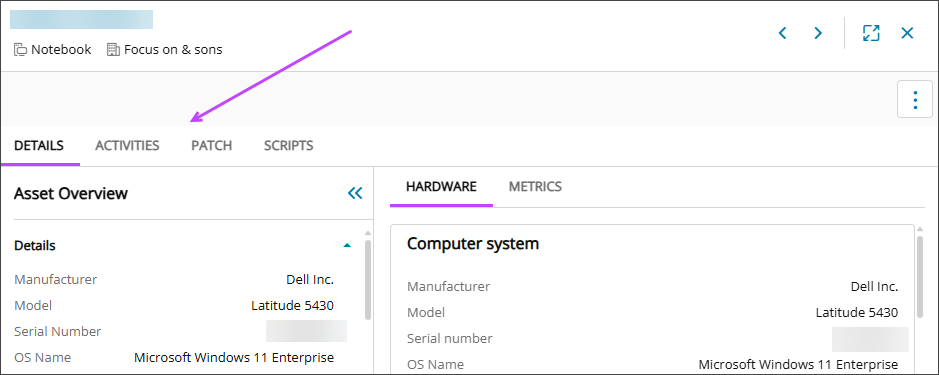
The overlay includes the following tabs to organize asset information:

Details tab

This tab provides a comprehensive view of the asset, organized into the following sections:

  • Asset overview

    Displays the operating system, model, serial number, TPM information, and network interfaces. Content may vary depending on the asset’s OS.

  • Hardware

    Includes information about the computer system, processor, motherboard, physical drives, installed memory, and network adapters.

  • Metrics

    Shows graphs for CPU and memory utilization over a selected time.

Patch tab (Linux assets only)

Use the Patch tab to track and start patching for the Linux asset. You can view patch installation status, schedule patches, control reboots, and access historical patch data.

Activity tab (Windows assets only)

The Activity tab shows recent events related to the asset, including access activity and system crashes. Additional event types will be added over time to provide greater visibility and insight.

This tab is available for Windows assets that have the Modern agent installed. It updates every 30 minutes at quarter past and quarter to the hour. On average, the data shown is about 15 minutes behind real time.

Activities might not appear for an asset for these reasons:

  • The feature currently supports only Windows assets.
  • If the Event Log is larger than 20 MB, activities are not captured. Most assets have logs of this size or smaller, but some servers may have larger files.

Access events

These events help track user authentication and session activity.

Event ID Event name Logon type requested Description
4624 Successful logon 2: Interactive
7: Unlock
10: RemoteInteractive
11: CachedInteractive
Occurs when a logon session is created on the destination machine.
4625 Failed logon attempt Same as above Occurs when a logon attempt fails on the local machine.
4634 Logoff 2: Interactive
10: RemoteInteractive
Occurs when a logon session ends and no longer exists.
4800 Workstation locked 2: Interactive Occurs when a local session is locked.
4801 Workstation unlocked 7: Unlock Occurs when a local session is unlocked.

System crash events

These events indicate system-level failures or shutdowns.

Event ID Event name Description
41 System kernel-general crash Occurs when the system restarts unexpectedly without cleanly shutting down first.
1001 Application crash Occurs when Windows Error Reporting has logged an application error or crash. Common BugCheck codes include:
  • 0x0000000A — IRQL_NOT_LESS_OR_EQUAL: Driver accessed memory at too high IRQL
  • 0x0000003B — SYSTEM_SERVICE_EXCEPTION: System service caused an exception
  • 0x0000007B — INACCESSIBLE_BOOT_DEVICE: System cannot access the boot device during startup
  • 0x0000007E — SYSTEM_THREAD_EXCEPTION_NOT_HANDLED: System thread generated exception
  • 0x00000074 — BAD_SYSTEM_CONFIG_INFO: Registry contains invalid information
  • 0x00000080 — NMI_HARDWARE_FAILURE: Hardware malfunction detected by NMI
  • 0x0000009C — MACHINE_CHECK_EXCEPTION: Fatal machine check exception occurred
  • 0x00000101 — CLOCK_WATCHDOG_TIMEOUT: Multiprocessor system clock watchdog timeout
  • 0x00000124 — WHEA_UNCORRECTABLE_ERROR: Hardware error detected by WHEA
  • 0x000000EF — CRITICAL_PROCESS_DIED: Critical system process terminated unexpectedly
6008 Unexpected system shutdown Occurs when the system shuts down unexpectedly.

Related articles