
2026.1 Release Notes
| Build Number: | 2026.1.0.527 [N-central] |
| 2026.1.1.1 [N-central for CMMC Compliance] | |
| Last updated: | 31-July-2026 |
Azure partners are advised to reboot their N-central server before beginning the 2026.1 upgrade process.
What's New in 2026.1
We’re introducing exciting new features, enhancements, and critical fixes to improve usability, security, and performance. Here’s what’s in the 2026.1 release:
N-central for CMMC Compliance: version available for on-premises deployments
CMMC (Cybersecurity Maturity Model Certification) is a security framework developed by the U.S. Department of Defense (DoD) to safeguard Controlled Unclassified Information (CUI) and Federal Contract Information (FCI).
N-central now includes a dedicated CMMC Compliance version to help organizations operate in environments that require CMMC Level 2 compliance, and this capability will be officially made available for GA.
As a result, any organization participating in the government contracting supply chain including organizations and IT service providers must meet CMMC Level 2 controls in order to continue delivering services to the DoD.
Details are noted here: CMMC N-central version
You cannot upgrade from a non-CMMC-compliant version of N-central to N-central for CMMC Compliance.
To use N-central for CMMC Compliance, you must perform a new, clean installation.
UI Refresh: Updated Layout and Navigation Experience
This release introduces several improvements to N-central’s interface as part of the ongoing UI refresh multi phased approach. These updates enhance usability, streamline navigation, and without functional changes.
This view will apply to all: CMMC, non-CMMC, on-premises and hosted, trial or contracted versions of N-central.
The following are the changes applied:
Simplified page layouts and reduced visual clutter
Lightened and simplified page layouts and removed excessive bold text, heavy colors, and redundant icons.

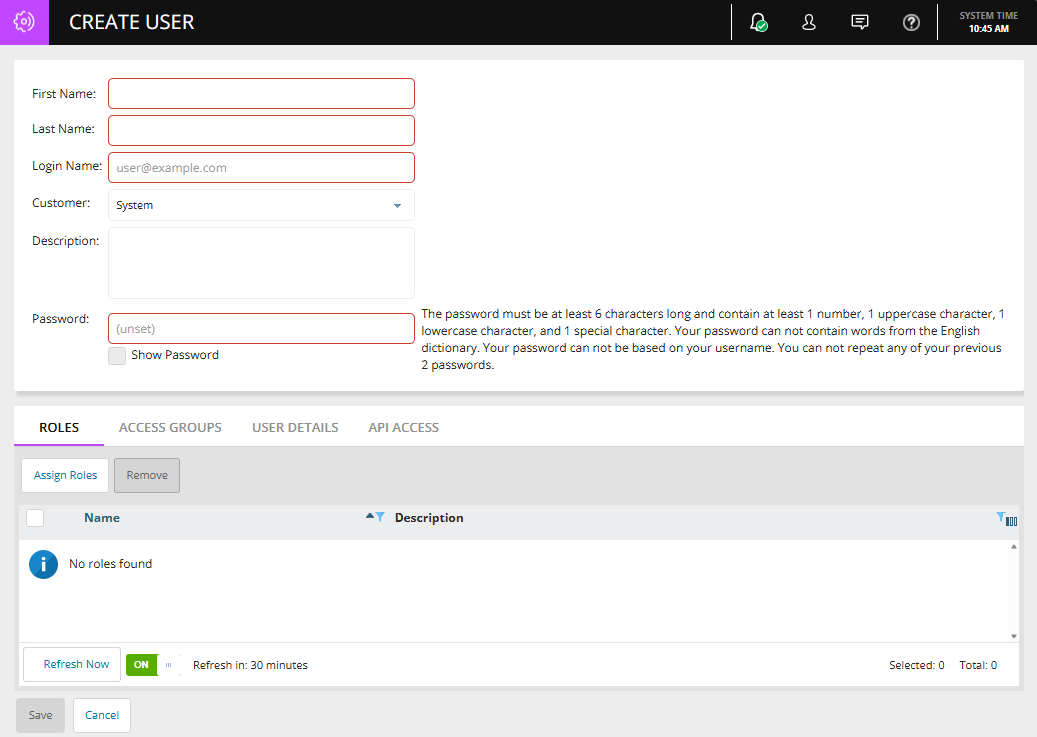
Form updates:
General buttons are now white, and primary/submit actions now use Apex Teal.
Tabs and titles lightened with clear underlines
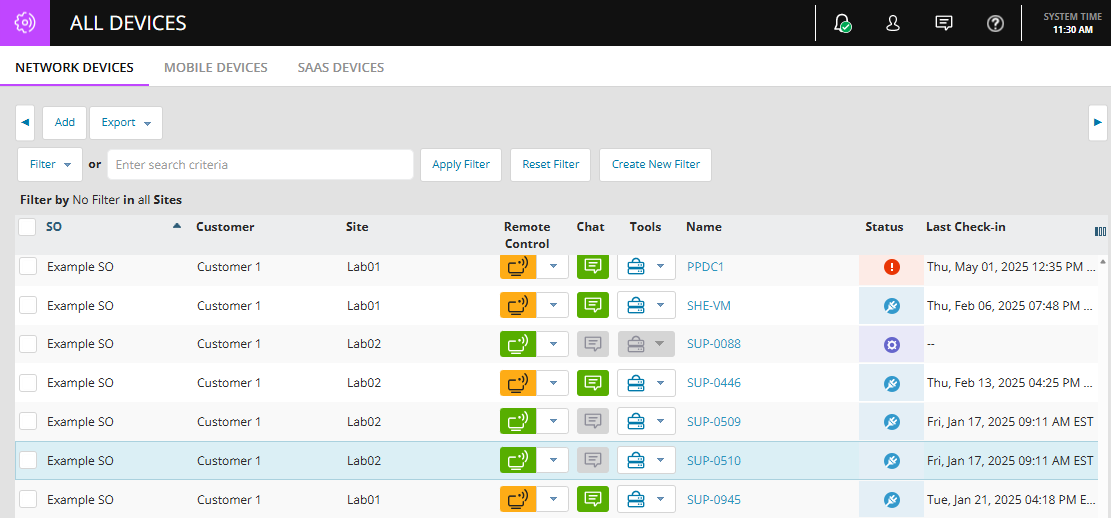
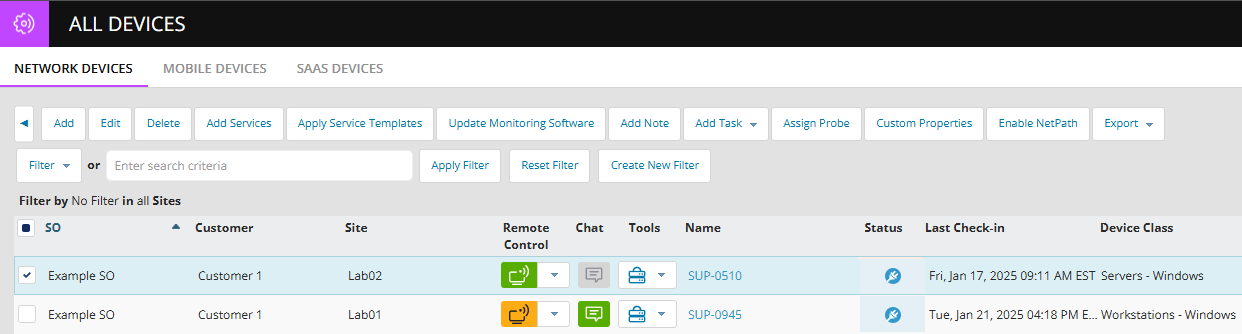
New Horizontal Button Sliders on the All-Devices page
-
Action buttons remain hidden until at least one device is selected. Disabled buttons are no longer shown.
-
All buttons now appear in a single row instead of multiple rows. New left/right arrow controls allow you to scroll through the full button to set horizontally.
-
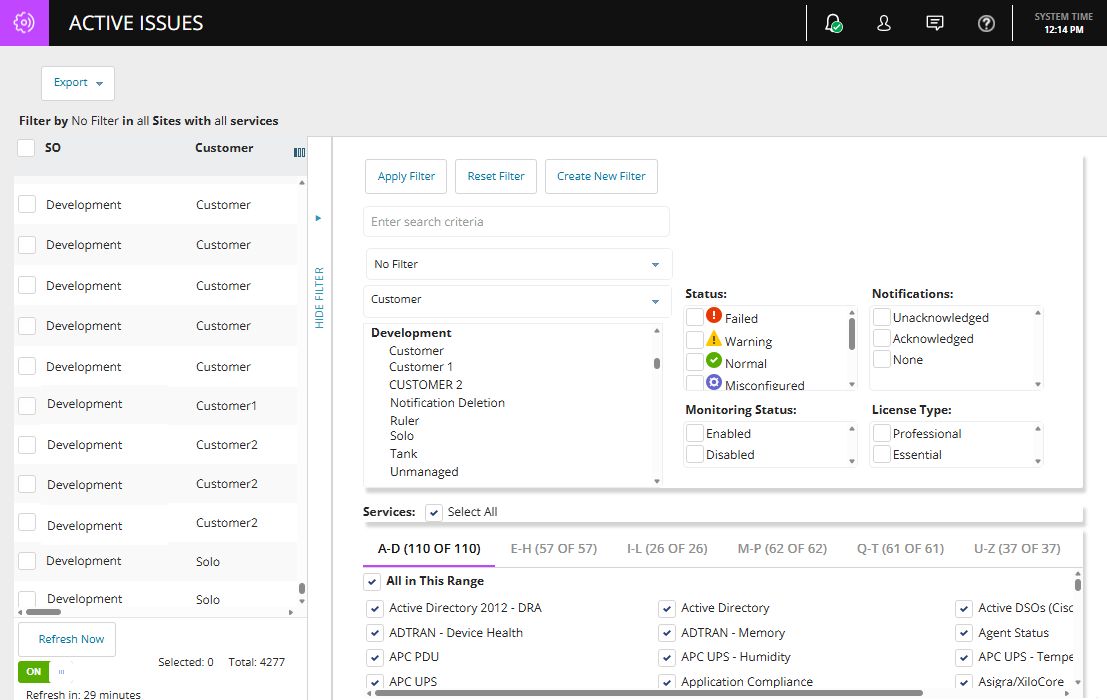
The Active Issues page will receive the same enhancement in an upcoming release.
Polished high-traffic components (tables and filters):
-
Dropdowns, selection boxes, and combo boxes now use the new UI styling standards.
-
All buttons across N-central have been slightly increased in size for improved accessibility and readability.
-
Remote Control, Two-Way Chat, and Tools buttons in All Devices, Active Issues, Dashboards, and the Device Header now use the new button styling.
Left-Hand Menu Behavior
-
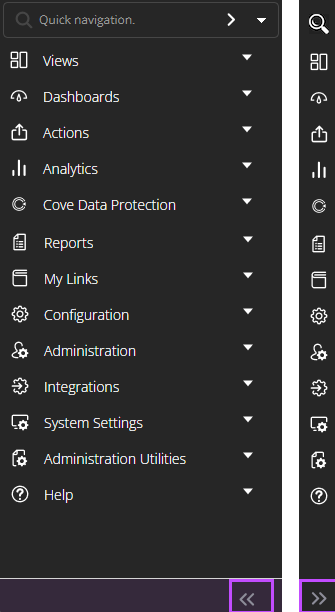
Left-hand menus now start collapsed by default when logging in, refreshing the browser, or opening a new tab.
-
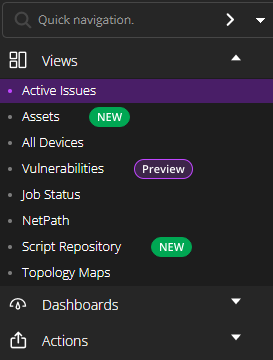
Logos previously displayed next to each sub menu items have been removed.
-
Highlighted background when a left navigation menu item is selected
-
The Expand/Collapse Button control for the left navigation has been moved and no longer in the top-right corner of the navigation area but appears as a standalone button in the bottom-right corner, separate from the lower menu items.
-
Side Navigation Menu no longer disappears when collapses they gracefully minimize to icons. Quick navigation widget now restyled to blend into the background of the side menu bar.
|
|
|
Collapsed sub-menus. Collapse and expand buttons, with collapsed left navigation. |
Sub-menu with logos removed. Highlighted background for selected section. |
Authenticated In-Product Support Chat (N-Able Login)
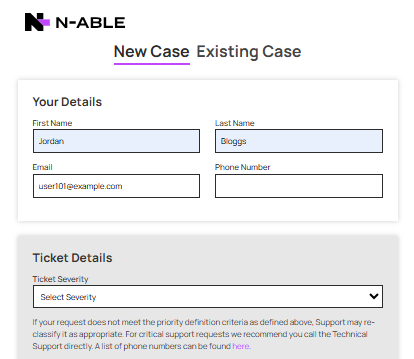
N-central now includes an authenticated support chat experience, replacing the previous unauthenticated chat flow. This enhancement ensures all support interactions initiated through the in-product chat button are securely tied to a verified N-Able Login SSO and N-AbleMe user.
Where to Access:
The chat button remains in the top-right navigation bar (see highlighted icon below).

When clicked, N-central now initiates a secure, authenticated chat session using the user’s N-Able Login credentials.
User Flow:
-
If the user is already signed in to N-Able Me, the system validates their session and sends them directly to the product chat experience.
-
If the user does not have an N-Able Me account, they are prompted to create one.
-
Creating an N-Able Me account initiates SSO user provisioning and sends a welcome email with instructions to complete the setup.
-
Once the user completes this setup and signs in, they can immediately access the in-product authenticated chat.
Deployment notes: On-prem customers
You must upgrade to N-central 2026.1 to regain access to in-product chat. If you remain on an earlier version of N-central, chat functionality will not be available.
NetPath End-of-Life (EOL)
NetPath by SolarWinds is an on-premises, single-tenant solution that provides performance metrics and a visual hop-by-hop path for monitoring the traversal route of a URL over the internet and was delivered as part of the Orion Platform within the Network Performance Monitor (NPM) product.
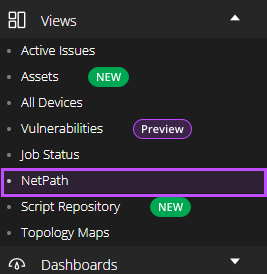
NetPath is scheduled for retirement on March 2, 2026. Once retired, NetPath will no longer be available or function.
As part of N-Able’s decision to retire NetPath, N-central is aligning with this direction and officially ending support for NetPath across all N-central versions, both On-Premises and Hosted (NCOD).
Impact on N-central Customers:
-
Existing customers who are already using NetPath or who are licensed for it will continue to have access and may keep using the feature without interruption. After upgrading, partners with active NetPath usage will retain the feature.
-
Customers who are not licensed for NetPath, or who have never used or configured it, will no longer see any NetPath options or references in the UI.
-
On brand-new N-central installations and for newly created Service Organizations (SOs), NetPath will not be available or displayed anywhere in the interface.
New Script Repository and On-Demand Script Execution for N-central, Now in Public Preview!
We’re excited to announce the public preview of our new scripting environment, delivered as part of the Script Hub experience, built on a modern infrastructure and designed to make it easier for technicians to create, manage, and run scripts across Windows, Mac and Linux devices.
This release introduces three core capabilities:
-
Script Repository: Create, upload, edit, and view PowerShell, PowerShell Core, Bash, Shell and Python scripts.
-
Run Script: Execute scripts on demand for individual Windows, macOS, and Linux devices directly from the Assets view.
-
View Task Output: Access execution status, timestamps, and downloadable task output from a dedicated Scripts tab in the Assets view.
Script Repository
The new centralized Script Repository accelerates how teams build, organize, and reuse scripts across operating system environments. It helps bring clarity, efficiency, and consistency to script management. The repository includes:
-
A built-in script editor which supports collaborative editing and input/output parameters.
-
Script categorization by Type and Operating System, with assignment to Service Organizations, Customers, or Sites.
-
Search and filtering options to help you quickly find the right script when needed.
-
Support for PowerShell, PowerShell Core, Shell, Bash and Python script types.
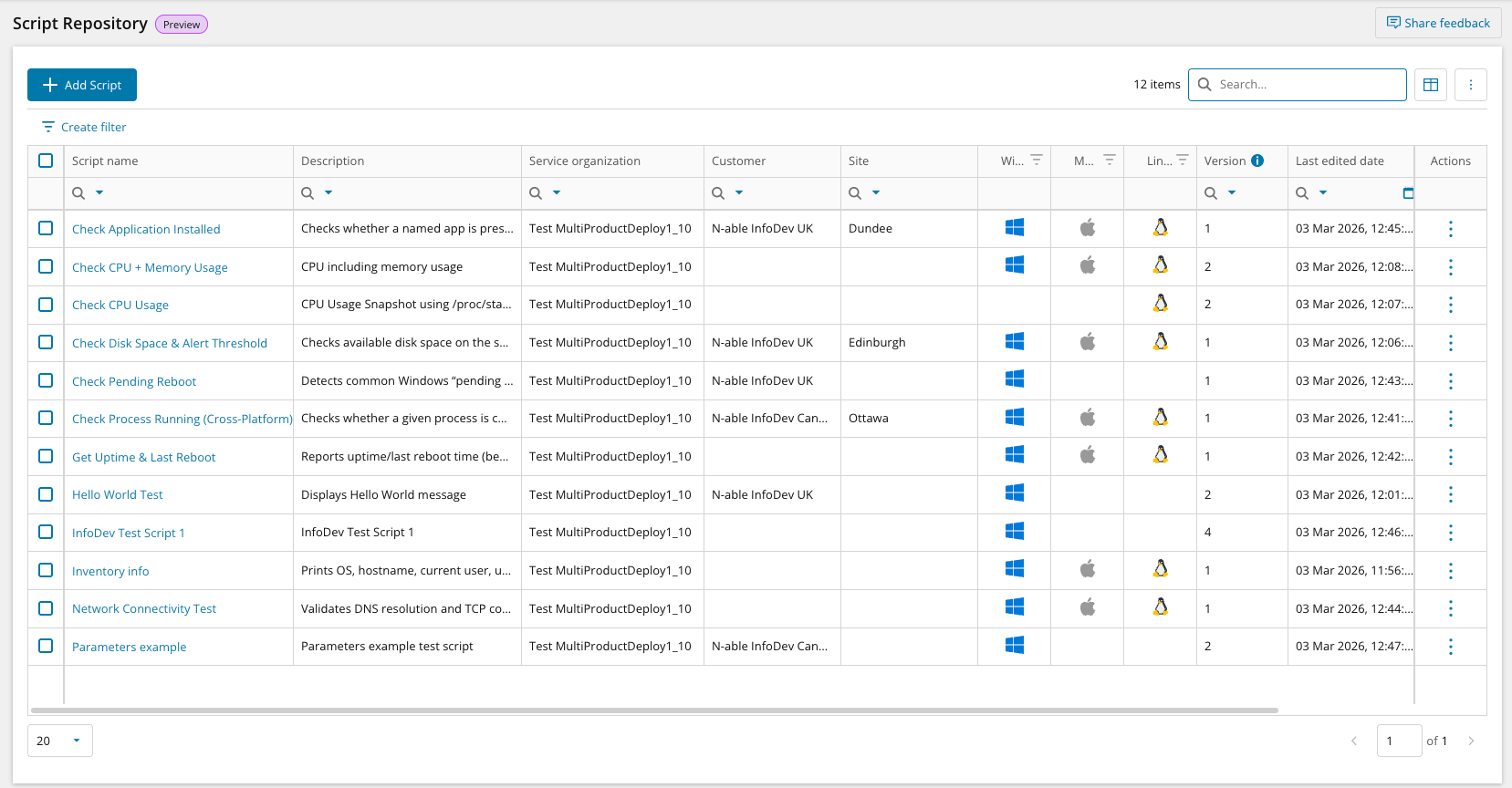
The Script Repository is accessible from the left-hand navigation under ‘Script Repository’.
Run Scripts on Demand
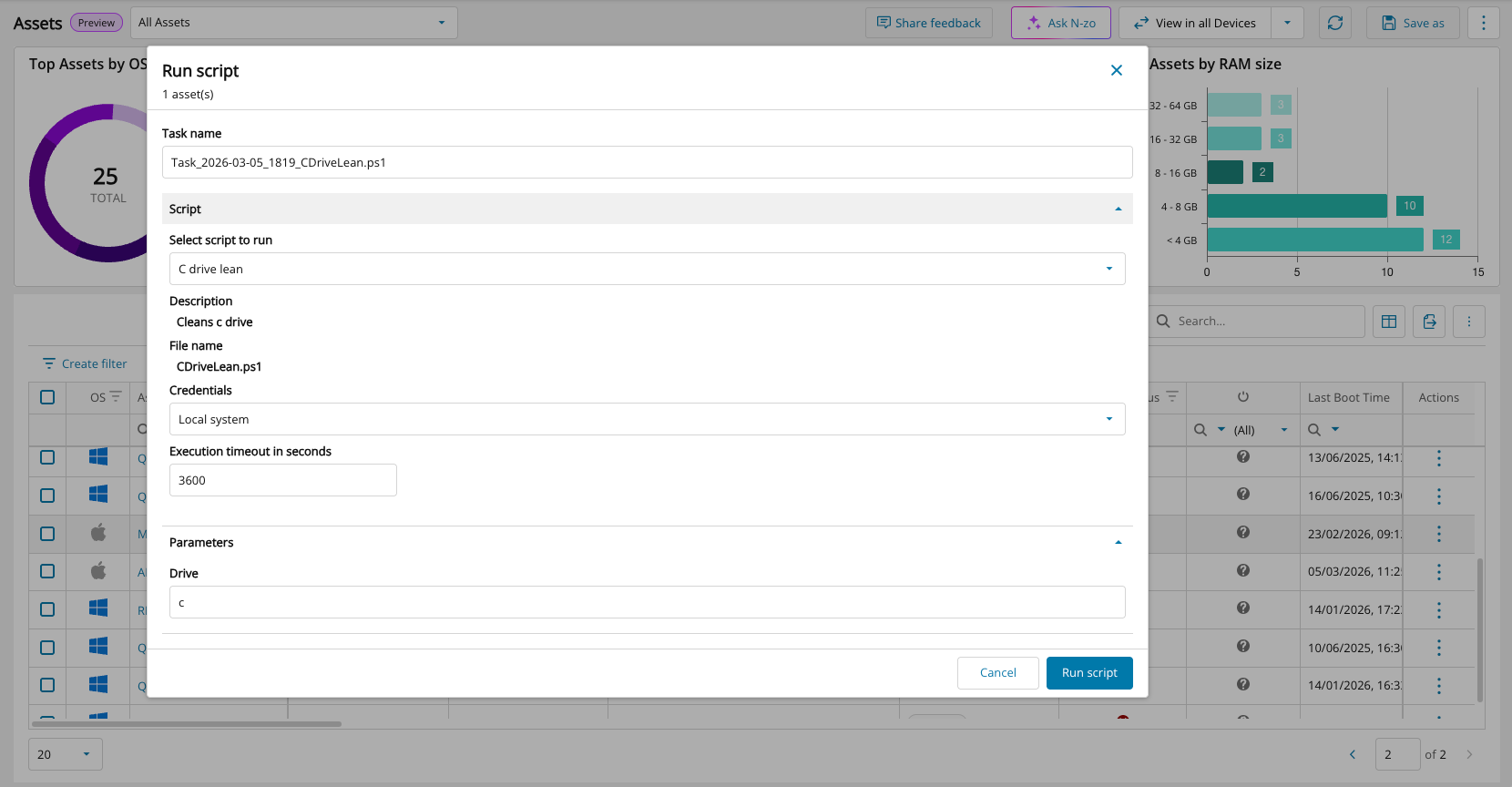
Technicians can now execute scripts directly on individual Windows, Mac and Linux devices from Assets View for fast, in-context operations. Select ‘Run Script’ from the Actions column.
-
Respond quickly to alerts or issues with fewer clicks and no navigation away from the Assets view
-
Run scripts using local or custom credentials to handle a wider range of administrative and user-context tasks
Script Execution Output View
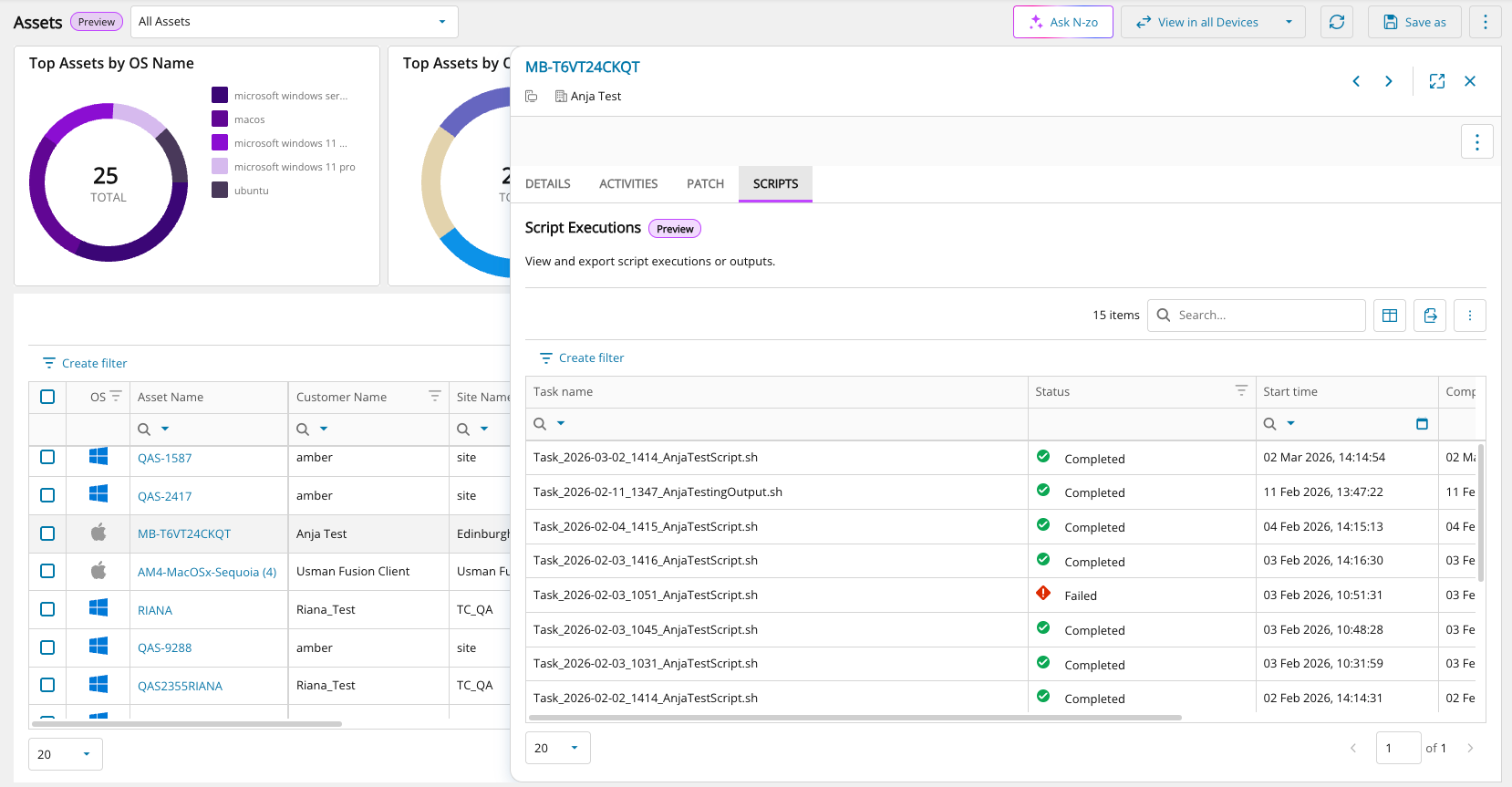
A dedicated Scripts tab in the Assets view fly-out panel lets you view and download key execution details, including:
-
Execution status (success or failure)
-
Task output data available for download in JSON format
-
Start time, end time, and execution duration
What’s Next
These updates mark the first phase of N-able’s new and modern scripting experience, establishing a foundation for how scripting will continue to evolve across N-central.
Future phases will build on this foundation and are planned to include:
-
Bulk script execution
-
Centralized execution and task views
-
Script scheduling
-
AI-assisted script generation
-
Multi-layered script policies
Get Started
To help you get started, please refer to the following resources:
Agent Improvements (15th May 2026)
Introduced the new /dms/services2/ServerMMS3 API endpoint for agent communication after agents are updated. This update strengthens communication security and reliability and lays the groundwork for future platform enhancements.
N-central Mac agent v1.14.5 (30th July 2026)
Added support for the SNI extension during the TLS handshake, resolving an issue that prevented the N-central Mac agent from registering with servers behind TLS-terminating proxies, including Cloudflare.
Upgrade notice for On-Premises partners (pre-2025.1)
Upgrades from versions earlier than 2025.1 require a full operating system migration from CentOS to AlmaLinux, include new system requirements, and take longer than a standard upgrade. Review system requirements before upgrading.
Supported Upgrade Paths
Direct upgrade to 2026.1:
-
2025.4.0.16
-
2025.4.1.2
For all other versions, upgrade to 2025.4.1.2 before upgrading to 2026.1.
Bug Fixes
A range of high-impact bugs have been resolved in this release. Be sure to review the full list included below for more details.
|
Category |
Updated Summary |
Issue Key |
|---|---|---|
| Analytics |
Patch records with status Not Installed and marked as deleted were still appearing in reporting
Issue:An issue was identified in patch analytics where certain patch records with a status of “Not Installed” and marked as deleted were still appearing in reporting. Fix:This warehouse fix improves the data quality of patch lifecycle by excluding the non-installable, deleted patches from Analytics. Note that this change may affect the counts etc. |
DW-682 |
|
Core |
Login & Authentication - OIDC Login Errors- Some users could not sign in with SSO
Issue: Certain login responses could not be read, causing sign-in failures. Fix: Improved how N-central reads and processes SSO login tokens. |
NCCF-1146711 |
|
Core |
PSA Integration - ConnectWise Mapping - Creating a new device mapping in ConnectWise failed
Issue: Clicking “Create New” resulted in a 404 error. Fix: Updated the connection path so new device mappings work again. |
NCCF-1094947 |
|
Core |
Agent Upgrade – DLL Issue -Agent upgrades failed on some devices
Issue: An outdated internal file caused upgrade failures. Fix: Updated file references so agents upgrade successfully. |
NCCF-1076908 |
|
Core |
Monitoring – Custom Services - Custom services didn’t run when they should
Issue: Scheduled custom services either didn’t run or didn’t self-heal. Fix: Updated scheduling so services run and correct themselves reliably. |
NCCF-1049176 |
|
Core |
LWT Integration – Timeout Problems- EDR/LWT connections timed out
Issue: API requests stopped responding due to short timeouts. Fix: Added longer, configurable timeouts for more reliable communication. |
NCCF-1043379 |
|
Core |
PSA Integration – Tigerpaw Setup - Tigerpaw integration couldn’t be set up
Issue: Version checks were outdated, blocking setup. Fix: Updated validation so Tigerpaw connections work correctly. |
NCCF-1014460 |
|
Core |
Device Management – Large Deletions- Deleting lots of devices at once caused system errors
Issue: Cleanup tasks failed when too many devices were deleted together. Fix: Improved processing so mass deletions work smoothly. |
NCCF-1003837 |
|
Core |
User Provisioning – Incorrect Selection- Provisioning selected the wrong users
Issue: Selecting all users and then deselecting some still provisioned everyone. Fix: Your final selections are now honored correctly. |
NCCF-1003629 |
|
Core |
Backup Manager UI – Missing Version Info- Backup Manager info failed to load
Issue: Devices reporting empty version numbers caused the UI to break. Fix: The UI now handles missing version data safely. |
NCCF-988410 |
|
Core |
Remote Control – Connection Handler Issue-Corrupted network packets caused RC failures
Issue: Damaged packets caused the Remote Control handler to stop working. Fix: Improved validation so RC sessions handle bad packets safely. |
NCCF-962079 |
|
Core |
Performance – All Devices Page- All Devices took too long to load
Issue: Version lookups slowed the page down. Fix: Optimized the lookup process for much faster loading. |
NCCF-957016 |
|
Core |
EDR Monitoring – Large Streams- Large EDR responses caused monitoring issues
Issue: Very large data streams exceeded internal limits. Fix: Increased capacity and improved processing of large responses. |
NCCF-932612 |
|
Core |
User Management – Access Group Errors- Removing users from groups caused system errors
Issue: Permission updates failed during removal. Fix: Fixed the update process so users can be removed cleanly. |
NCCF-923864 |
|
Core |
Permissions – Wrong Error Message- Permission issues showed as system errors
Issue: Access-denied actions looked like system failures. Fix: Users now see accurate, clear permission messages. |
NCCF-879871 |
|
Core |
UI – Switching Customer/SO Levels- Switching between Customer and SO views didn’t refresh properlyIssue: The screen didn’t update fully for users with restricted access. Fix: Updated refresh behavior to always load the correct view. |
NCCF-881473 |
|
Core |
Task Logs – Missing Expiration – Some old task logs never cleaned up
Issue: Logs without finish times were skipped during cleanup. Fix: All applicable logs now expire correctly. |
NCCF-859660 |
|
Core |
Azure Deployments – Missing waagent- Azure installs were missing the required waagent package
Issue: The package wasn’t included in some deployments. Fix: It is now installed properly in all Azure setups. |
NCCF-840762 |
|
Core |
UI – Character Display Issue- Scandinavian letters did not display correctly
Issue: Characters like å, ä, and ö appeared incorrectly. Fix: Updated encoding so these characters show properly. |
NCCF-762243 |
|
Core |
EDR Integration – Uninstall Not Working-EDR stayed installed even after being disabled
Issue: The uninstall process didn’t trigger. Fix: Updated workflow so EDR is removed when disabled. |
NCCF-744241 |
|
Core |
Notifications – Customer-Level Profiles-Notification profiles caused errors when saving
Issue: Customer-level notifications triggered system errors. Fix: Validation logic updated so profiles can be saved correctly. |
NCCF-746033 |
|
Core |
Notifications – Wrong Scope-Customer-level notifications were applied to sites
Issue: Re-saving a profile pushed settings to site-level devices incorrectly. Fix: Improved scoping so notifications stay at the correct level. |
NCCF-302846 |
|
Core |
Notifications – HTML in Subject Lines-Self-healing emails showed HTML code in the subject
Issue: The system didn’t strip HTML tags from subject text. Fix: Cleaned formatting so subjects appear normally. |
NCCF-859523 |
|
Core |
API – Special Characters- ü, ä, ö were saved incorrectly through the API
Issue: Customer-create/update API calls corrupted certain characters. Fix: Encoding updated so special characters can be saved properly. |
NCCF-594320 |
|
Patch Management |
Reboot Prompt Timing - Reboot countdown timer showed the wrong time
Issue: When postponing a reboot, the timer displayed the incorrect remaining time. Fix: The timer now shows the correct countdown. |
PMCM-10788 |
| Core | Operating System Detection :
Windows NT 6.x Identified Incorrectly.
Issue: Certain Windows NT 6.x systems were incorrectly identified due to OS determination logic. Fix: Updated OS detection logic to properly classify affected Windows systems. |
NCCF-1441572 |
| Core | Job Status : Browser Crash When
Viewing Large Job Lists
Issue: The Job Status page could crash partner browsers when loading large result sets due to missing pagination. Fix: Added pagination handling to improve stability and prevent browser crashes. |
NCCF-1403787 |
| Core | Halo PSA : Unable to Delete Ticket
Recipients
Issue: Users were unable to delete Halo ticketing recipients. Fix: Corrected recipient management logic to allow proper deletion. |
NCCF-1260135 |
| Core | Halo PSA : Tickets Not Closing
When Service Returned to Normal
Issue: Halo tickets were not automatically closing when monitored services returned to a healthy state. Fix: Corrected service state handling to ensure tickets close appropriately. |
NCCF-1260099 |
| Core | Halo PSA : Recipient Rename Not
Updating First Name
Issue: Renaming a Halo ticket recipient did not update the first name field in the user table. Fix: Ensured recipient updates correctly synchronize with underlying user records. |
NCCF-1255378 |
| Core | Submit
Queue : TaskSemaphore Delays
Issue: Submit queue delays caused by long waits when acquiring the TaskSemaphore. Fix: Improved concurrency handling to eliminate queue bottlenecks. |
NCCF-1094691 |
| Core | Agent Communication : CRL Site
Blocked
Issue: Agent communication failed when the N-central certificate CRL site was blocked. Fix: Improved certificate validation handling to prevent communication failures. |
NCCF-1090874 |
| Core | Halo PSA Integration : Unable to
Create Assets
Issue: After updating to 2025.4.0.11, Halo PSA integration could not create assets in Halo. Fix: Corrected asset creation logic within the integration workflow. |
NCCF-1090455 |
| Core | Remote Control : Maximum
Connection Requests Reached
Issue: Users received errors indicating the maximum number of remote connections was reached. Fix: Improved connection handling and resource management. |
NCCF-1080385 |
| Core | Azure SSO : Sessions Expiring
After Upgrade
Issue: Azure SSO user sessions expired after five minutes following upgrade to Release 2025.4. Fix: Corrected session management behavior post-upgrade. |
NCCF-1042177 |
| Core | REST API : Custom Organization
Properties Error
Issue: Retrieving custom organization properties via REST API caused an error. Fix: Improved deserialization handling in API responses. |
NCCF-1052703 |
| Core | Pre-Upgrade Checks : Incorrect
Memory Warning
Issue: Servers running on Release 2025.4 reported insufficient memory during pre-upgrade checks incorrectly. Fix: Corrected memory validation logic. |
NCCF-1006162 |
| Core | Web Remote Control : SSH Fails
Under Load
Issue: Remote control over SSH failed during high load conditions. Fix: Improved load handling for SSH sessions. |
NCCF-1001614 |
| Core | XMPP Roster Loading
Issue: XMPP roster failed to load correctly in certain NCOD environments. Fix: Resolved roster loading logic. |
NCCF-999546 |
| Core | Active Sessions Lock Contention
Issue: Index Keeper lock contention caused performance degradation. Fix: Improved session locking logic. |
NCCF-980339 |
| Core | Asset Job Cleanup and Cache
Locking Improvements
Issue: Updating asset information at task completion caused performance degradation. Fix: Improved performance and reduced lock contention during asset job processing by cleaning up completed system jobs and optimizing locking behavior. |
NCCF-826285 |
| Core | OS Detection : Azure Edition Not
Recognized
Issue: Windows Server 202x Datacenter Azure Edition was not detected as supported. Fix: Updated OS recognition logic. |
NCCF-813057 |
| Core | Submit Queue : SSO Token Refresh
Impact
Issue: Token refresh calls caused submit queue instability. Fix: Improved token refresh handling to stabilize queue processing. |
NCCF-873999 |
| Patch Management | Patch Management : Agents Not
Downloading from Probe Cache
Issue: Agents failed to download patches from the N-able probe cache. Fix: Corrected probe cache handling to ensure successful patch downloads. |
NCCF-1123978 |