
Windows patch policies use the same settings as patch policies for Linux or Apple. See Use policies to manage patching for details.
The main difference is the Windows patch classifications, which are used to approve or decline Windows operating system patches. For descriptions of each classification, see Windows patch classifications. For information on supported third-party patches, see Manage third-party patches for Windows devices.
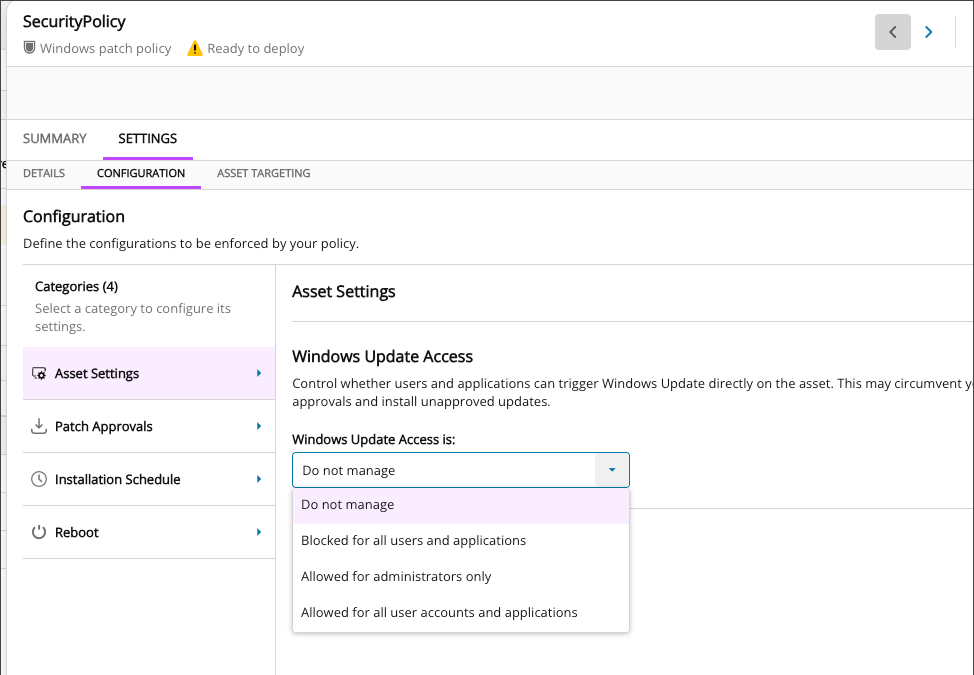
Windows patch policies also include Windows Update Access settings. Use these settings to control who can access Windows Update directly on an asset:
Choose the level of access:
- Do not manage: Does not make any changes to the device.
If you change a previously managed policy setting to Do not manage, the policy stops managing that setting and restores the related Windows registry values to the operating system defaults.
- Blocked for all users and applications: Blocks direct Windows Update access for users and applications.
- Allowed for administrators only: Allows administrators to use Windows Update directly.
- Allowed for all user accounts and applications: Allows users and applications to use Windows Update directly.
When access is set to Do not manage, Microsoft controls the Windows Update experience. The Windows Update page may change between Windows releases.