Integrate existing MSP Manager account with N-sight RMM
If you do not have an existing MSP Manager account, see Integrate MSP Manager with N-sight RMM.
If you already have an MSP Manager account, you can integrate it with N-sight RMM so both products work together to automatically create tickets, import your customers and users, and update assets.
To enable this feature, contact support. To open a Technical Support case, go to N-ableMe and click Support.
Before you integrate you account, make sure the following requirements are met:
- The N-sight RMM Agent Key must be a user in the MSP Manager company.
- The Agent Key must also be the owner of the MSP Manager company.
If these requirements are not met, contact support for assistance.
N-sight RMM and MSP Manager use a similar hierarchy but different terminology. The following lists show the terms for each product:
N-sight RMM
- Client
- Site
- Device Inventory
MSP Manager
- Customer
- Location
- Asset
To integrate your existing MSP Manager account with N-sight RMM:
- Contact support to enable this feature. To open a Technical Support case, go to N-ableMe and click Support.
- If another PSA product is already integrated with your N-sight RMM account, uninstall it. N-sight RMM only supports one PSA integration at a time:
- In the All Devices view, go to Settings > PSA Integration > Uninstall.
- Review the summary and select OK to confirm.
- Set up the MSP Manager integration:
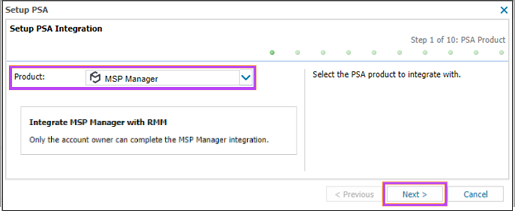
- Go to Settings > PSA Integration > Setup.
- Select MSP Manager in the drop-down menu, then select Next.
- At the prompt, select Finish to continue to MSP Manager
- Choose how to configure MSP Manager:
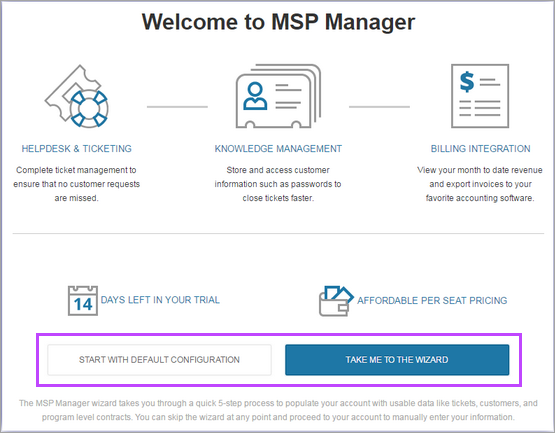
- Select Start with a default configuration. The system applies the default settings, which you can review and update on the Summary screen.
- To complete the initial setup, select Take me to the wizard. The wizard guides you through setting up: