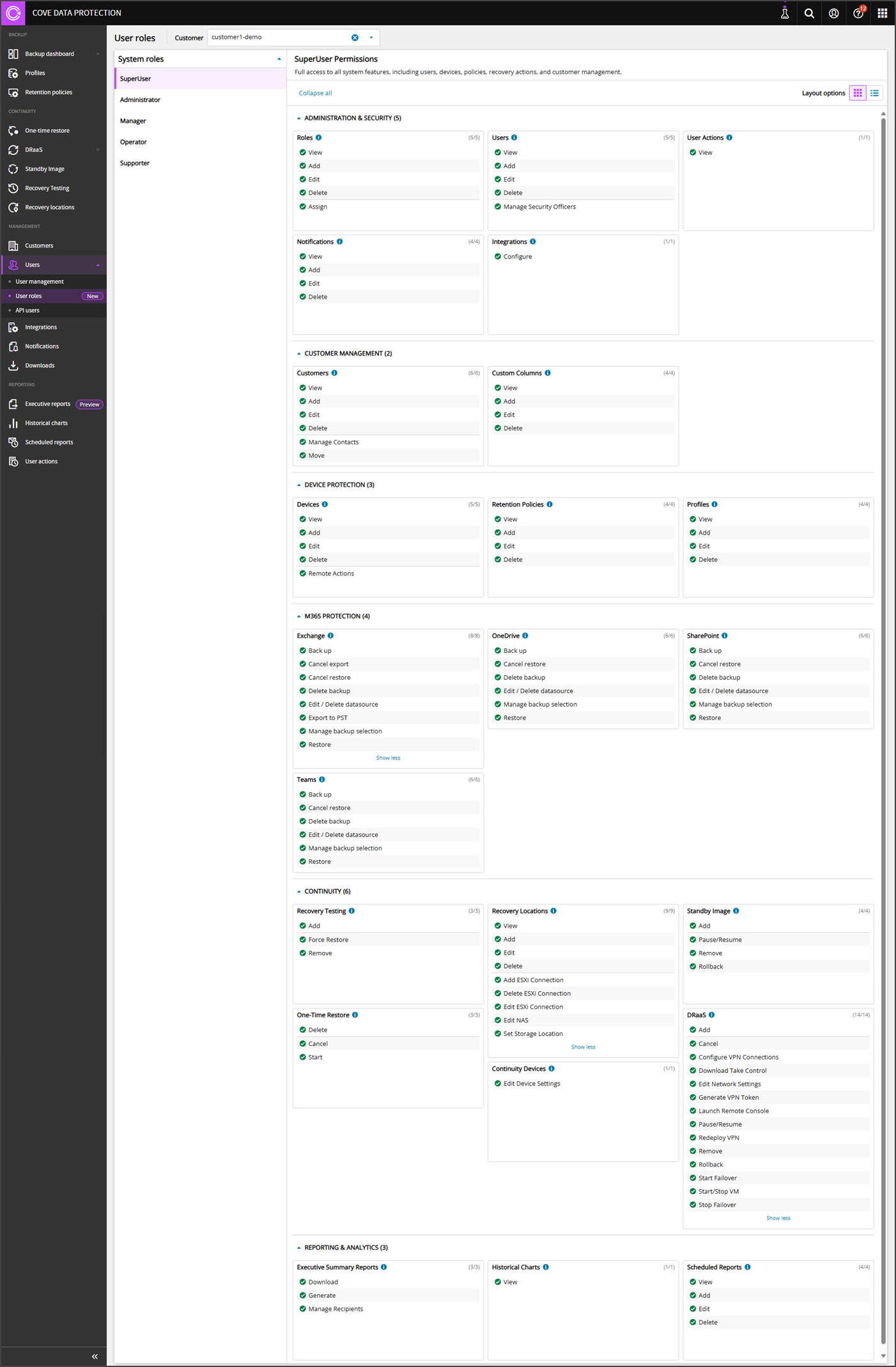
User Roles - System Roles
The User Roles page in Cove Data Protection (Cove)'s Management Console provides a detailed outlook on what permissions each System user role has.
System Roles cannot be edited.
The following System roles are available:
SuperUser
The system SuperUser role has full access to all system features, including Users, Devices, Policies, recovery actions, and Customer Management.
The SuperUser can have the Security Officer permission applied, which provides additional access to generate a passphrase. This user role has the following permissions:
Administration and Security
| View - View role details |
View - View user details |
View - View user actions logs |
View - View notifications |
Configure - Configure integrations |
| Add - Add roles |
Add - Add users |
|
Add - Add notifications |
|
| Edit - Edit existing roles by adding or removing permissions |
Edit - Edit existing users |
|
Edit - Edit notifications |
|
| Delete - Delete roles |
Delete - Delete users |
|
Delete - Delete notifications |
|
| Assign - Assign roles to users |
Manage Security Officers - Assign or remove the Security Officer flag for users |
|
|
|
Customer Management
| View - View customer details |
View - View custom columns |
| Add - Add customers |
Add - Add custom columns |
| Edit - Edit customer settings |
Edit - Edit custom columns |
| Delete - Delete customers |
Delete - Delete custom columns |
| Manage Contacts - Manage customer contacts |
|
| Move - Move customers within the customer hierarchy |
|
Device Protection
| View - View device details |
View - View retention policies |
View - View profiles |
| Add - Add devices |
Add - Add new retention policies |
Add - Add profiles |
| Edit - Edit device settings |
Edit - Edit retention policies |
Edit - Edit profiles |
| Delete - Delete devices |
Delete - Delete retention policies |
Delete - Delete profiles |
| Remote Actions - Run remote commands and launch the Backup Manager on devices |
|
|
Microsoft 365 Protection
| Back up - Trigger Backup of Exchange mailboxes |
Back up - Trigger Backup of OneDrive files |
Back up - Trigger Backup of SharePoint sites |
Back up - Trigger Backup of Teams data |
| Cancel export - Cancel an in-progress export |
Cancel restore - Cancel an in-progress restore |
Cancel restore - Cancel an in-progress restore |
Cancel restore - Cancel an in-progress restore |
| Cancel restore - Cancel an in-progress restore |
Delete Backup - Permanently delete a Backup history |
Delete Backup - Permanently delete a Backup history |
Delete Backup - Permanently delete a Backup history |
| Delete Backup - Permanently delete a Backup history |
Edit / Delete datasource - Modify or remove a data source |
Edit / Delete datasource - Modify or remove a data source |
Edit / Delete datasource - Modify or remove a data source |
| Edit / Delete datasource - Modify or remove a data source |
Manage Backup Selection - Add/remove items from the Backup scope, including automatic inclusion of new items |
Manage Backup Selection - Add/remove items from the Backup scope, including automatic inclusion of new items |
Manage Backup Selection - Add/remove items from the Backup scope, including automatic inclusion of new items |
| Export to PST - Export Exchange data to PST format |
Restore - Initiate a restore from Backup |
Restore - Initiate a restore from Backup |
Restore - Initiate a restore from Backup |
| Manage Backup Selection - Add/remove items from the Backup scope, including automatic inclusion of new items and In-Place Archives |
|
|
|
| Restore - Initiate a restore from Backup |
|
|
|
Continuity
| Add - Add to plan |
View - View settings |
Add - Add to plan |
Delete - Delete Device from Dashboard |
Edit Device Settings
|
Add - Add Device to Plan |
| Force Restore
|
Add - Add Recovery Location |
Pause/Resume - Pause or Resume Restores |
Cancel - Cancel Recovery |
|
Cancel - Cancel restore |
| Remove - Remove from plan |
Edit - Edit Recovery Location |
Remove - Remove from Plan |
Start - Start Recovery |
|
Configure VPN Connections
|
| |
Delete - Delete Recovery Location |
Rollback - Rollback device to the selected session |
|
|
Download Take Control - Download Take Control Viewer |
| |
Add ESXi Connection - Add ESXi Connection for Recovery Location |
|
|
|
Edit Network Settings - Edit network settings for the device in Failover |
| |
Delete ESXi Connection - Delete ESXi Connection for Recovery Location |
|
|
|
Generate VPN Token
|
| |
Edit ESXi Connection - Edit ESXi Connection for Recovery Location |
|
|
|
Launch Remote Console
|
| |
Edit NAS - Edit Network Share for Recovery Location |
|
|
|
Pause/Resume - Pause or resume continuous restore |
| |
Set Storage Location - Set Storage for Recovery Location |
|
|
|
Redeploy VPN - Redeploy VPN Gateway |
| |
|
|
|
|
Remove - Remove device from Plan |
| |
|
|
|
|
Rollback - Rollback device to the selected session |
| |
|
|
|
|
Start Failover - Start Failover for the device |
| |
|
|
|
|
Start/Stop VM - Start or stop VM in Failover |
| |
|
|
|
|
Stop Failover - Stop Failover for the device |
Reporting and Analytics
| Download - Download executive summary reports |
View - View historical charts |
View - View scheduled reports |
| Generate - Generate executive summary reports |
|
Add - Add scheduled reports |
| Manage Recipients - Manage executive summary report recipients |
|
Edit - Edit scheduled reports |
| |
|
Delete - Delete scheduled reports |
Administrator
The system Administrator role allows this user to manage system settings, permissions, and Policies, but cannot manage Devices, add Devices, or manage Customers.
The Administrator can have the Security Officer permission applied, which provides additional access to generate a passphrase. This user role has the following permissions:
Administration and Security
| View - View role details |
View - View user details |
View - View user actions logs |
View - View notifications |
Configure - Configure integrations |
| |
Add - Add users |
|
Add - Add notifications |
|
| |
Edit - Edit existing users |
|
Edit - Edit notifications |
|
| |
Delete - Delete users |
|
Delete - Delete notifications |
|
Customer Management
| View - View customer details |
View - View custom columns |
Device Protection
| View - View device details |
View - View retention policies |
View - View profiles |
| Remote Actions - Run remote commands and launch the Backup Manager on devices |
Add - Add new retention policies |
Add - Add profiles |
| |
Edit - Edit retention policies |
Edit - Edit profiles |
| |
Delete - Delete retention policies |
Delete - Delete profiles |
Microsoft 365 Protection
| Edit / Delete datasource - Modify or remove a data source |
Edit / Delete datasource - Modify or remove a data source |
Edit / Delete datasource - Modify or remove a data source |
Edit / Delete datasource - Modify or remove a data source |
| Export to PST - Export Exchange data to PST format |
|
|
|
Reporting and Analytics
| Download - Download executive summary reports |
View - View historical charts |
View - View scheduled reports |
| Generate - Generate executive summary reports |
|
Add - Add scheduled reports |
| Manage Recipients - Manage executive summary report recipients |
|
Edit - Edit scheduled reports |
| |
|
Delete - Delete scheduled reports |
Manager
The system Manager role can manage Devices and operational activities, but cannot manage Backup Profiles, Customers, Notifications, Users, or Retention Policies.
The Manager can have the Security Officer permission applied, which provides additional access to generate a passphrase. This user role has the following permissions:
Administration and Security
| View - View role details |
View - View user details |
Customer Management
| View - View customer details |
View - View custom columns |
Device Protection
| View - View device details |
View - View retention policies |
View - View profiles |
| Add - Add devices |
|
|
| Edit - Edit device settings |
|
|
| Delete - Delete devices |
|
|
| Remote Actions - Run remote commands and launch the Backup Manager on devices |
|
|
Microsoft 365 Protection
| Back up - Trigger Backup of Exchange mailboxes |
Back up - Trigger Backup of OneDrive files |
Back up - Trigger Backup of SharePoint sites |
Back up - Trigger Backup of Teams data |
| Cancel export - Cancel an in-progress export |
Cancel restore - Cancel an in-progress restore |
Cancel restore - Cancel an in-progress restore |
Cancel restore - Cancel an in-progress restore |
| Cancel restore - Cancel an in-progress restore |
Edit / Delete datasource - Modify or remove a data source |
Edit / Delete datasource - Modify or remove a data source |
Edit / Delete datasource - Modify or remove a data source |
| Edit / Delete datasource - Modify or remove a data source |
Manage Backup Selection - Add/remove items from the Backup scope, including automatic inclusion of new items |
Manage Backup Selection - Add/remove items from the Backup scope, including automatic inclusion of new items |
Manage Backup Selection - Add/remove items from the Backup scope, including automatic inclusion of new items |
| Export to PST - Export Exchange data to PST format |
Restore - Initiate a restore from Backup |
Restore - Initiate a restore from Backup |
Restore - Initiate a restore from Backup |
| Manage Backup Selection - Add/remove items from the Backup scope, including automatic inclusion of new items and In-Place Archives |
|
|
|
| Restore - Initiate a restore from Backup |
|
|
|
Continuity
| Add - Add to plan |
Add - Add to plan |
Delete - Delete Device from Dashboard |
Edit Device Settings
|
Add - Add Device to Plan |
| Force Restore
|
Pause/Resume - Pause or Resume Restores |
Cancel - Cancel Recovery |
|
Cancel - Cancel restore |
| Remove - Remove from plan |
Remove - Remove from Plan |
Start - Start Recovery |
|
Configure VPN Connections
|
| |
Rollback - Rollback device to the selected session |
|
|
Download Take Control - Download Take Control Viewer |
| |
|
|
|
Edit Network Settings - Edit network settings for the device in Failover |
| |
|
|
|
Generate VPN Token
|
| |
|
|
|
Launch Remote Console
|
| |
|
|
|
Pause/Resume - Pause or resume continuous restore |
| |
|
|
|
Redeploy VPN - Redeploy VPN Gateway |
| |
|
|
|
Remove - Remove device from Plan |
| |
|
|
|
Rollback - Rollback device to the selected session |
| |
|
|
|
Start Failover - Start Failover for the device |
| |
|
|
|
Start/Stop VM - Start or stop VM in Failover |
| |
|
|
|
Stop Failover - Stop Failover for the device |
Reporting and Analytics
| View - View historical charts |
View - View scheduled reports |
| |
Add - Add scheduled reports |
| |
Edit - Edit scheduled reports |
| |
Delete - Delete scheduled reports |
Operator
The system Operator role performs day-to-day operational tasks with assigned modules, but cannot manage Devices or system configuration.
The Operator can have the Security Officer permission applied, which provides additional access to generate a passphrase. This user role has the following permissions:
Administration and Security
| View - View role details |
View - View user details |
Customer Management
| View - View customer details |
View - View custom columns |
Device Protection
| View - View device details |
View - View retention policies |
View - View profiles |
| Remote Actions - Run remote commands and launch the Backup Manager on devices |
|
|
Microsoft 365 Protection
| Edit / Delete datasource - Modify or remove a data source |
Edit / Delete datasource - Modify or remove a data source |
Edit / Delete datasource - Modify or remove a data source |
Edit / Delete datasource - Modify or remove a data source |
| Export to PST - Export Exchange data to PST format |
|
|
|
Reporting and Analytics
| View - View historical charts |
View - View scheduled reports |
| |
Add - Add scheduled reports |
| |
Edit - Edit scheduled reports |
| |
Delete - Delete scheduled reports |
Supporter
The system Supporter role is provided primarily read-only access with limited support capabilities, focused on monitoring, troubleshooting, and assisting users without making configuration or operation changes.
This user role has the following permissions:
Administration and Security
| View - View role details |
View - View user details |
Customer Management
| View - View customer details |
View - View custom columns |
Device Protection
| View - View device details |
Reporting and Analytics
| View - View historical charts |
View - View scheduled reports |
| |
Add - Add scheduled reports |
| |
Edit - Edit scheduled reports |
| |
Delete - Delete scheduled reports |