
Disaster Recovery As A Service (DRaas) Virtual Private Network (VPN) connections are primarily used during partial production failover, though they can also emulate production failover during test failovers by allowing the customer to choose which restored machines are allowed to communicate with the On-Prem environment through the VPN connection. They extend your production network to include devices on the disaster recovery side.
In case of complete failovers, the VPN connection is created, but it provides no utility as the On-Prem environment is fully destroyed.
The VPN Connections page can be accessed by navigating to Continuity > DRaaS > VPN Connections from the vertical menu on the left hand side.
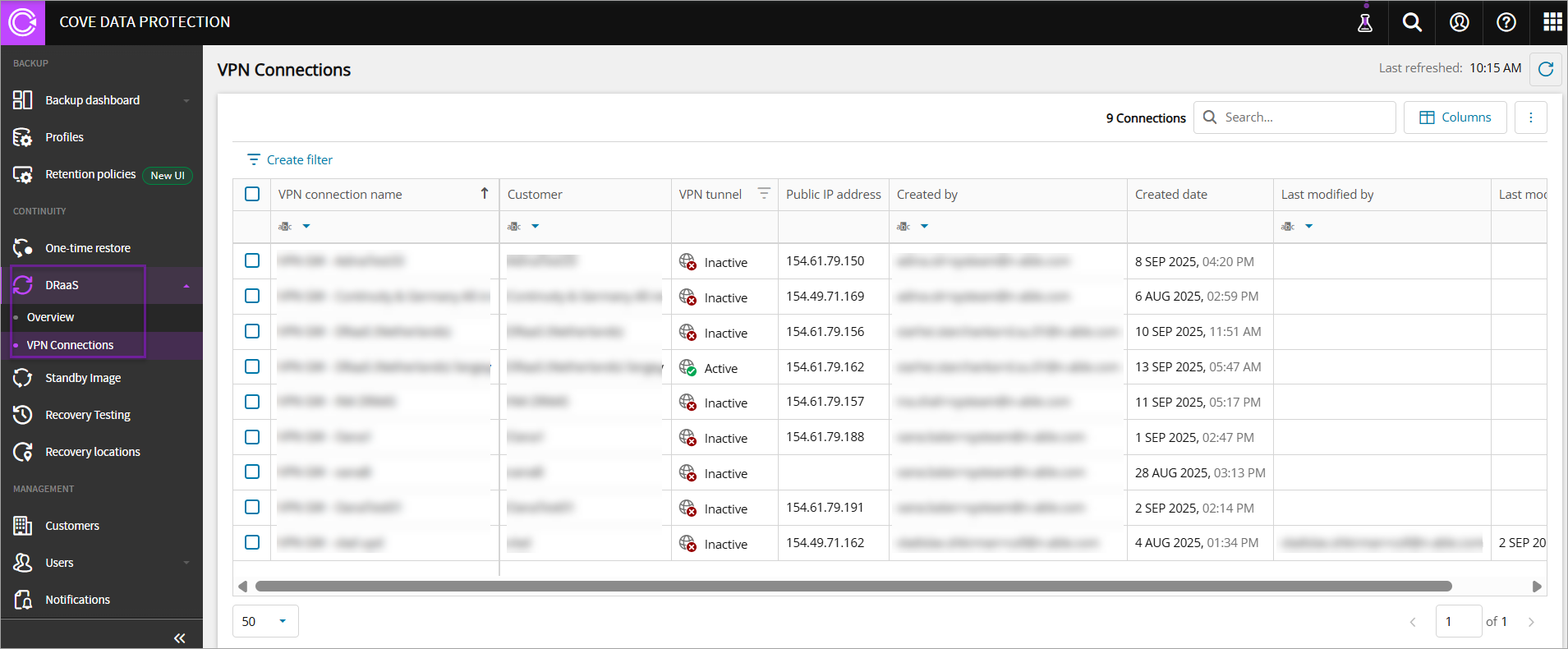
The VPN Connections dashboard allows you to:
- View the list of VPN Gateway connections
- Configure VPN connections
- Filter the list of VPN Gateway connections
- Search the list of VPN Gateway connections
- Sort and manage columns
You need to add devices to Cove DRaaS plan to view records under VPN Connections.
Dashboard Interface
The VPN Connections dashboard includes:
- VPN connection name: Refers to the name of the VPN connection
- Customer: Refers to the name of the customer
- VPN tunnel: Refers to the VPN tunnel status, which becomes Active once failover is configured and started, establishing connectivity between the on-prem environment and the DRaaS network.
- Cloud Gateway IP: Refers to the IP address of the virtual machine on the DRaaS cloud
- Created by: Refers to the email ID of the person who has configured the VPN connection
- Created date: Refers to the timestamp (date, month, year, and time) of VPN connection configuration
- Last modified by: Refers to the email ID of the person who has modified the configured VPN connection
- Last modified date: Refers to the timestamp (date, month, year, and time) of the modified VPN connection
- VPN Gateway IP: Refers to the IP address of the gateway device
- VPN Gateway state: The state of the VPN gateway device
- Online
- Offline
- VPN Appliance state: The state of the virtual machine appliance
- Online
- Offline
- VPN Agent version: (Optional) The version of the agent installed on the virtual machine
- VPN Gateway version: (Optional) The version of the agent installed on the gateway device
- VPN Appliance OS version: (Optional) The operating system version of the virtual machine on the DRaaS cloud
- Gateway Image version: (Optional) The operating system version of the gateway device
Requirements
The following prerequisites are required before configuring VPN Connections.
- A Cove SuperUser or Manager account to access the Cove Management Console DRaaS Dashboard
- An on-prem hypervisor to run the VPN appliance:
- Hyper-V
- VMware ESXi
- QCOW2