
About tag scope, level, and asset count
Tag Management uses scope to decide which tags you see and where a new tag applies. The tag table also shows the organization level where each tag is defined and how many assets the tag is associated with. Use this information to understand the impact of a tag before you change it or use it to target assets.
Context
Tags are the way you target assets at scale in Ecoverse. Changing or deleting a tag can change the configuration of every asset the tag is associated with. Scope and the asset count give you the context to make that decision.
Scope selector
Use the scope selector at the top of Tag Management to choose the organization whose tags you want to see. By default, the selector points to the highest-level organization you have access to. The tags in the table match your selection.
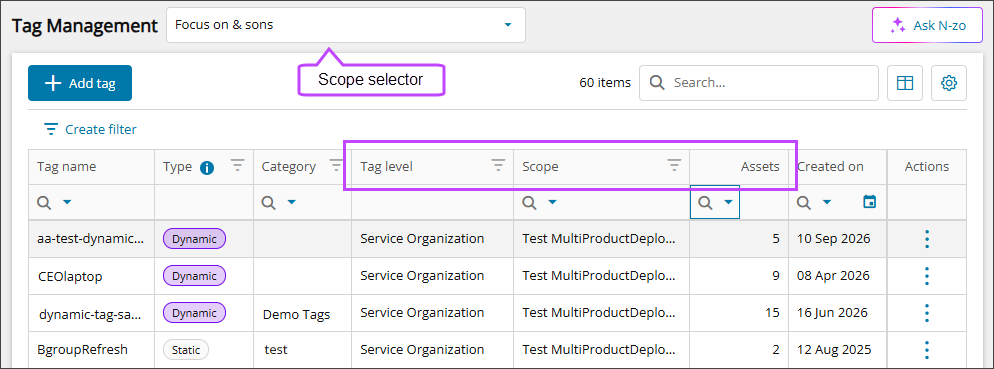
The scope you select in Tag Management is the default scope when you add a tag. You can change the scope while you create the tag.
Which tags you see
The tags you see depend on the organization you select:
- Service organization: The tags created in that service organization and in its child organizations. You don't see tags from sibling service organizations.
- Customer: The tags created for that customer; plus the tags it inherits from its parent organizations.
You can view tags that you inherit from a parent organization, but you can't edit or delete them. You can edit and delete tags in your own organization and in its child organizations.
Tag level and scope
The table shows where each tag is defined:
- Tag level: The organization level of the tag, such as service organization, customer, or site.
- Scope: The name of the organization that owns the tag.
For a tag that you inherit from a parent organization, Scope shows the name of the parent organization that owns the tag.
You can filter and sort both columns.
Asset count
The Assets column shows the number of assets associated with a tag. A tag with no associated assets shows 0. You can sort this column.
The count shows tag associations only. It doesn't show whether a policy was applied successfully to the assets. The count includes assets that you can't view, so it can be higher than the number of assets you see in the tag details.
After you create or change a tag, the system applies the tag in the background. The table shows that the tag is being applied, and the count updates when the application finishes. Dynamic tags can take longer.
To see the assets associated with a tag, select the tag to open its details. The count isn't a link.

Key points
- The scope selector controls which organization's tags appear and sets the default scope for a new tag.
- You can view tags inherited from parent organizations, but you can't edit or delete them.
- Tag level and scope show where a tag is defined.
- The asset count shows tag associations, not policy success, and can lag after a change.
- Tag creation, tag assignment, and tag viewing are separate permissions.
Related topics