
N-central 2026.4 Release
| Build Number: | 2026.4.0.27 [N-central] |
| Last updated: | 02-Oct-2026 |
Includes fixes for CVE-2026-86206, CVE-2026-86207, and CVE-2026-86218, previously released in N-central 2026.3 Hotfix 3 and Hotfix 4.
Additional Information:
N-central (Self-hosted ) – How do I upgrade to the latest version?
Download and upgrade to 2026.4.0.27 using the instructions provided below and on the N-able support portal. If you need assistance with the upgrade process, please contact our support team at Support: N-able Me (login required)
Documentation links:
Supported Upgrade Paths
Upgrade directly to 2026.4.0.27 from:
-
2025.4
-
2026.1
-
2026.2
-
2026.3
-
2026.3.1 (Hotfix 1)
-
2026.3.1 (Hotfix 2)
-
2026.3.1 (Hotfix 3)
-
2026.3.1 (Hotfix 4)
If you are on an older version, we recommend going to any of the builds above, then upgrading to this version ASAP. If you are unsure of what to do, you can contact support directly.
Do I need to update my agents too?
While this release does not require agents to be upgraded to protect you from the CVEs. As a best practice we always recommend that you upgrade agents to the latest available version.
For more information:
What's New in 2026.4
We’re introducing exciting new features, enhancements, and critical fixes to improve usability, security, and performance. Here’s what’s in the 2026.4 release:
The N-central 2026.4 agent package is approximately 130 MB. The package size may change before General Availability.
Dedicated Ecoverse Navigation and Modern Feature Discovery
N-central now includes a dedicated Ecoverse section in the left navigation, providing a clear home for modern, cloud-powered capabilities and making them easier for customers and technicians to discover.
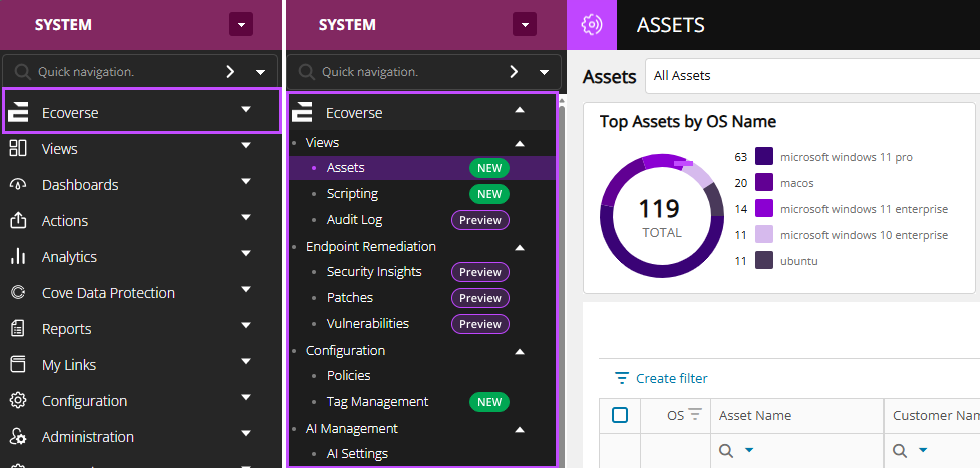
Previously, Ecoverse capabilities were only visible when the following minimum requirements were met:
-
Hosted N-central and on-premises N-central: Users required a valid N-able Login or N-able Login with Entra ID.
-
On-premises N-central: N-central 2025.2.0.1 or later with Analytics enabled to establish cloud connectivity.
-
Applicable feature flag enabled for the server.
-
Appropriate roles and permissions assigned to users.
As a result, users who did not meet these requirements might not have been aware that these capabilities were available.
With this release, the Ecoverse section and applicable modern capabilities are visible in the navigation even when all access requirements have not yet been met.
Users who do not meet the required criteria are provided with guidance on what is needed to access a capability.
Administrators receive additional guidance on configuring N-able Login, enabling the required cloud connectivity, and completing the necessary configuration.
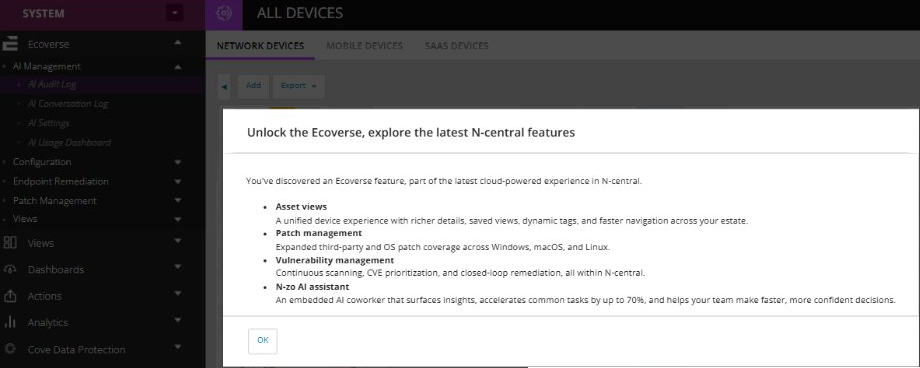
Existing role-based permissions continue to be enforced. Visibility of an Ecoverse feature does not grant access to that feature.
Highlights:
-
Modern Ecoverse capabilities are easier to discover, even when the prerequisites for access have not yet been met.
-
Guidance is provided when additional configuration is required to access a capability.
-
Existing role-based access and permissions remain enforced.
-
Provides a scalable navigation foundation for introducing future Ecoverse capabilities independently of traditional N-central server releases.
Native Dark Mode, Themes and Contrast Modes
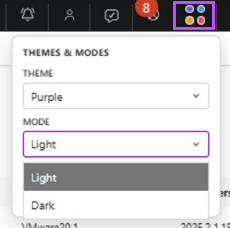
N-central now introduces a native personalization framework designed to improve comfort, usability, and inclusivity for every technician.
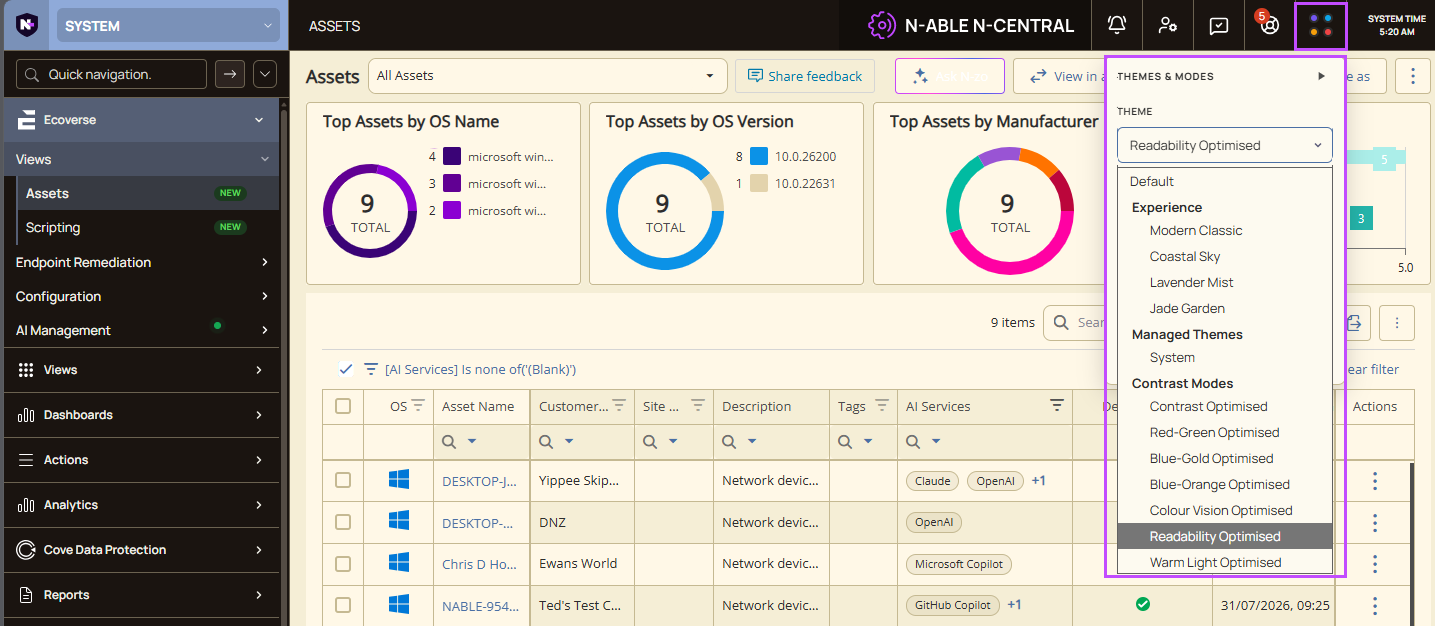
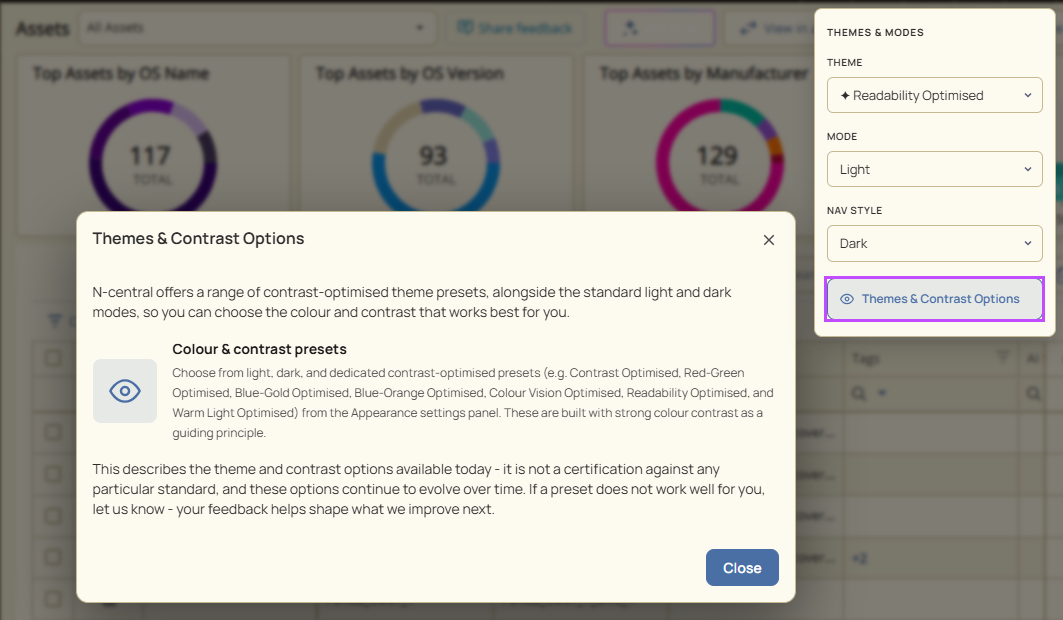
Choose between Light and Dark Mode, personalize your experience with multiple built-in themes, and apply contrast modes designed to improve visibility, readability, and viewing comfort.
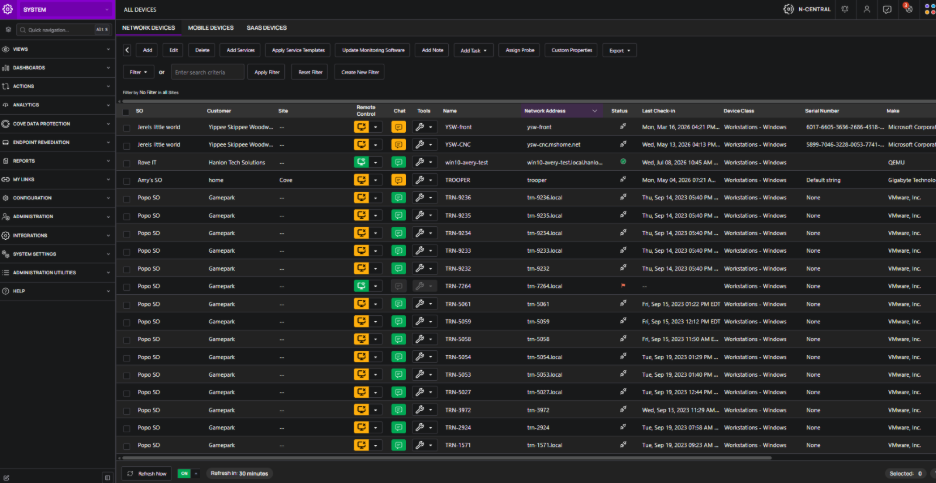
Highlights
-
Native Light and Dark Mode.
-
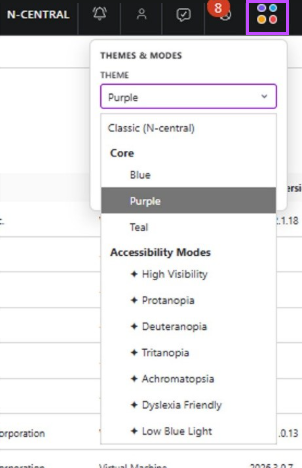
Five built-in themes:
-
Default: Uses the original N-central appearance. Dark and light mode are not available.
-
Modern Classic: The core N-central theme. Select this theme to enable dark or light mode.
-
Coastal Sky: Clean and professional.
-
Lavender Mist: Bold and modern.
-
Jade Garden: Fresh and vibrant.
-
-
Contrast modes including:
-
Contrast Optimized: Enhanced contrast.
-
Red-Green Optimized: Improves red-green colour distinction.
-
Blue-Gold Optimized: Improves blue-yellow colour distinction.
-
Blue-Orange Optimized: Improves blue-orange colour distinction.
-
Color Vision Optimized: Reduces reliance on colour alone.
-
Readability Optimized: Improves text readability.
-
Warm Light Optimized: Reduces blue light.
-
Customer Benefits:
-
Reduce eye strain during extended work sessions.
-
Personalize the interface without relying on third-party browser extensions.
-
Improve readability with contrast modes for technicians with diverse visual needs.
Known issue: Inconsistent theme application
Some N-central pages do not fully support theme and display mode settings. As a result, visual elements on these pages may not update correctly when you change themes or display modes.
The issue affects a small number of N-central pages, including Device Management for Apple and parts of the Integrations and Cove Data Protection sections.
We are investigating a long-term resolution for this issue.
Migrate N-able Integrated Backup (BUI) devices to Cove
You can now migrate eligible N-able Integrated Backup (BUI) devices to Cove Data Protection without uninstalling the Backup Manager. Previously, disabling Integrated Backup removed the Backup Manager from the device, which required you to reinstall it before protecting the device with Cove.
During migration, N-central disables N-able Integrated Backup and transfers backup monitoring to Cove. The Backup Manager remains installed, reducing the steps required to move devices to Cove Data Protection.
Highlights
-
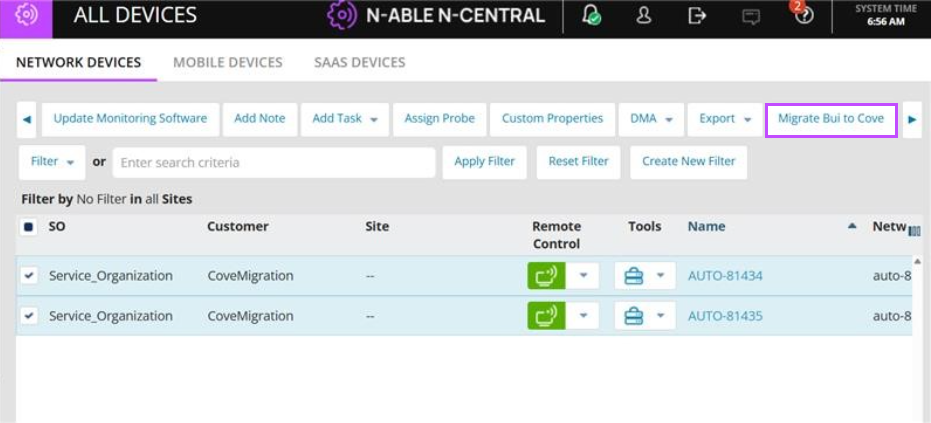
Migrate one or more eligible devices from the All Devices view.
-
Keep the Backup Manager installed during migration.
-
Remove the MSPBackup monitoring services automatically.
-
Enable the Cove Data Protection monitoring services automatically.
-
Prevent rules from reapplying N-able Integrated Backup to migrated devices.
-
Monitor backups for migrated devices through Cove Data Protection.
Before you begin
Verify the following requirements:
-
Target devices run N-central Agent version 2026.4.0.1 or later.
-
N-able Integrated Backup is enabled on each device you want to migrate.
-
You have the required permissions.
Migrate the devices
-
Open the customer in N-central.
-
Select All Devices.
-
Select one or more devices that have N-able Integrated Backup enabled.
-
Select Migrate BUI to Cove.
-
Review the migration information in the confirmation dialog.
-
Select Continue.
Changes made during migration
When migration begins, N-central:
-
Keeps the Backup Manager installed on each device.
-
Disables N-able Integrated Backup (BUI).
-
Removes the MSPBackup monitoring services.
-
Enables the Cove Data Protection monitoring services.
-
Hides the Backup Manager configuration options for migrated devices.
-
Prevents rules from reapplying N-able Integrated Backup to migrated devices.
After the migration completes, backups for the migrated devices are monitored through Cove Data Protection.
Server Upgrade Pre-Check & Progress Visibility
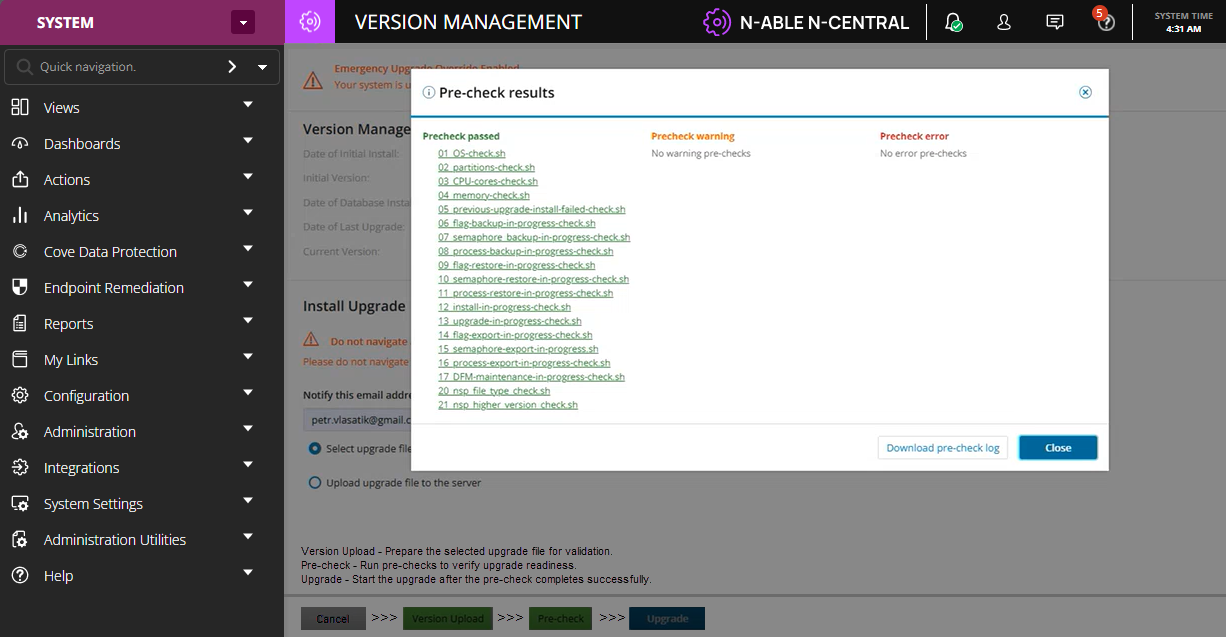
Upgrading N-central is now more predictable and transparent with comprehensive pre-upgrade validation and real-time upgrade visibility.
Before taking the server offline, N-central performs a series of readiness checks, including disk space, database health, certificates, backup readiness, operating system prerequisites, and network validation. Administrators can review the results and address any issues before proceeding, helping to minimize unexpected downtime.
This feature provides visibility into upgrade pre-checks that are performed before an upgrade begins. The pre-checks run online, independently of the upgrade process, and do not cause service disruption. No upgrade actions are performed until the administrator reviews the results and chooses to proceed.
Highlights:
-
Online pre-upgrade validation before downtime begins.
-
Upgrade package validation and verification prior to execution.
-
Pass, Warning, and Fail status for each validation check.
-
Validation results available before initiating the upgrade.
-
Early identification of package and environment readiness issues.
-
One-click download of pre-upgrade validation results and logs.
-
Review validation results before initiating the upgrade.
Customer Benefits:
-
Eliminate unnecessary downtime caused by failed pre-checks.
-
Identify package or environment readiness issues before beginning the upgrade process.
-
Upgrade production servers with greater confidence.
-
Resolve upgrade readiness issues before downtime is scheduled.
-
Reduce time spent working with Support.
-
Encourage faster adoption of new releases and security updates.
-
Gain a more controlled and predictable upgrade experience.
Common Audit Log (CAL) (Preview)
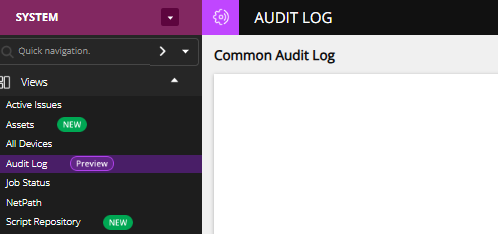
We are introducing the Common Audit Log (CAL) in N-central, providing a centralized and consistent audit experience across the platform, powered by Ecoverse permissions, it improves audit transparency, and provides unified audit experience across the N-able ecosystem.
This enhancement enables partners to securely view, export, and manage audit data using existing N-central roles, while leveraging new, granular permission controls.
The Common Audit Log currently lists Ecoverse-generated user audit events. Support for classic N-central user audit events is planned for a future release.
With this release:
-
Centralized Audit Visibility
-
Role-Based Access Control (RBAC)
-
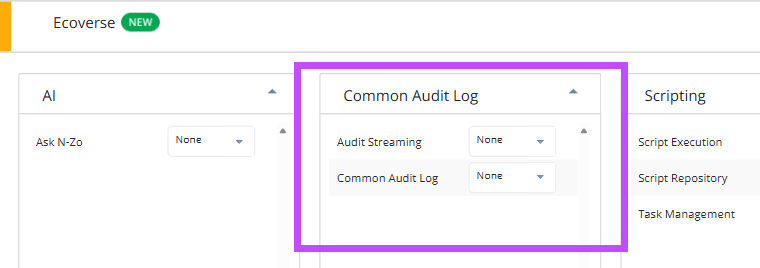
Administrators can manage permissions, and view logs. Note features to export the audit data and configure audit streaming will be added later.
-
Technicians can view and export audit logs based on assigned permissions.
-
Users without permission will not see the feature in the UI.
Partners can access audit records through a dedicated and intuitive UI within N-central, making it easier to track system activity and support compliance needs.
Access to the Common Audit Log is governed by user roles and permissions:
For more information see Common Audit Log (Public Preview).
Common Audit Log is not available in N-central for CMMC Compliance.
Automation Manager enhancements
Automation Manager now supports PowerShell 7 through a new Run PowerShell 7 Script object, enabling automation policies to use a modern PowerShell runtime while maintaining compatibility with existing PowerShell 5.1 policies.
The release also introduces significant script editor enhancements, including syntax highlighting, line numbers, parameter auto-complete, word wrap, zoom controls, current-line highlighting, and improved editor window behavior. PowerShell 7 support is available for 64-bit Windows operating systems.
For further information see Automation Manager Release – PowerShell 7 Support and Improved Script Editing Experience release.
New N-central Mobile app available for N-central 2026.4
The new N-central Mobile app is now available for iOS and Android. This release introduces a modern mobile experience focused on helping technicians quickly find devices and launch Take Control remote sessions from their mobile devices. This initial release focuses on Take Control functionality, with additional mobile capabilities planned for future updates. The app supports N-able Login, including MFA and Entra ID-based sign-in, and requires N-central 2026.4 or later. For more information and download links, see N-central Mobile: A New, Modern Mobile Experience.
Bug Fixes
A range of high-impact bugs have been resolved in this release. Be sure to review the full list included below for more details.
| Category | Updated Summary | Issue Key |
|---|---|---|
| Core Platform | ||
| Core | Summary: Improved server performance during security token verification. | NCCF-2078544 |
| Issue: Under heavy load, token verification could reduce server responsiveness. | ||
| Fix: Updated verification handling to prevent performance degradation. | ||
| Core | Summary: Resolved monitoring tasks becoming stale when scheduled triggers are left paused. | NCCF-2353153 |
| Issue: Quartz-scheduled monitoring tasks whose trigger became stuck could silently stop scanning, causing services to be marked Stale. | ||
| Fix: Updated task trigger handling to prevent paused triggers from stalling service scans. | ||
| Core | Summary: Resolved system errors caused by deadlocks when updating Service Templates with many device associations. | NCCF-2307063 |
| Issue: Updating a Custom Service within a Service Template deployed to thousands of devices could cause a database deadlock and system error. | ||
| Fix: Updated task ID processing order to prevent concurrent database lock conflicts during service template updates. | ||
| Core | Summary: Resolved slow upgrades caused by AIDE integrity scanning large output file directories. | NCCF-2249046 |
| Issue: The AIDE integrity check during upgrades could take several hours when the scheduled task output directory contained millions of files. | ||
| Fix: Excluded high-change directories from AIDE scanning to prevent upgrade delays. | ||
| Core | Summary: Corrected email validation that blocked upgrades for domains with long top-level domains. | NCCF-2140790 |
| Issue: N-central upgrade could fail if the notification email address used a top-level domain longer than four characters. | ||
| Fix: Updated email validation to support top-level domains of any valid length. | ||
| Core | Summary: Resolved upgrade failure when invoked within one hour after a backup restore. | NCCF-2101113 |
| Issue: Starting an upgrade shortly after a backup restore could fail because a delayed cleanup script removed the upgrade repository. | ||
| Fix: Updated the backup restore process to prevent interference with active upgrade operations. | ||
| Core | Summary: Resolved NullPointerException when running NCLI commands. | NCCF-2114342 |
| Issue: Running NCLI commands could fail with a NullPointerException after certain code updates were applied. | ||
| Fix: Corrected the SOAP binding initialization to prevent null class references. | ||
| Core | Summary: Updated LaunchDarkly client dependency to address feature flag stability. | NCCF-1944862 |
| Issue: A connectivity issue with LaunchDarkly could cause all feature flags to be disabled, potentially breaking SSO login. | ||
| Fix: Updated the LaunchDarkly SDK to a supported version to improve connection resilience. | ||
| Core | Summary: Corrected scheduled task removal when changing device licence mode. | NCCF-1936757 |
| Issue: Changing a device from Professional to Essential licence mode did not remove scheduled tasks from the device. | ||
| Fix: Updated the licence eligibility lookup to use the correct licence mode values. | ||
| Core | Summary: Corrected time server configuration not being applied by chronyd. | NCCF-1533434 |
| Issue: Changing the time server in N-central did not update the active time source used by the system. | ||
| Fix: Updated chronyd configuration loading to use N-central's time server settings. | ||
| Core | Summary: Resolved Azure disk expansion failures when more than 24 data disks are attached. | NCCF-950596 |
| Issue: Azure deployments with more than 24 data disks could fail during volume group creation. | ||
| Fix: Updated the disk expansion script to correctly handle device names beyond /dev/sdz. | ||
| Core | Summary: Restored MFA reset and two-factor authentication controls for N-able Login users. | NCCF-2544553 |
| Issue: Previously restored controls were disabled, even though the reset request was confirmed to be handled by N-able Login. | ||
| Fix: Reverted the prior change and restored the MFA reset and two-factor authentication controls for N-able Login users. | ||
| Core | Summary: Corrected DMA enrollment failures caused by invalid session handling. | NCCF-2350907 |
| Issue: DMA enrollment links could fail with an UnknownSessionException and prevent device enrolment. | ||
| Fix: Updated session handling for DMA enrollment to prevent the invalid session failure. | ||
| Core | Summary: Resolved database locking caused by backend session cleanup. | NCCF-2249181 |
| Issue: Backend session cleanup could contribute to database locking and affect N-central responsiveness. | ||
| Fix: Updated backend session cleanup handling to reduce locking during session close operations. | ||
| Core | Summary: Corrected customer save system errors on servers with large rule sets. | NCCF-2037707 |
| Issue: Saving a customer on servers with large rule sets could cause a system error. | ||
| Fix: Updated customer save handling to support large rule set processing. | ||
| Core | Summary: Corrected database deadlocks during large notification changes. | NCCF-1984750 |
| Issue: Large notification configuration changes could cause database deadlocks. | ||
| Fix: Updated notification change handling to prevent database deadlocks during large updates. | ||
| Core | Summary: Corrected VMware credential handling that caused system errors. | NCCF-1928272 |
| Issue: VMware user name handling could generate system errors in some environments. | ||
| Fix: Updated credential handling to prevent VMware user name related system errors. | ||
| Core | Summary: Resolved Java crashes during NKO health checks of XMPP services. | NCCF-1851006 |
| Issue: NKO health checks of XMPP services could trigger a Java crash. | ||
| Fix: Updated XMPP health check handling to prevent the crash. | ||
| Core | Summary: Corrected registration token sorting by customer. | NCCF-120948 |
| Issue: Sorting registration tokens by the Customer column could return zero results. | ||
| Fix: Updated the registration token sorting logic to return the expected results. | ||
| Core | Summary: Handle User Provisioning, Deprovisioning, and Reprovisioning Scenarios in N-able Login- Entra. | NCCF-333957 |
| Issue: SSO user deprovisioning and reprovisioning was not handled automatically and needed backend intervention. This action is now automatically handled | ||
| Fix: Added handling for all SSO state changes | ||
| Performance & Stability | ||
| Core | Summary: Reduced table contention in the DMS cache framework during asset discovery. | NCCF-2334266 |
| Issue: Read/write lock contention on the extended appliance configuration table could cause thread stalls during asset data processing. | ||
| Fix: Optimized cache locking to reduce contention and improve concurrent processing. | ||
| Core | Summary: Improved submit queue handling for customers with very large device counts. | NCCF-2326713 |
| Issue: Customers with a disproportionately large number of services under one customer could overwhelm a single submit queue. | ||
| Fix: Updated submit queue thread assignment to better distribute processing load. | ||
| Core | Summary: Improved Customer Mapping performance when saved filters are used. | NCCF-2524970 |
| Issue: Customer Mapping pages could load slowly when filter settings were not retained correctly. | ||
| Fix: Updated Customer Mapping filter handling to improve performance and preserve saved filter settings. | ||
| Core | Summary: Reduced contention in device property processing. | NCCF-2599793 |
| Issue: Concurrent device property operations could increase database contention. | ||
| Fix: Updated repository handling to apply indexed criteria inside the DAO lock and move string comparison outside the lock. | ||
| Core | Summary: Reduced database contention during asset job processing. | NCCF-2481637 |
| Issue: Asset job processing could experience increased write-lock contention during large delete operations. | ||
| Fix: Updated indexing and processing behaviour to reduce contention during asset job updates. | ||
| Core | Summary: Improved scheduled task profile processing for large device counts. | NCCF-2451257 |
| Issue: Scheduled Task profiles targeting many devices could cause status operations to time out. | ||
| Fix: Updated activity result processing to use bulk queries and improve profile status loading. | ||
| Core | Summary: Reduced unnecessary appliance configuration updates. | NCCF-2454390 |
| Issue: N-central could update isconfigrequired for appliance IDs that did not require configuration updates. | ||
| Fix: Updated appliance configuration handling to avoid unnecessary isconfigrequired updates. | ||
| Core | Summary: Improved device loading performance by reducing TimeElapsedCounter processing delays. | NCCF-2276577 |
| Issue: Loading devices could spend extended time in TimeElapsedCounter processing. | ||
| Fix: Updated device loading handling to reduce the delay and improve page responsiveness. | ||
| Agents & Device Management | ||
| Agent | Summary: Prevented MMS service from resetting its configuration to incorrect default values. | NCCF-2249740 |
| Issue: The MMS service could overwrite its configuration with incorrect defaults after a crash or recovery event. | ||
| Fix: Updated the configuration recovery logic to use correct default values. | ||
| Agent | Summary: Restored auto-detection of Veeam backup monitoring service templates. | NCCF-2124781 |
| Issue: Veeam 13+ backup monitoring service templates could not be detected and auto-onboarded because Veeam now uses PowerShell 7. | ||
| Fix: Updated asset scanning to support Veeam backup detection with PowerShell 7. | ||
| Agent | Summary: Cleaned up and signed PowerShell scripts in the Windows Agent bin folder. | NCCF-1976766 |
| Issue: Unsigned and outdated PowerShell scripts in the agent installation folder could trigger security tool warnings. | ||
| Fix: Removed inactive scripts and signed active scripts to align with security expectations. | ||
| Agent | Summary: Resolved probe crashes caused by concurrent SNMP operations. | NCCF-1863538 |
| Issue: The probe service could crash with a NullReferenceException when multiple SNMP tasks ran simultaneously. | ||
| Fix: Updated SNMP manager handling to prevent concurrent access conflicts. | ||
| Agent | Summary: Corrected SNMPv3 handling of per-OID response exceptions. | NCCF-1842962 |
| Issue: SNMPv3 monitoring could incorrectly report Error 102 when individual OIDs returned noSuchInstance or noSuchObject responses. | ||
| Fix: Updated SNMP response validation to treat per-OID exceptions as expected responses rather than fatal errors. | ||
| Agent | Summary: Improved performance of Windows service monitoring to prevent services from going stale. | NCCF-879370 |
| Issue: WMI-based service monitoring calls could stall, causing agent-based monitoring services to become stale periodically. | ||
| Fix: Updated Windows service monitoring to use Service Control Manager directly for faster, more reliable results. | ||
| Agent | Summary: Removed unused BitsAdmin.exe from the Windows Agent and Probe. | NCCF-4524 |
| Issue: The Windows Agent and Probe packages included BitsAdmin.exe, a legacy component originally used for remote control support. This component was no longer in use, and AV Defender scan exclusions for the file were still configured despite it not being required. | ||
| Fix: Removed BitsAdmin.exe and its associated code from the Windows Agent and Probe installer packages. Removed AV Defender scan exclusions for the file. On upgraded devices, the residual BitsAdmin.exe file in the bin directory is automatically cleaned up on the first agent or probe service restart after the update. | ||
| Notifications & Alerting | ||
| Core | Summary: Resolved intermittent failure of scheduled task email notifications. | NCCF-1954771 |
| Issue: Scheduled task completion email notifications could intermittently fail to generate on certain days. | ||
| Fix: Updated notification creation handling to ensure email notifications are reliably generated after task completion. | ||
| Custom PSA | Summary: Corrected Custom PSA Return to Normal email subjects. | NCCF-2259806 |
| Issue: Custom PSA Return to Normal email subjects ignored the notification template and used a hardcoded empty string. | ||
| Fix: Updated Custom PSA email subject handling to use the configured notification template. | ||
| PSA & Integrations | ||
| Custom PSA | Summary: Prevented PSA tickets from being incorrectly closed when services are in Warning state. | NCCF-2228912 |
| Issue: The nightly maintenance job could close PSA tickets when a service transitioned to Warning state, leading to duplicate tickets on subsequent failures. | ||
| Fix: Updated maintenance job logic to only close tickets when the associated service has returned to Normal state. | ||
| Halo PSA | Summary: Corrected Halo PSA errors when using device-only access groups. | NCCF-2389150 |
| Issue: Device-only access groups could generate system errors in Halo PSA integrations. | ||
| Fix: Updated access validation logic to prevent integration failures. | ||
| PSA & Integrations | Summary: Resolved PSA tickets remaining open after services return to Normal status from downtime. | NCCF-2389348 |
| Issue: Return-to-Normal notifications were not sent when services recovered directly from downtime, leaving linked PSA tickets open. | ||
| Fix: Corrected recovery processing so Return-to-Normal notifications are sent and linked PSA tickets close automatically. | ||
| Backups | ||
| Core | Summary: Corrected FTP backup process not deleting previous backups in subdirectories. | NCCF-2065449 |
| Issue: The backup process could fail to delete previous backup files on FTP servers when a target directory was configured. | ||
| Fix: Updated FTP delete operations to include the correct directory path. | ||
| Reporting | ||
| Core | Summary: Resolved duplicate exports occurring from N-central to Report Manager. | NCCF-2414793 |
| Issue: N-central could trigger multiple duplicate export operations to Report Manager. | ||
| Fix: Updated export processing to prevent duplicate exports from being initiated. | ||
| Core | Summary: Corrected discrepancies in Availability Report averages. | NCCF-2383561 |
| Issue: Availability reports could display inconsistent average values. | ||
| Fix: Updated report calculation logic to provide consistent availability metrics. | ||
| User Interface & Configuration | ||
| Core | Summary: Corrected filter transfer operations that removed saved filter parameters. | NCCF-2126944 |
| Issue: Transferring filters to another user could delete the filter parameters. | ||
| Fix: Updated filter transfer handling to preserve filter parameters during ownership changes. | ||
| Core | Summary: Corrected schedule sorting behaviour. | NCCF-2291678 |
| Issue: Sorting on schedule values could return incorrect or unexpected results. | ||
| Fix: Updated schedule sorting logic to return consistent results. | ||
| Core | Summary: Corrected style variable inheritance in Branding. | NCCF-2419603 |
| Issue: Inherited branding style values did not display the expected default value after custom values were cleared. | ||
| Fix: Updated branding style inheritance handling to apply the inherited value correctly. | ||
| Platform Support | ||
| Core | Summary: Added support for Windows Server 2019 Essentials. | NCCF-2063352 |
| Issue: Windows Server 2019 Essentials was not fully supported by the platform. | ||
| Fix: Updated platform support validation and deployment handling. | ||
| Core | Summary: Fixed Live Agent Chat link | NCCF-2799332 |
| Issue: Live Agent Chat link is unavailable | ||
| Fix: Pointed Live Agent Chat link to new platform | ||
| Core | Summary: Scrolling in non-classic theme is slow | NCCF-2797395 |
| Issue: In non-classic themes mode the scrolling is slow and consumes CPU | ||
| Fix: Updated icon generation logic to be much faster | ||
| Core | Summary: Several non-classic theme mode UI fixes |
NCCF-2728850 NCCF-2781187 NCCF-2737538 NCCF-2748653 NCCF-2747046 NCCF-2710991 NCCF-2728050 NCCF-1616167 NCCF-2704230 NCCF-2222621 NCCF-2702002 NCCF-2663338 |
| Issue: In non-classic themes mode some UI rendering issues in various pages were incorrect. | ||
| Fix: Updated UI to address UI rendering issues | ||
| Core | Summary: Fixed notification associations tab not showing data | NCCF-2777709 |
| Issue: Associations tab for notifications was missing content | ||
| Fix: Fixed logic to fetch the data from the notifications table. | ||
| Core | Summary: Fixed upgrade being prevented from 2026.3.1.7 with Veeam services. | NCCF-2654929 |
| Issue: Upgrades to 2026.4 from 2026.3.1.7 were failing due to service template duplication in some cases | ||
| Fix: Added logic to prevent duplication. Upgrade issue should be addressed. | ||
| Core | Summary: Veeam failed job service templates threshold values fixed | NCCF-2396710 |
| Issue: Veeam job service templates were not showing threshold values. | ||
| Fix: Added labels for the new thresholds so they appear | ||
| Summary: Device classes cannot be edited when name as forward slash | NCCF-2397059 | |
| Issue: When device name has forward slash, the device class cannot be edited | ||
| Fix: Improved handling forward slash in device class actions | ||
| Core | Summary: Interface Health service taskident not updating upon discovered changes | NCCF-2330047 |
| Issue: When interface index numbers change on routers, the monitoring services are not updating even though the service details reflect the new interface name and alias. | ||
| Fix: Fixed handling taskindent for routers | ||
| Core | Summary: Fix for not being able to upgrade to new version due to timezone handling | NCCF-2675111 |
| Issue: For N-centrals in APAC timezones, the Manage Version screen was not allowing to upload NSP upgrade files | ||
| Fix: Fix rendering of upgrade page to accommodate APAC timezones. | ||
| Core | Summary: Addressed issue with orphaned DB threads that would result in high number of submit queue threads | NCCF-2423330 |
| Issue: Core DB logic improvement to better handle DB threads is needed to prevent high submit queue numbers | ||
| Fix: Improved DB thread handling to address corner cases on DB resource contention | ||
| Core | Summary: Domain Controller TTL logic resulting in multiple password resets | NCCF-2509099 |
| Issue: If a large number of domain managed passwords are requested to be updated at the same time, if the application of the password reset prolongs beyond an hour, all passwords would be reset again | ||
| Fix: Calculation of the TTL for the password reset has been corrected to not result in reapplication of password resets when a longer time is needed for the action to be performed. | ||
| Core | Summary: Customer Loading Slowly Because the Customer Mapping Filter is Not Saved | NCCF-2524970 |
| Issue: When Connectwise customer mapping is in place, customer view loads slowly and times out. | ||
| Fix: Push the reloading of the customer mapping to an asynchronous thread to let the UI render faster | ||
| Core | Summary: More System Errors with VMware User Name Problems | NCCF-1928272 |
| Issue: System Errors with VMware discovery when username has too many dots . | ||
| Fix: Add support for usernames with multi domain parts . | ||