
You can automatically exclude certain directories or types of files from backup. This is done using exclusion filters on the devices Backup Manager, by going to Preferences > Backup filters.
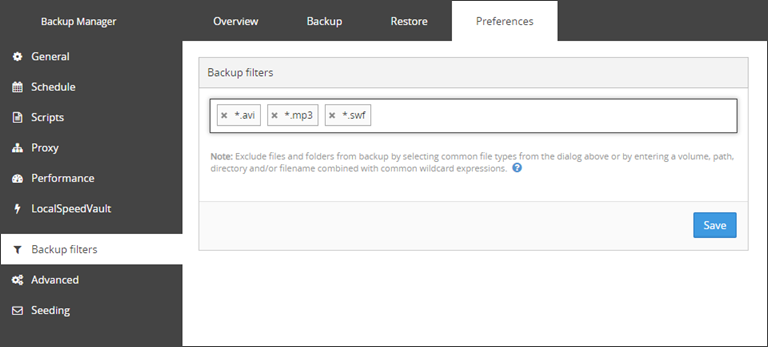
Predefined filters
Windows
Some files are automatically excluded from backup on Windows devices only.
These predefined filters only work on Windows devices by the use of a standard ‘files not to backup’ entry in the Windows Registry, meaning there is no alternative for Linux or macOS devices.
What files are automatically excluded from backup:
- All files indicated in the registry subkey:
HKEY_LOCAL_MACHINE\SYSTEM\CurrentControlSet\Control\BackupRestore\FilesNotToBackup
Typical examples:
\Pagefile.sys\hiberfil.sys%TEMP%\* /s
- All files from the Backup Manager installation folder
- Temporary files of no importance:
- C:\Users\<username>\AppData\Local\Microsoft\Windows\Explorer\IconCacheToDelete
There is such a file for every user account registered in the system
- C:\Users\<username>\AppData\Local\Microsoft\Internet Explorer\DomainSuggestions
There is such a file for every user account registered in the system
- C:\Windows\System32\config\systemprofile\AppData\Roaming\Microsoft\CLR Security Config\v2.0.50727.312\64bit
- Files from the Print Spooler folder
- C:\Users\<username>\AppData\Local\Microsoft\Windows\Explorer\IconCacheToDelete
- Files/folders matching the following masks:
*\Local Settings\Temporary Internet Files\*?:\RECYCLER?:\System Volume Information%systemdrive%\$WINDOWS.~??(for exampleC:\$WINDOWS.~BTorC:\$WINDOWS.~WS%SYSTEM_ROOT%/Windows/*.config.cch?:\swapfile.sys?:\pagefile.sys?:\hiberfil.sys*\AppData\Local\Temp\*(on Windows Vista and Windows 7)*\Local Settings\Temp\*(on Windows XP)
macOS
Certain files and folders may be inaccessible to the Backup Manager due to System Integrity Protection (SIP) restrictions on macOS. Backup behavior differs depending on whether the Backup Manager has been granted Full Disk Access.
Backup behavior: Full Disk Access has NOT been granted
- The backup session completes with errors
- A list of affected paths is provided in session errors
- The user is explicitly notified that Full Disk Access is missing (through session errors)
To enable Full Disk Access for improved session status that was introduced in macOS 10.14 Mojave, refer to macOS Full Disk Access
Backup behavior: Full Disk Access has been granted
- Backup completes successfully (no session errors)
- Any files or folders returning “permission denied” are skipped
Skipped items are only visible in Debug-level logs. To gather debug logs, refer to Enable debug logs
- Enable and collect Debug-level logs and search for entries containing:
- Operation not permitted
- Skipping inaccessible node
- Failed to enumerate child nodes
File Type Examples
Filters based on file type are the same across all Operating Systems.
Here are some example filters you can add:
- a* - excludes all files starting with the letter "a"
- *.mp3 - excludes all files with the .mp3 extension
C:\Data\*.*- excludes all files in theC:\Data\..path and underlying foldersC:\Data\*.mp3- excludes all files in theC:\Data\..path, with the .mp3 extensionC:\Data\*.m??- excludes all files in theC:\Data\..path, with a three-character extension starting with .m and ending with any two other characters, such as .mob, .mp3, .mov or .mpg
The filters are applied to upcoming backup sessions. Older backups stay as they are.
Suggested Additional Filters
We would strongly advise to add the following additional exclusions to your filters:
Windows temp locations
*\Microsoft\Windows Defender\Scans\mpcache**\AppData\Local\Microsoft\Outlook\*.ost
Chrome/Edge/Firefox browser cache and update files
*\Chrome\User Data\*\Cache\**\Google\Chrome\Application\*\Installer\**\Google\Update\Install\**\Google\Update\Download\**\Local\Microsoft\Edge\User Data\*\Cache\**\Microsoft\EdgeUpdate\Install\**\Microsoft\EdgeUpdate\Download\**\Local\Mozilla\Firefox\Profiles\*\cache\**\Local\Mozilla\Firefox\Mozilla Firefox\updates\*
N-central cache directories
*\PME\archives\**\NablePatchCache\**\SolarWinds.MSP.CacheService\cache\**\N-able Technologies\UpdateServerCache\**\MspPlatform\FileCacheServiceAgent\cache\**\N-able Technologies\UpdateServerCache\**\N-able Technologies\*\cache\**\N-able Technologies\PatchManagement\archive\*
AV Defender cache files
*\ThreatScanner\Antivirus*\Plugins\cache.**\ThreatScanner\Antivirus*\smartdbv2.dat
Save
You must make sure to save any changes you make before moving away from this page.