
Cove Architecture Guide
Introduction
N-able's Cove Data Protection (Cove) is a cloud-first backup and disaster recovery solution designed to provide comprehensive data protection for managed service providers (MSPs) and IT professionals. The platform's architecture is built to ensure high performance, scalability, and ease of use, making it an essential tool for safeguarding critical data.
Cove Data Protection leverages a cloud-first architecture, which means that backups are primarily stored in the cloud. This approach offers several advantages, including reduced hardware costs, simplified management, augmented security, and enhanced data accessibility.
The platform uses TrueDelta technology to perform efficient, incremental backups, minimizing the amount of data transferred and stored. This technology ensures that only changes made since the last backup are captured, resulting in faster backup times and reduced storage requirements. Furthermore, the Backup Accelerator feature speeds up backups and increases Recovery Point Objective (RPO).
Cove Data Protection includes a centralized and multitenant web-based dashboard that allows MSPs to manage all backup and recovery tasks from a single interface. This dashboard provides real-time visibility into the status of backups, alerts for potential issues, and detailed reporting capabilities. The platform supports a wide range of devices, including physical and virtual servers, workstations, and Microsoft 365 data. This extensive device support ensures comprehensive data protection across diverse IT environments.
Cove Data Protection's architecture is designed with robustness and reliability in mind. The platform uses multiple data centers to ensure continuous availability and data integrity. Additionally, the platform's modular design allows for easy integration with other N-able products and third-party tools, enhancing its functionality and adaptability.
What's inside:
Purpose and target audience
Purpose
The purpose of this document is to provide a detailed overview of the architecture of Cove. This document aims to inform Managed Service Providers (MSPs) about the core components, functionalities, and advantages of the Cove solution. By understanding the architecture, MSPs can better grasp how the solution integrates into their IT environments, enhances data backup and recovery capabilities, and ensures secure and efficient protection of client data
Target Audience
This document is intended for MSPs who are responsible for the deployment, management, and support of data protection solutions within their client organizations.
The target audience includes:
- IT Managers and Directors: Individuals overseeing IT operations and strategy within MSPs, who need to understand the technical capabilities and benefits of Cove.
- System Administrators: Professionals within MSPs responsible for the day-to-day management and maintenance of client IT systems, who require detailed knowledge of the solution's architecture to ensure optimal performance and security.
- Technical Support Engineers: Personnel within MSPs providing frontline support to clients, who need to be familiar with the solution's features and troubleshooting procedures.
- Backup and Recovery Specialists: Experts within MSPs in data protection and disaster recovery, who must understand how Cove interacts with client IT environments to maintain data integrity and availability.
By addressing the needs and concerns of these key stakeholders, this document aims to facilitate informed decision-making and effective implementation of Cove within diverse client IT environments.
Cove Capabilities
- On-prem: Refers to the backup of local physical and virtual machines hosted within the MSP's environment ensuring enhanced security and compliance, greater control, and optimized performance.
- Cloud to Cloud (C2C): Refers to the multi-tenant Microsoft 365 capability offering a backup and recovery service for Exchange, OneDrive, SharePoint, and Teams. The service handles full Microsoft 365 Exchange, OneDrive, SharePoint, and Teams backups so that MSPs can recover data long after it is cleaned or lost from Microsoftdatabases.
- Continuity: Refers to the multi-phased approach to deliver N-able Disaster Recovery as a Service (DRaaS), protect applications and data from disruptions, enable full recovery in the cloud, implement total system backup and fail-over, and ensure business continuity in case of failure.
Cove Data Protection High-Level Architecture (Cove at a glance)
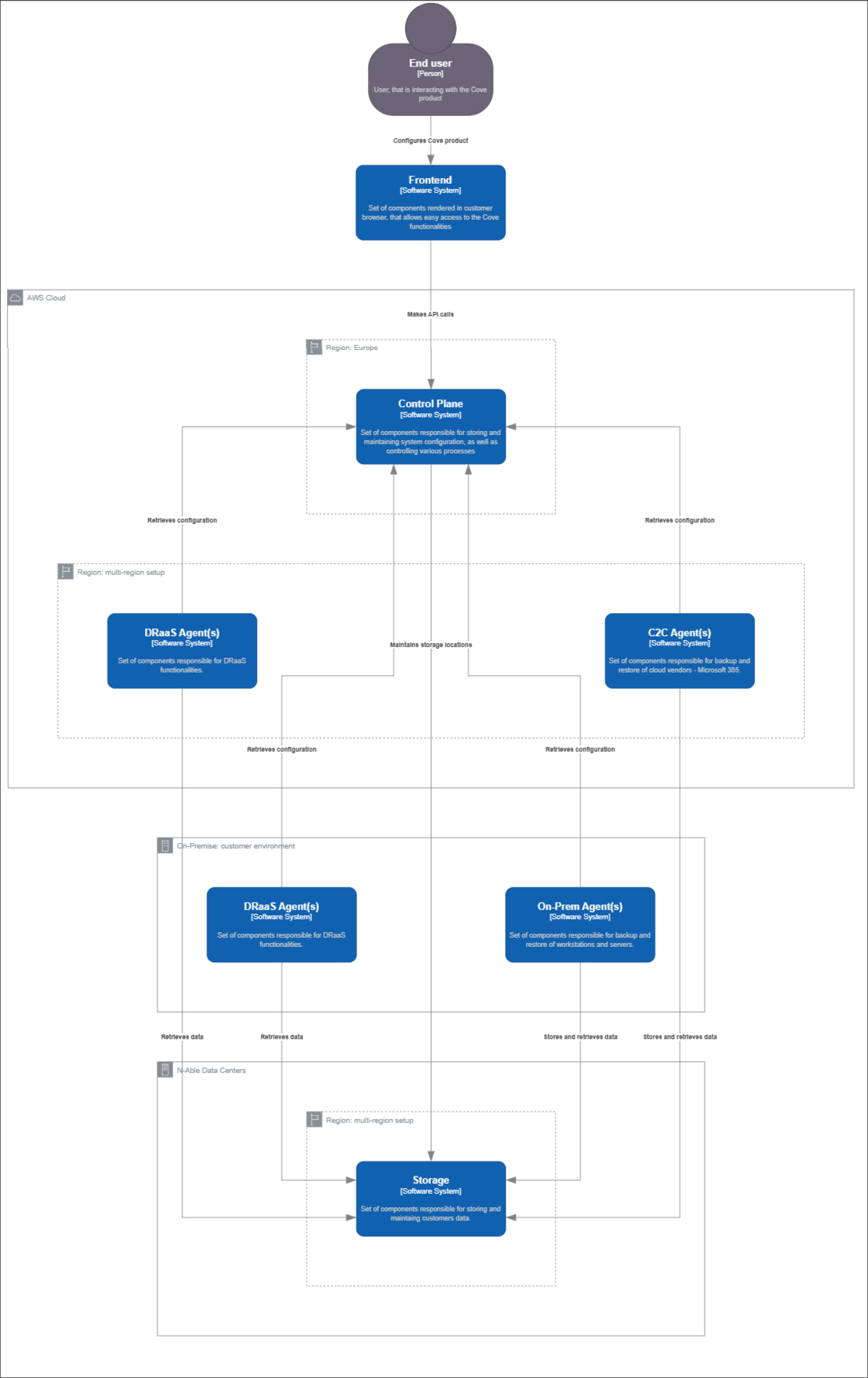
Cove Data Protection solution consists of three major elements:
- Control Plane: Allows MSPs to configure the system to run and control all internal backup and restore processes based on that configuration.
- Storage: Retains MSPs data, providing all necessary security mechanisms and data sovereignty processes.
- Agents: Refers to the components of the system that directly work with MSPs data based on the configuration provided by the Control Plane. The following are the three types of agents:
- On-prem agent: Responsible for backup and restore processes of servers and workstations.
- C2C agent: Responsible for backup and restore processes of Cloud data sources (e.g. Microsoft 365).
- Continuity agent: Responsible for DRaaS functionality of the Cove system.
Control Plane and C2C run in the cloud environment managed by N-able, DRaaS agent runs on both cloud environments managed by N-able or optionally in the environment controlled by the MSP, and On-prem agent runs in the environment controlled by the MSP. Storage is hosted in the private cloud, owned and managed by N-able.
Communication between various components of the system is properly secured, regardless of the fact if it is done via public internet or internally in the N-able zone.
On-prem
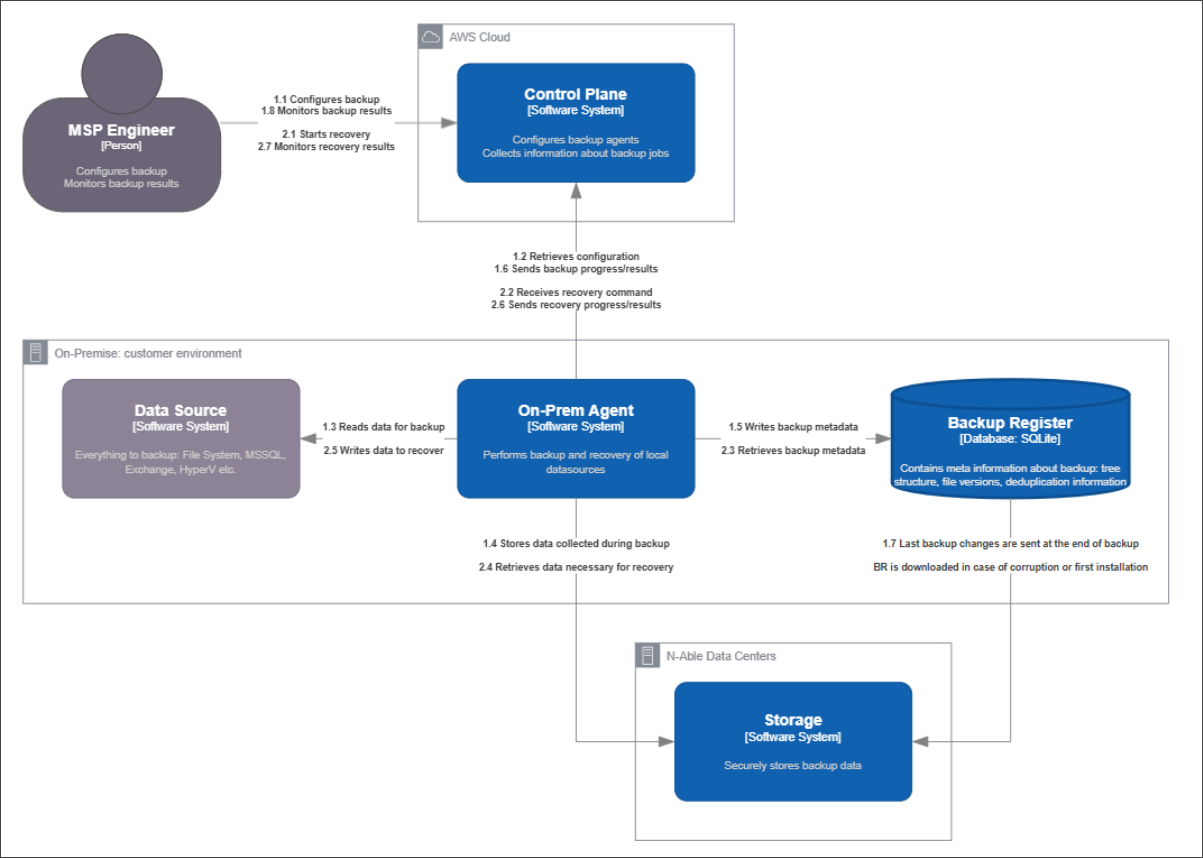
On-prem Backup refers to the backup of local physical and virtual machines hosted within the MSP's environment. To back up local workloads such as File System, MS SQL, Exchange, Hyper-V, etc., a backup agent must be installed on each physical or virtual machine that requires backup. The Backup Agent is managed by the Control Plane and stores the backup data in Storage.
The below diagram depicts the communication paths between the systems as well as two main functional flows: backup (1), and recovery (2).
Control Plane
Control Plane is a set of AWS hosted services that provide two types of API used by On-prem backup:
- Management API: Management API is used by Web UI or directly to manage Backup Agents
- Manage Backup Agent installations.
- Configure Backup Agents.
- Monitor agent health, backup and recovery statuses.
Management API is protected by two-factor authentication (2FA).
- Agent API: Agent API is used by the Backup Agents installed on partner devices to:
- Obtain agent configuration.
- Support agent control channel with Control Plane.
- Report agent health, backup and recovery status.
Agents are authenticated and authorized using mTLS (mutual TLS).
Storage
The Backup Agent deployed to the client’s device uploads the backup data to Storage, where the device’s backup data is isolated from all other device backups. Our Storage system comprises of thousands of Storage Nodes hosted in multiple Cove data centers across the globe. The Storage Node exposes the Web Distributed Authoring and Versioning (WebDAV) protocol over HTTPS. In addition to storing backups, the Storage Nodes also perform storage housekeeping jobs to maintain efficiency and performance. These include data repatriation, defragmentation, removal of unused data etc.
Backup Manager
Backup Manager is the official name of the Backup Agent package installed on a client machine. The main component of this package is the Backup Agent, the worker process that is responsible for backup and recovery. The Backup Agent design follows the “fat” or “rich” client pattern, where all the backup and recovery logic are implemented in the agent (which keeps the storage implementation simple):
- Changes detection (Scanning) - Changes are detected on two levels:
- Object level - If the object (file) metadata (modification time, size, permissions) are the same, the object is considered unchanged and is excluded from backup.
- Content level – The object considered as changed is divided into blocks and compared to its previous version using hashes calculated per block; only changed blocks are backed up.
- Backup Acceleration: The Backup Manager package contains a specially designed filter driver called Backup Accelerator. This tracks changes at the object and content levels and eliminates resource consuming scanning and content reading phases, significantly reducing backup time.
- Deduplication: If a block with the same hash already exists in the storage, it is not backed up owing to the True Delta Technology.
- Compression: Every block is compressed to reduce network traffic and storage volume.
- Encryption: Every block is encrypted on the client side before it is sent to the storage.
- Data Packaging: To optimize network operations and storage, blocks are packaged into mid-size container files called cabinets.
- Delivering data to cloud storage.
- Posting backup progress to Control Plane.
Backup Register
During backup and recovery, Backup Agent operates different types of meta information:
- Hierarchy of objects being backed up.
- Object versions.
- Hashes of blocks for deduplication.
- Lists of blocks every object version consists of.
- References storage nodes where backup data is stored.
To efficiently perform backups, the data is stored locally in a database called Backup Register. At the end of the backup, delta changes accumulated in Backup Register are synchronized to Storage Node. If the Backup Register is corrupted or lost, or indeed the whole source machine no longer available (clean recovery), Backup Register is downloaded and rebuilt locally.
Cloud 2 Cloud (C2C)
C2C is responsible for the protection of Microsoft 365 cloud data sources, such as Exchange, OneDrive, SharePoint, and Teams.
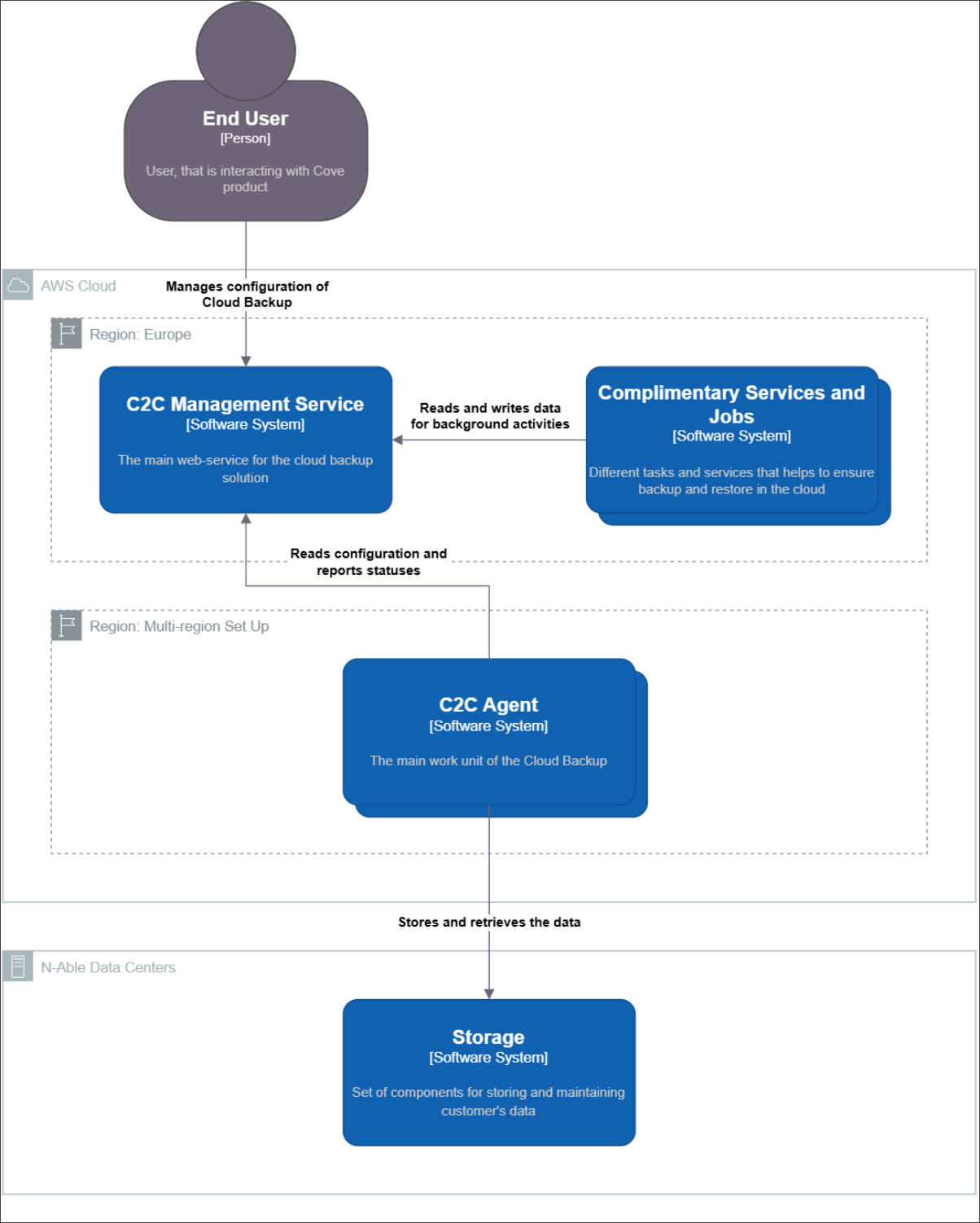
The C2C solution is composed of three key components: Control Plane, Agents, and Storage.
Control Plane
Control Plane manages the web application’s logic and coordinate agents. Control Plane acts as intermediaries between the business logic of applications and agents ensuring that the core functionality can be accessed independently of how MSPs interact with it, thereby resulting in modular, scalable, and maintainable applications.
Agents
Agents serve as the primary work units for cloud backup thereby enabling interoperability, supporting distributed computing, and improving efficiency. Agents coordinate by sending and receiving data in standard formats over HTTP.
Storage
Storage securely retains MSPs backup data thereby ensuring that backup data is stored safely and is protected from unauthorized access, loss, or corruption.
Continuity
Continuity is a multi-phased approach to delivering N-able Disaster Recovery as a Service (DRaaS), based on a computing and backup service model that leverages cloud resources to protect applications and data from disruption caused by disasters. Moreover, enabling a full recovery in the cloud, gives the MSPs a total system backup and fail-over that allows for business continuity in the event of system failure.
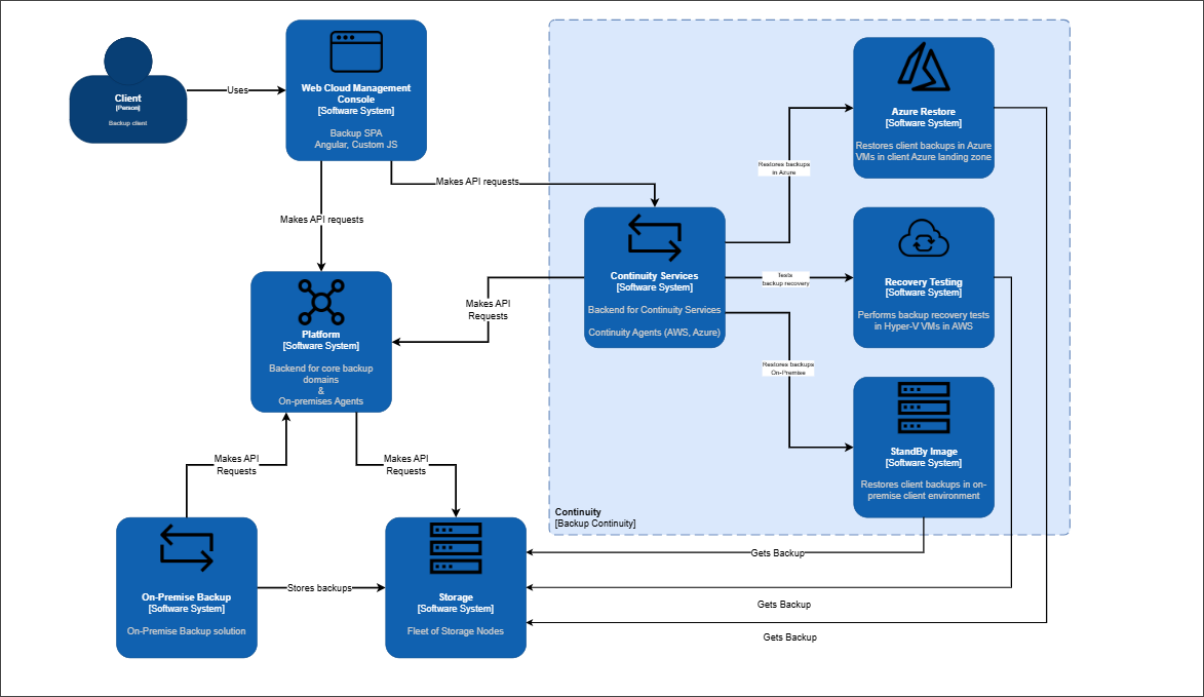
The Continuity solution includes three main recovery locations: Standby Image, Recovery Testing, and Azure Restore.
Standby Image
Standby Image refers to the scheduled automated service to recover critical devices. This service restores data to an on-prem MSP-hosted environment. Restores run after each backup session for System State, Files and Folders. After the first full restore, a virtual machine is created after which only incremental updates are applied.
Recovery Testing
Recovery Testing refers to the scheduled, automated service to test the recoverability of critical devices. This service restores data to a secure hosted facility provided by N-able, located in the same geographical region where the backup data is stored. MSPs can opt for restoring their virtual machine backups every 14 or 30 days. As a part of this test, the virtual machine is booted and a screenshot of the login screen is captured and then sent to the Management Console as proof of recovery test for users to validate it.
Azure Restore
Azure Restore enables MSPs to automatically recover critical data and devices in their Azure managed environment. The result of Azure Restore is an Azure Virtual Machine replica of their on-prem device, that is kept up to date with each backup from the source machine.
Summary
In conclusion, N-able’s Cove Data Protection’s robust architecture illustrates Cove’s capabilities to ensure scalability, security, and operational efficiency to optimize workload distribution, enhance disaster recovery, and support business continuity. Cove’s architecture provides a flexible, resilient, and cost-effective foundation for MSPs operations, enabling smooth cloud adoption while leveraging existing on-prem investments and balancing performance and security, utilizing the latest technologies and industry best practices, and safeguarding the sensitive data. Cove architecture’s key components, such as, the API layers, data storage, and user interface have been optimized for expandability and resilience to ensure that Cove can handle enhanced traffic and data volume without compromising on the performance.
Appendices
We'd love to hear your thoughts. If there's any additional information you'd like to see in this guide, please let us know through the feedback form below. Select No for "Did this topic help you?" and then choose Other reason not listed here to share your suggestions. Your input helps us improve. If you'd like us to follow up with an update, please provide your email address.