The Executive Summary Report (ESR) is broken down into three main sections, and includes the following key performance indicators (KPIs):
Cyber resilience and storage
This section will detail what safeguards have been enabled on the customers devices:
- Off-site cloud storage: All backup data is securely stored off the local network within a private, globally distributed network of data centers.
- End-to-end encryption: A secure communication method where the data is encrypted at its source device and stays encrypted during transfer, storage, and backup. It is only decrypted at its final destination by an authorized party with the appropriate encryption keys.
- Immutable backup copy: The read-only copies of backup data that are fully isolated and cannot be altered or deleted thereby providing recoverability from ransomware and malicious deletion.
- Role-based access control: The security mechanism that assigns permissions based on predefined user roles thereby allowing limited access to backups as needed.
- Secure ISO certified data-center: All backup data is stored in a global network of certified data-centers that meets international standards for security, reliability, and quality management, ensuring best practices in data handling and infrastructure operations.
- Separate backup credentials: A dedicated set of login details (username and password) different from the main system or user account credentials specifically for accessing or managing backup data to limit unauthorized access.
- SOC2 compliant: The stringent security standards and controls across devices to secure backup data, including availability and confidentiality.
- Long-term retention: The robust long-term retention policies to ensure your data is securely stored and easily retrievable when required.
- 2 factor authentication (2FA): A security process that requires users to provide two different forms of identification before accessing an application, thereby adding an extra layer of verification to protect against unauthorized access.
- Data isolation & segmentation: All backup data are stored in isolation ensuring protection from local attacks and ransomware. Furthermore, the backup data is divided into smaller segments or blocks for more efficient backup and recovery.
- Private & generated keys: Refers to the Encryption Key/Security Code that are set by a user, however, cannot be changed or retrieved afterward. This key offers full control but data is unrecoverable if lost.
Servers and Workstations
This section details the information relating to device's, backups and recovery.
Backup
- Backup Success Rate
formula: (No. of completed backups / Total number of backups attempted) * 100 - Data backed up:
- The total data being backed up indicating the volume of data being protected.
- Formula: Sum of data size of all backup jobs for the period.
- Average backup time:
- The average time to complete a backup operation to assess backup efficiency.
Formula: Total backup duration / Total backups completed
- Devices: The overall count of devices.
- Used Storage: The total used storage from data backed up.
Recovery point objective (RPO)
Recovery point objective displays the percentage of devices for each backup frequency depicting how often the successful backups are performed within the specified RPO interval, for example, every 24 hours, which is essential for minimizing data loss and ensuring business continuity, compliance, and cost-efficiency.
Restore
- Restore Success Rate
formula: (No. of successful restores / Total number of restores attempted) * 100 - Data restored
- The total data being restored.
Formula: Sum of all restore jobs attempted for the period.
- Average restore time
- The average time to complete a restore operation to evaluate recovery performance.
Formula: Total restore duration / Total restores completed.
- Restores: The overall count of restores.
- Recovery tested devices: Display devices with Recovery Testing vs Total device count, For example: 4/10.
Microsoft 365
- Saas backup success rate
formula: (No. of completed backups / Total number of backups attempted) * 100 - Used storage: Refers to the amount of storage space that has been consumed by your data across various Microsoft 365 services.
- M365 Billable users: Refers to the users for whom your organization is billed based on the Microsoft 365 services licenses assigned to them.
- Tenants: Refers to the dedicated instance of Microsoft 365 services for your organization.
- Retention: Specifies how long you can retain data across Microsoft 365 services.
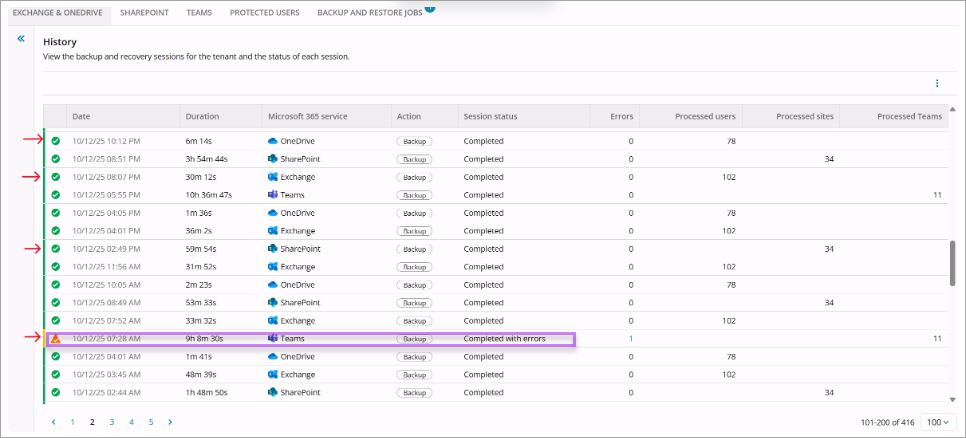
The backup success rate given in the report may differ from what is displayed in the Cove Dashboard as this displays all the backup sessions initiated on a given day.
The dashboard color bar displays all Microsoft 365 data sources grouped together. The color of the segments on this bar reflect the status of overall backup activity for the group on a given day. If the last backup of each data source is successful, the color bar appears green.

However, for Executive Summary Reports, the backup success rate is determined by the outcome of the last backup of the day for each Microsoft 365 data source. If any one of these fails to complete successfully within the day, it negatively affects the overall success rate.