
Monitor your security posture
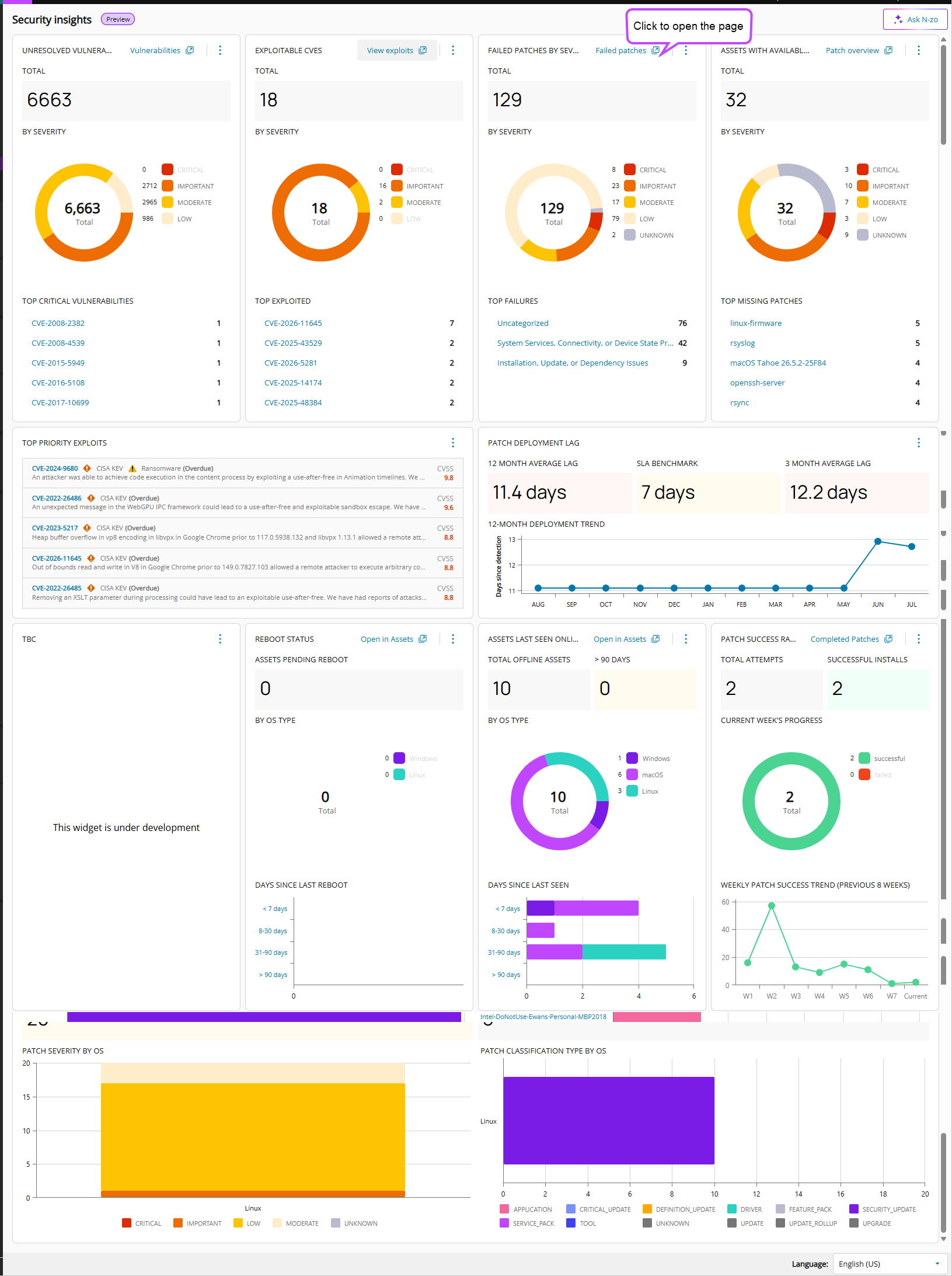
Use Security Insights to view security and patching data across your managed environment. Security Insights combines vulnerability, exploitability, patching, and asset health metrics into a unified dashboard. Use it to identify risks, prioritize remediation work, and monitor your security posture.
The dashboard provides summary widgets, charts, and trend information that help you identify high-risk assets, monitor patching performance, and track remediation progress.
Go to Endpoint Remediation > Security Insights to view this vital information.
Unresolved vulnerabilities
Displays the total number of unresolved vulnerabilities detected across your managed assets.
Use this widget to:
- Monitor overall vulnerability exposure.
- Review vulnerability severity distribution.
- Identify the most critical vulnerabilities in your environment.
The widget includes:
- Total unresolved vulnerabilities.
- Vulnerabilities grouped by severity.
- Top critical vulnerabilities.
Exploitable CVEs
Displays vulnerabilities with known exploits.
Use this widget to:
- Prioritize vulnerabilities that present the highest risk.
- Review current exploit activity.
- Identify vulnerabilities that require immediate attention.
The widget includes:
- Total exploitable CVEs.
- Exploitable vulnerabilities grouped by severity.
- Top exploited vulnerabilities.
Failed patches by severity
Displays patch installation failures grouped by severity.
Use this widget to:
- Identify patch deployment issues.
- Review failed patch installations.
- Prioritize remediation for high-severity failures.
The widget includes:
- Total failed patches.
- Failures grouped by severity.
- Top patch failure categories.
Assets with available patches
Displays assets with patches available for installation.
Use this widget to:
- Identify assets requiring patching.
- Review missing patch coverage.
- Prioritize patch deployment efforts.
The widget includes:
- Total assets with available patches.
- Available patches grouped by severity.
- Top missing patches.
Top priority exploits
Displays vulnerabilities with known exploit activity that require urgent attention.
Use this widget to:
- Review actively exploited vulnerabilities.
- Identify high-risk vulnerabilities.
- Prioritize remediation efforts based on exploitability.
Information displayed includes:
- Vulnerability identifier.
- Vulnerability description.
- Exploit status.
- Risk score or severity information.
Patch deployment lag
Displays the average time required to deploy patches.
Use this widget to:
- Monitor patch deployment performance.
- Compare deployment performance against service-level objectives.
- Identify trends in patch deployment efficiency.
The widget includes:
- 12-month average deployment lag.
- Service-level benchmark.
- Three-month average deployment lag.
- Twelve-month deployment trend.
Use this information to evaluate how quickly security updates are deployed after becoming available.
Reboot status
Displays assets that require a reboot.
Use this widget to:
- Identify assets with pending reboots.
- Monitor reboot requirements by operating system.
- Determine whether reboot-related actions may be affecting patch compliance.
The widget includes:
- Assets pending reboot.
- Status breakdown by operating system.
- Days since last reboot.
Assets last seen online
Displays asset connectivity information.
Use this widget to:
- Identify offline assets.
- Review asset availability.
- Investigate devices that may not be receiving updates or scans.
The widget includes:
- Total offline assets.
- Assets not seen for more than 90 days.
- Operating system breakdown.
- Days since last seen.
Offline assets can increase security risk because they may not receive recent scans, patches, or remediation actions.
Patch success rate
Displays patch deployment success metrics.
Use this widget to:
- Monitor patch installation effectiveness.
- Review successful and failed patch deployments.
- Track patching performance over time.
The widget includes:
- Total patch attempts.
- Successful installs.
- Current week progress.
- Eight-week patch success trend.
Patch severity by operating system
Displays patch severity distribution across operating systems.
Use this widget to:
- Compare patching requirements between platforms.
- Identify operating systems with higher concentrations of critical or important patches.
- Prioritize patch deployment efforts.
Severity levels include:
- Critical
- Important
- Moderate
- Low
- Unknown
Patch classification type by operating system
Displays patch classifications grouped by operating system.
Use this widget to:
- Understand the types of updates required across your environment.
- Review update distribution by operating system.
- Identify trends in patch classifications.
Patch classifications include:
- Application
- Critical update
- Definition update
- Driver
- Feature pack
- Security update
- Service pack
- Tool
- Update rollup
- Upgrade