2026.3 Release Notes
| Build Number: | 2026.3.0.13 [N-central] |
|
2026.3.0.13 [N-central for CMMC Compliance] |
|
| Last updated: | 04-Aug-2026 |
What's New in 2026.3
We’re introducing exciting new features, enhancements, and critical fixes to improve usability, security, and performance. Here’s what’s in the 2026.3 release:
Modernized Filter & Rule Device Preview Experience
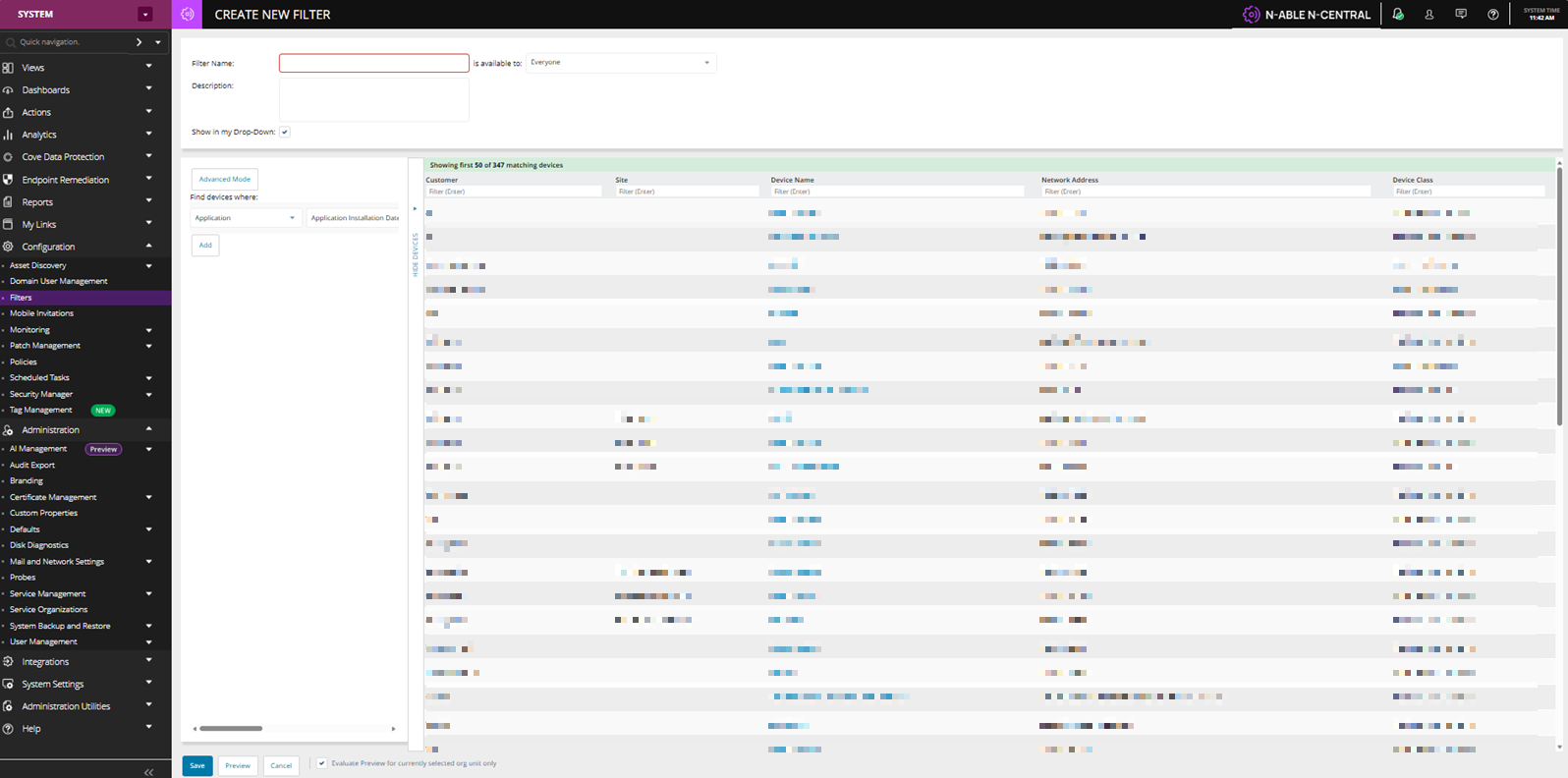
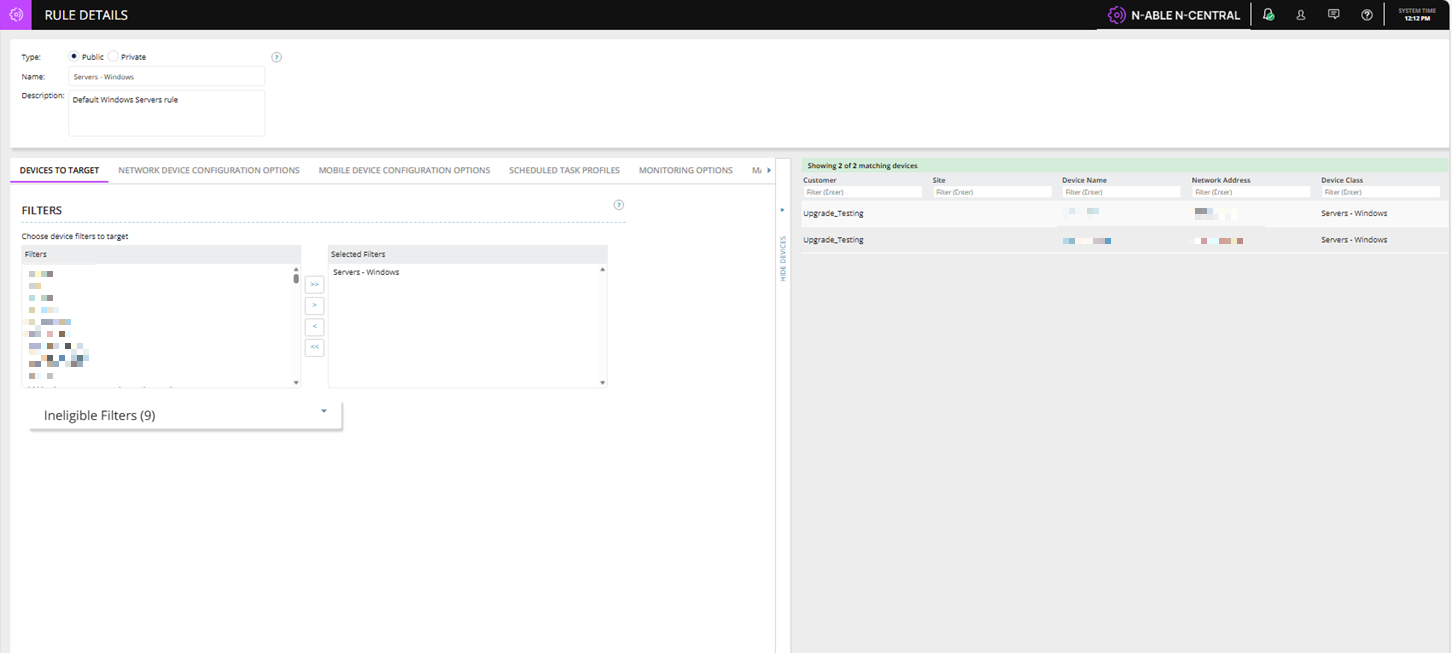
We’ve introduced a major modernization and performance optimization for Filter Preview and Rule Show Devices functionality. This enhancement replaces the legacy preview execution model with a faster, scalable, in-memory evaluation framework while introducing a modernized shared preview grid experience across Filters and Rules.
This approach avoids the legacy preview model, which built full device lists server-side and sent them to the browser. By evaluating matches in memory and returning a limited result set, the preview delivers faster verification of expected devices while reducing server load.
Key behaviors include:
-
Maximum of 50 preview rows returned
-
No pagination
-
Full match count metadata included in the response
The UI now displays messaging such as: This provides visibility into total matches without requiring additional server roundtrips: “Showing first 50 of 347 matching devices”.
The preview grid now supports backend-powered text filtering across key device attributes, including:
-
Customer
-
Site
-
Device Name
-
Network Address
-
Device Class
This allows administrators to quickly narrow results without loading full device datasets into the browser.
Scalable Agent Upgrade Queue & Asynchronous Asset Discovery Processing
N-central 2026.3 introduces a new asynchronous processing architecture for post-upgrade asset data, improving platform stability and resilience during large-scale agent upgrade operations.
What's changed
When agents restart after an upgrade, they immediately submit a large burst of asset discovery data back to the server. Historically, this synchronous processing created significant load spikes and was the primary reason N-central enforced strict limits on how many agents could upgrade concurrently.
In 2026.3, N-central now ingests and processes this post-upgrade asset data asynchronously using a queuing architecture. Rather than processing each submission inline and blocking server resources, asset data is durably queued and processed at a controlled rate. This eliminates the load spikes that previously accompanied large upgrade rollouts and improves overall platform stability during these operations.
Future benefits
By decoupling asset data processing from the upgrade pipeline, these architectural changes remove the key bottleneck that historically required conservative concurrency limits. This establishes the foundation to safely increase the concurrent upgrade queue size in a future release enabling faster rollouts across large environments without risking platform performance.
Windows Agent Trust, Compatibility & Delivery Improvements
We’ve delivered a series of foundational enhancements to the N-central Windows Agent to improve trust, compatibility with security tools, and overall reliability across deployments.
These updates focus on ensuring agent binaries are securely signed, and consistently trusted by antivirus and firewall solutions.
What’s new
We have updated the Windows Agent to digitally sign key runtime binaries produced by N‑able, allowing customers and security tools to verify authenticity, reduce ‘unknown publisher’ warnings, and help protect against tampering.
N-able Login User Deletion Event Support
This enhancement ensures that when a user is deleted in N-able Login, connected products such as N-central receive and processing the deletion event consistently.
This enhancement helps improve:
-
Consistent user deprovisioning across products.
-
Reduced risk of orphaned or active accounts after SSO deletion.
-
Centralized identity lifecycle management.
-
Better auditability and access governance.
N-central now supports this event flow by:
-
Receiving the N-able Login user deletion event.
-
Converting the affected N-able Login user back to a local N-central user.
-
Automatically lock the local account to prevent access.
-
If a deleted N-able Login user attempts to authenticate N-central after deletion, the account will remain locked and inaccessible until manually addressed by an administrator.
DMS Framework Cache, Locking & Scalability Improvements
Much of the N-central service layer depends heavily on the DMS ORM caching framework particularly for core entities such as devices, appliance tasks, and business process data improvements in this area can positively impact performance across the entire platform.
As customer environments continue growing toward
-
40,000+ devices
-
100,000+ managed endpoints
-
High-frequency automation workflows
-
Large-scale business process execution
existing cache structures and locking mechanisms can become performance bottlenecks.
We are introducing architectural optimization work focused on improving cache efficiency, concurrency handling, and lock contention reduction within the DMS Framework.
This is a back end improvement so no direct user interface changes are included as part of the above change in N-central 2026.3.
Maintenance Windows: One-Time Scheduled Reboots
N-central allows you to schedule either a recurring reboot or a one-time reboot for managed devices using Maintenance Windows.
One-time scheduled reboots are useful when you need to restart a device after patching, software deployment, maintenance activities, or troubleshooting without creating a recurring reboot schedule.
After the reboot executes, the one-time maintenance window is automatically removed.
Previously, Scheduled Reboots only supported recurring schedules, even when a technician needed a single after-hours restart. This often resulted in temporary maintenance windows being left behind and creating the risk of unintended future reboots.
You must have appropriate permissions to manage Maintenance Windows for devices.
What's New:
-
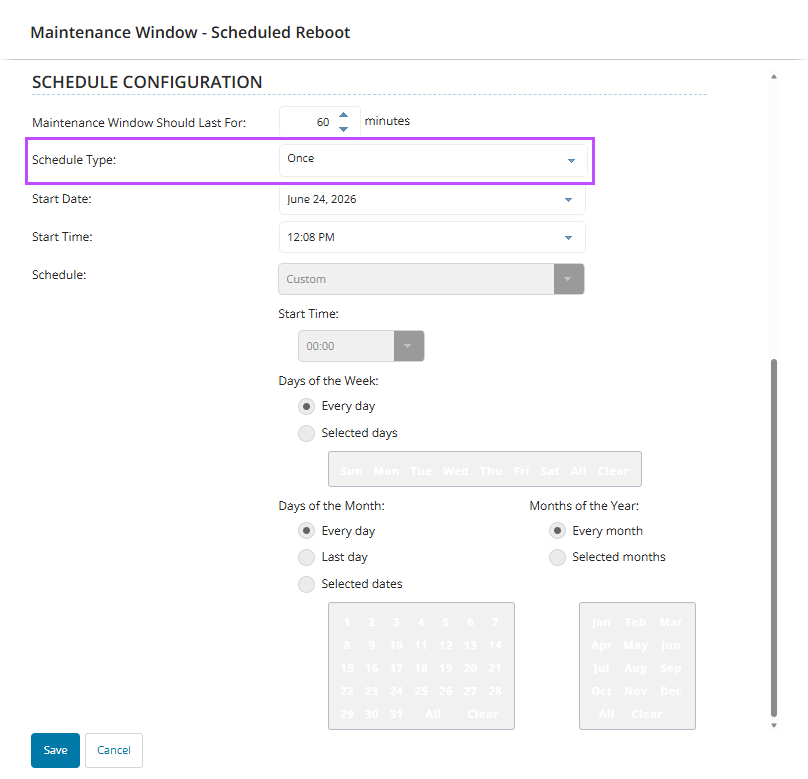
New "Once" scheduling option for Scheduled Reboots
-
Schedule a single reboot for a specific date and time. A one-time reboot cannot be scheduled for a date and time in the past.
-
One-time reboot schedules execute once at the scheduled date and time and are automatically removed after completion.
Note:
-
Existing recurring reboot scheduling remains unchanged and remains available for rule-based Scheduled Reboot Maintenance Windows.
-
Existing reboot notifications, user postponement options, and reboot methods continue to be supported
Where It's Available
The "Once" scheduling option is available when scheduling reboots for one or more devices.
For an individual device:
-
Navigate to the device you want to reboot.
-
Add the reboot task from the Device Details Add Task button or in the Settings tab.
-
Device Details:
-
Select Add Task > Maintenance > Add new Maintenance Window > Scheduled Reboot.
-
-
Settings tab:
-
Under Maintenance Windows, select Add > Scheduled Reboot.
-
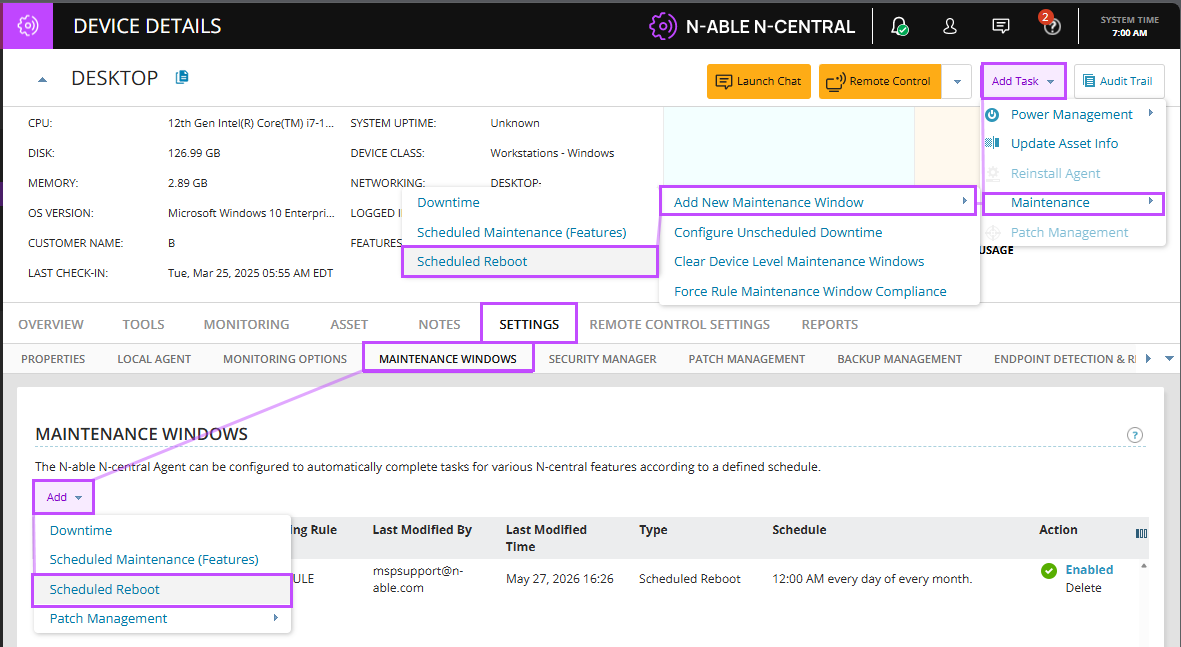
Either option opens the Scheduled Reboot dialog.
-
Enter a Name for the maintenance window.
-
In Schedule Type, select Once.
-
Choose the desired Start Date and Time for the reboot.
-
-
Configure any additional reboot settings, including:
-
Reboot method
-
User notification message
-
Allow user postponement
-
Maximum downtime
-
Reboot delay
-
-
Select Save.
-
Choose Save on the device page.
Administrators can also create a one-time Scheduled Reboot for multiple selected devices from the All Devices view using the Add Task > Maintenance > Add new Maintenance Window > Scheduled Reboot workflow.

Identifying One-Time and Recurring Reboots
In the Maintenance Windows list:
-
One-time schedules display as:
-
Once at HH on
-
-
Recurring schedules display as:
-
HH every
-
This allows administrators to quickly distinguish between one-time and recurring reboot schedules.
Common Use Cases
-
Schedule a one-time reboot after deploying operating system or application updates.
-
Restart devices after a software installation that requires a reboot to complete configuration.
-
Perform maintenance-related reboots outside business hours without creating a recurring schedule.
-
Schedule a single reboot as part of troubleshooting or corrective actions.
Asset Scanning Performance Improvements
We've made significant improvements to how N-central handles asset updates triggered by recurring scheduled tasks, directly addressing performance concerns reported by partners managing large environments. Partners with large device counts should see noticeable improvements in server responsiveness and overall stability.
Previously, every task execution triggered a full asset scan potentially every 5 minutes, creating unnecessary server load. With this update, you can choose a scan interval that fits your environment.
What was done?
When "Update Asset Info When Finished" is enabled on a recurring Scheduled Task, N-central now controls how frequently asset information can be refreshed for each device.
Where to Find It:
Configuration > Scheduled Tasks > Add/Delete.
The new Asset Scan Interval dropdown appears on the Schedule tab when creating or editing a recurring Scheduled Task (Scripting or Automation Policy).
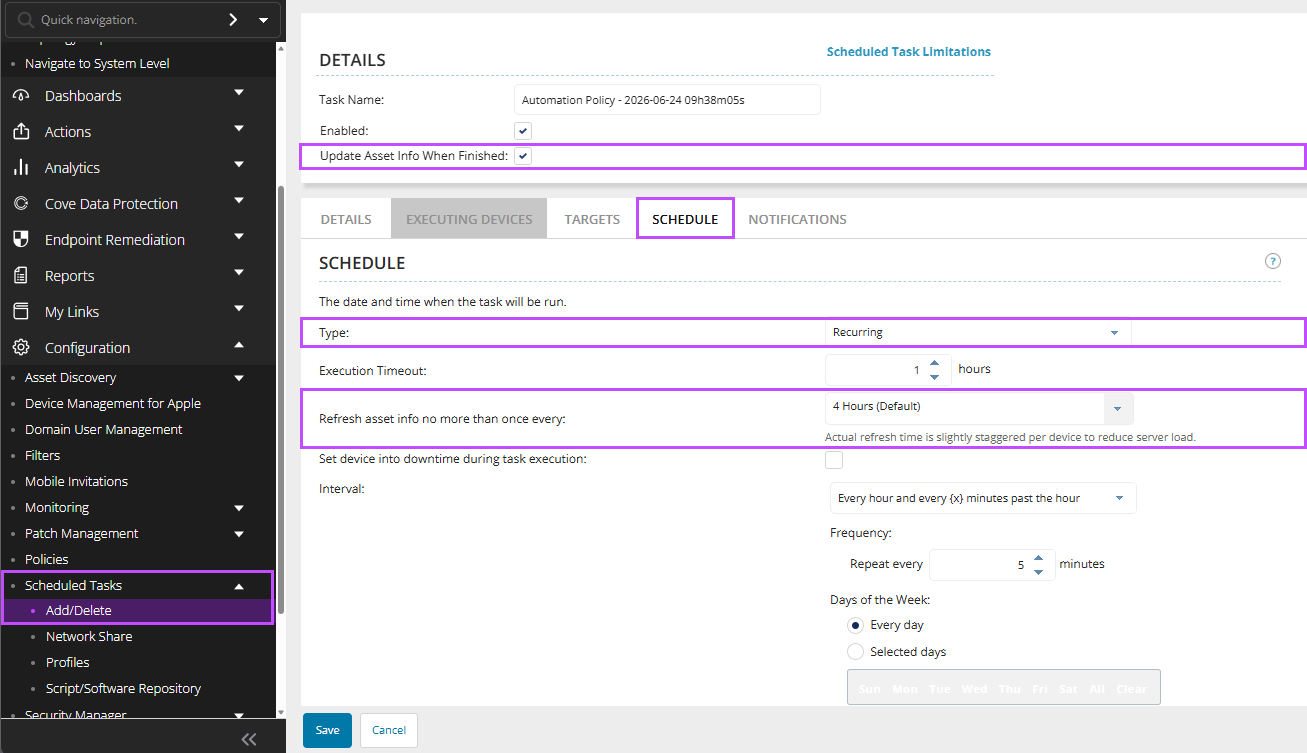
When the Setting Appears
The setting is only displayed when:
| Setting | Value |
|---|---|
| Schedule Type | Recurring |
| Update Asset Info When Finished | Enabled |
The setting is hidden when:
-
Schedule Type is Now or Once.
-
Update Asset Info When Finished is disabled.
Configurable Asset Refresh Intervals
Administrators can now choose how frequently asset information is refreshed when a recurring Scheduled Task completes.
Available options:
-
1 Hour
-
2 Hours
-
4 Hours (Default)
-
8 Hours
Default Behavior
-
New Scheduled Tasks: The default refresh interval is: 4 Hours
-
For Existing Scheduled Tasks: Following upgrade to N-central 2026.3:
-
Existing Scheduled Tasks retain their current configuration.
-
Asset refresh intervals default to 4 Hours.
-
No manual action is required.
-
Supported Task Types
The setting is available for:
-
Scripting Tasks
-
Automation Policy Tasks
Additional Optimizations:
Staggered Refreshes
When a Scheduled Task targets multiple devices, asset refreshes are automatically staggered across those devices rather than occurring simultaneously. This helps reduce spikes in server activity and database load.
Efficient Refresh Processing
If multiple Scheduled Tasks request asset refreshes for the same device, N-central intelligently reuses existing refresh activity and takes recently completed refreshes into account, reducing unnecessary processing.
What Isn't Changing:
This enhancement is implemented entirely on the N-central server.
-
No changes have been made to agent behavior.
-
The asset discovery and reporting process remains unchanged.
-
Devices continue to report asset information using the existing discovery mechanisms.
Example:
A Scheduled Task runs every 5 minutes and has Update Asset Info When Finished enabled.
If the Asset Refresh Interval is set to 4 Hours:
-
The task continues to run every 5 minutes.
-
Asset information is refreshed no more than once every 4 hours.
-
Refresh activity is staggered across devices to reduce server load.
Best Practices
Large Environments
For environments with thousands of managed devices, consider using 8 Hours to reduce backend processing and improve scalability.
Most Environments
The default 4 Hour interval provides a balance between asset freshness and performance and is recommended for most deployments.
Frequently Scheduled Tasks
For tasks that run every few minutes, avoid unnecessarily short refresh intervals unless near-real-time asset updates are required.
Halo PSA Integration Reliability & Workflow Improvements
This release hardens the native N-central HaloPSA integration focusing on ticketing workflows, asset export reliability, and operational resilience. Customers will see more predictable ticket reopen behavior, clearer export diagnostics, safer handling of Halo-side mandatory field policies, and an easier migration path from custom integrations via bulk asset sync.
This includes the following changes:
Asset Sync for Faster Migration:
-
New Sync Assets functionality allows customers to bulk match existing Halo PSA assets to N-central devices using serial number matching.
-
Automatically links existing Halo assets to N-central devices, simplifying migration from custom integrations to the native Halo PSA integration.
Improved Export Reliability & Troubleshooting:
-
Export errors are now cleared automatically after a successful retry, reducing confusion during troubleshooting.
-
More detailed API error information is surfaced directly in the export UI to help customers identify issues faster.
-
If a previously exported asset was deleted in Halo, N-central can now properly detect the condition and recreate the asset during re-export.
-
Last logged-in user information can now be synchronized to Halo asset records for improved technician visibility.
-
Improved handling of Halo mandatory field policies helps reduce export and ticket creation failures.
More Predictable Ticketing Workflows:
-
Ticket reopen behavior is now more consistent with standard Halo PSA workflows.
-
Ticket recipient configuration settings such as default assignee and ticket status are now more consistently respected.
-
“Do Not Reopen” preferences are now properly enforced for repeat failures.
-
Improved handling of multi-device notification scenarios helps ensure ticket updates and return-to-normal events behave more reliably.
Operational & Integration Improvements:
-
Better reconciliation of orphaned tickets and assets between N-central and Halo PSA.
-
Improved handling of assets previously created through older custom PSA integrations.
-
Continued alignment with Halo PSA best practices by avoiding direct workflow bypass behavior.
Known Limitations:
-
Some devices do not report a serial number. In Halo environments where serial numbers are mandatory, asset export may fail for those devices. This is expected and outside of N‑central’s control.
-
Upgrade Recommendations:
-
After upgrading, customers are encouraged to run the new Sync Assets function before enabling ticket automations or performing large-scale exports.
-
Review Halo recipient configuration settings such as ticket status, assignee behavior, and reopen preferences to ensure they align with internal workflows.
-
Validate any mandatory field policies configured within Halo PSA to ensure successful ticket and asset synchronization.
-
-
N‑central does not support Halo workflows for ticket status updates, in Halo environments where workflows are required to control status changes, ticket updates initiated by N‑central may fail or be rejected.
To use workflows with N‑central, Halo must be configured to allow ticket updates using one of the following approaches:
-
Allow status updates outside workflows
-
In Halo, enable status changes without a workflow action:
-
Configuration > Tickets > General Settings
-
-
Set "Changing of status outside of an action" to Always allowed.
-
-
Use a dedicated ticket type for N‑central
-
Create or use a Halo ticket type with no workflows and configure N‑central to create and update tickets using that ticket type.
-
Full End of Life: Help Desk Manager (HDM) and NetPath
Effective with N-central 2026.3, both Help Desk Manager (HDM) and NetPath have reached full End of Life and are permanently disabled for all customers, including those with existing usage or licenses. This applies to both On-Premises and Hosted (NCOD) deployments.
In N-central 2026.2, a soft deprecation was introduced that hid these features from customers who were not already using or licensed for them. With 2026.3, this deprecation is now complete as these features are no longer accessible to any user.
Help Desk Manager (HDM)
Help Desk Manager was a legacy on-premises ticketing system integrated into N-central, designed to allow MSPs to create, assign, and track service tickets directly within the platform. As the industry has shifted toward dedicated PSA and ITSM tools, HDM was underutilized and no longer aligned with N-central core RMM focus.
What has changed:
-
PSA Integration: HDM has been removed as an option from the PSA Integrations section for all customers.
-
UI: All Help Desk Manager navigation menus, icons, and configuration options have been removed from the N-central UI.
-
Backend: HDM-related services, processes, and integrations have been fully disabled.
-
Billing: HDM billing ceased in February 2026. No further charges will be incurred.
Recommended action: Customers previously using HDM should transition to a dedicated PSA or ITSM solution that integrates with N-central through available APIs and connectors.
NetPath
NetPath, originally by SolarWinds, was an on-premises network monitoring add-on that provided performance metrics and a visual graph of the traversal route of a URL over the web. As part of N-able's decision to retire from low-use components that no longer align with long-term product objectives, NetPath has been fully decommissioned.
Recommended action: There is no direct migration path for an equivalent solution within N-able. Customers who relied on NetPath for network path analysis should evaluate third-party network monitoring tools.
Analytics: Improved patch compliance scoring for removed patches
Patch Compliance and Patch Management now provide more accurate compliance scoring by treating patches with the Removed status as Not Included. Removed patches are excluded from Patch Installation % and other compliance score calculations while remaining visible in the Patch Details section for reporting and auditing purposes. This enhancement ensures compliance scores more accurately reflect the patches that are actively applicable to managed devices.
Post GA releases
N-central Mac agent v1.14.5 (30th July 2026)
Added support for the SNI extension during the TLS handshake, resolving an issue that prevented the N-central Mac agent from registering with servers behind TLS-terminating proxies, including Cloudflare.
Supported Upgrade Paths
N-central
-
2025.4.0.16 > 2026.3
-
2025.4.1.2 > 2026.3
-
2026.1.0.527 > 2026.3
-
2026.2.0.11 > 2026.3
-
2026.2.0.13 > 2026.3
-
2026.2.0.14 > 2026.3
-
2026.2.0.15 > 2026.3
-
2026.2.0.17 > 2026.3
N-central for CMMC Compliance
-
2026.1.1.1 > 2026.3
Bug Fixes
A range of high-impact bugs have been resolved in this release. Be sure to review the full list included below for more details.
| Category | Updated Summary | Issue Key |
|---|---|---|
| Core Platform | ||
| Core | Summary: Improved server performance during security token verification. | NCCF-2078544 |
| Issue: Under heavy load, token verification could reduce server responsiveness. | ||
| Fix: Updated verification handling to prevent performance degradation. | ||
| Core | Summary: Corrected invalid status reporting for Lightweight services. | NCCF-2067007 |
| Issue: Lightweight services could be flagged as invalid despite operating normally. | ||
| Fix: Updated service validation to ensure status is reported correctly. | ||
| Core | Summary: Improved reliability of Report Manager exports. | NCCF-2066396 |
| Issue: Exports could time out before completing in larger environments. | ||
| Fix: Updated export processing to prevent timeouts on large servers. | ||
| Core | Summary: Prevented probe installation from affecting other appliances on shared hardware. | NCCF-2047154 |
| Issue: Installing or reinstalling a probe could unintentionally remove authentication tokens used by other appliances. | ||
| Fix: Updated probe installation logic to preserve existing appliance tokens. | ||
| Core | Summary: Improved handling when devices exit maintenance windows. | NCCF-2028662 |
| Issue: Devices leaving a maintenance window while disconnected could trigger errors. | ||
| Fix: Updated processing to handle disconnected devices correctly when maintenance ends. | ||
| Core | Summary: Improved stability during concurrent self-healing scans. | NCCF-2027450 |
| Issue: Running multiple self-healing scans at the same time could cause submit queue errors. | ||
| Fix: Resolved a database issue to prevent errors when scans overlap. | ||
| Core | Summary: Improved service status freshness during heavy processing. | NCCF-1989795 |
| Issue: Submit queue backlogs could delay updates and make services appear stale. | ||
| Fix: Improved queue processing so service updates are applied reliably. | ||
| Core | Summary: Corrected administrator credential handling during server reactivation. | NCCF-1983444 |
| Issue: Server reactivation could update the wrong administrator account. | ||
| Fix: Updated account selection logic to ensure the correct administrator account is updated. | ||
| Core | Summary: Improved reliability of customer creation through the API under load. | NCCF-1908560 |
| Issue: Creating multiple customers at the same time via API could fail under heavy usage. | ||
| Fix: Updated API handling to better support concurrent customer creation. | ||
| Core | Summary: Prevented customer custom properties from saving incorrect values. | NCCF-1788756 |
| Issue: Values from a previously viewed customer could be saved to a different customer. | ||
| Fix: Updated context handling to ensure values are saved to the correct customer. | ||
| Core | Summary: Improved export reliability for service templates with large values. | NCCF-1786040 |
| Issue: Templates with very large parameter values could fail to export. | ||
| Fix: Updated export processing to support large parameter values. | ||
| Core | Summary: Corrected System Settings permission visibility. | NCCF-1767348 |
| Issue: The System Settings permission could be hidden when it should be available. | ||
| Fix: Updated role handling so the permission remains visible as expected. | ||
| Core | Summary: Improved stability when opening Agent Settings. | NCCF-1048144 |
| Issue: The Agent Settings page could fail to load in some scenarios. | ||
| Fix: Updated handling to ensure Agent Settings loads reliably. | ||
| Core | Summary: Reduced unnecessary internal processing during background cleanup. | NCCF-1759873 |
| Issue: Repeated cleanup activity could increase processing overhead and slow the server. | ||
| Fix: Reduced redundant cleanup work to lower internal processing. | ||
| Core | Summary: Improved resilience of internal message handling. | NCCF-1759635 |
| Issue: Oversized internal messages could disrupt server communications. | ||
| Fix: Added safeguards to prevent oversized messages from impacting operations. | ||
| Core | Summary: Ensured updated HP Physical Drive status mappings apply after upgrades. | NCCF-1724321 |
| Issue: Updated HP Physical Drive status mappings were not applied during upgrades. | ||
| Fix: Updated service mapping metadata so changes apply correctly after upgrade. | ||
| Core | Summary: Fixed customer save errors on servers with large rule sets. | NCCF-2037707 |
| Issue: Saving customer or site changes could trigger a system error in environments with large rule sets. | ||
| Fix: Updated customer save processing to prevent these errors and allow changes to save successfully. | ||
| Agents & Device Management | ||
| Agent | Summary: Improved handling of passwords in logs during probe-based remediation. | NCCF-2013728 |
| Issue: In some cases, passwords could be included in device history or Linux agent logs after remediation tasks were run through a probe. | ||
| Fix: Updated logging behaviour so passwords are properly hidden in device history and Linux agent logs. | ||
| Agent | Summary: Improved syslog component updates during probe upgrades. | NCCF-1873790 |
| Issue: Syslog monitoring components were not updated during some probe upgrades. | ||
| Fix: Updated the probe upgrade process to ensure syslog components are updated. | ||
| Agent | Summary: Added support for discovering Aruba network devices through SNMP. | NCCF-1815538 |
| Issue: Aruba network devices could not be discovered through SNMP. | ||
| Fix: Added SNMP discovery support for Aruba devices. | ||
| Agent | Summary: Improved Remote Control session stability after tunnel switching. | NCCF-1767153 |
| Issue: Remote Control sessions could disconnect after switching to an HTTPS tunnel. | ||
| Fix: Updated session handling to maintain connectivity after tunnel changes. | ||
| Agent | Summary: Improved automation policy execution on devices with older PowerShell configurations. | NCCF-1504077 |
| Issue: Automation policies could fail on devices with older PowerShell configurations. | ||
| Fix: Updated execution handling to improve compatibility with older PowerShell environments. | ||
| UI & User Experience | ||
| Core | Summary: Resolved an error when adding maintenance windows using a direct URL. | NCCF-1907401 |
| Issue: Adding a maintenance window from a bookmarked or direct link could result in an error. | ||
| Fix: Corrected request handling so maintenance windows can be added from direct links. | ||
| Core | Summary: Corrected sorting behaviour for the Make column in the All-Devices view. | NCCF-1896701 |
| Issue: Sorting by manufacturer did not order devices correctly. | ||
| Fix: Updated sorting logic to order devices by manufacturer name. | ||
| Core | Summary: Resolved an error when bulk editing devices from the All-Devices view. | NCCF-1830274 |
| Issue: Bulk edit actions could fail and display an error. | ||
| Fix: Updated bulk edit handling to prevent errors. | ||
| Core | Summary: Corrected UI label rendering that affected reports and bulk edit workflows. | NCCF-1813407 |
| Issue: Some UI labels displayed incorrectly, impacting reporting and bulk edit. | ||
| Fix: Updated UI rendering logic to display labels correctly. | ||
| Core | Summary: Improved stability of the notification profile page. | NCCF-1812787 |
| Issue: Certain special characters in profile names could cause the page to crash. | ||
| Fix: Updated input handling to safely process special characters. | ||
| Notifications & Alerting | ||
| Core | Summary: Corrected formatting for specific notification variables. | NCCF-1921480 |
| Issue: Some notification fields displayed without the intended spacing. | ||
| Fix: Updated variable formatting so notification content displays correctly. | ||
| Authentication & SSO | ||
| Core | Summary: Improved server stability during SSO token refresh. | NCCF-1927906 |
| Issue: Token refresh activity could stall and delay other server operations. | ||
| Fix: Updated refresh handling to prevent blocking behaviour. | ||
| Core | Summary: Improved reliability of SSO login. | NCCF-1283474 |
| Issue: Users could experience intermittent SSO login failures. | ||
| Fix: Updated authentication handling to ensure consistent login behaviour. | ||
| Core | Summary: Resolved a Settings page error for GSuite SSO users. | NCCF-1675717 |
| Issue: GSuite SSO users could encounter an error when accessing the device Settings page. | ||
| Fix: Updated access handling to allow Settings page access. | ||
| PSA & Integrations | ||
| PSA | Summary: Improved reliability of PSA ticket creation. | NCCF-1831625 |
| Issue: A timing issue could prevent tickets being created when notifications triggered. | ||
| Fix: Updated ticket creation handling to ensure notifications generate tickets reliably. | ||
| Custom PSA | Summary: Improved reliability of Custom PSA ticket creation. | NCCF-1805266 |
| Issue: Intermittent connectivity issues could cause Custom PSA ticket creation to fail. | ||
| Fix: Updated connection handling to improve ticket submission reliability. | ||
| Custom PSA | Summary: Improved server stability during Custom PSA operations. | NCCF-1439680 |
| Issue: Custom PSA activity could consume excessive server resources and impact stability. | ||
| Fix: Optimised processing to reduce resource usage during Custom PSA operations. | ||
| HaloPSA | Summary: Resolved HaloPSA ticket creation failures caused by mandatory field validation. | NCCF-1718037 |
| Issue: Ticket creation could fail when mandatory field settings were enabled in HaloPSA. | ||
| Fix: Updated the integration so ticket creation succeeds when mandatory fields are configured. | ||
| Autotask PSA | Summary: Prevented duplicate device entries when moving devices between customers. | NCCF-1681853 |
| Issue: Moving devices between customers could create duplicate records in Autotask PSA. | ||
| Fix: Updated export handling to prevent duplicate device records. | ||
| Patch | ||
| Patch | Summary: Removed old, non-applicable patches from Analytics views. | NCCF-1874139 |
| Issue: Some old patches could remain visible in Analytics dashboards after they were no longer relevant. | ||
| Fix: Updated Analytics processing to remove obsolete patch entries. | ||
| Analytics | ||
| Analytics | Summary: Analytics Summary Patch Management dashboard — No Approval tab now displays consistent data Issue This inconsistency was caused by a filter mismatch between the KPI card and the charts. Fix | DV-9062 |
| Issue: The Patch Management dashboard No Approval tab was displaying 0 patches instead of the expected count, while the KPI card (Total patches with no approval) showed approximately 99,000 patches. | ||
|
Fix: The charts now use the Non Actioned patch status definition, which aligns with the reporting model used in the Patch Compliance report. This ensures that the chart data matches the KPI card totals. Dashboard titles retain the No Approval wording (for example, Total no approval, No approval patches by severity). The underlying filter logic now correctly uses the Non Actioned status, which identifies patches that are awaiting an approval decision. |
||
| Analytics | Summary: Patch Management Dashboard – Fixed incorrect 100% compliance reporting. | DV-9005 |
| Issue: The Patch Management dashboard incorrectly displayed 100% patch compliance, even when devices still had pending patches or lacked maintenance windows to install them. | ||
| Fix: The dashboard now accurately reflects the actual patch installation status across all devices. | ||
| Analytics | Summary: Improved scheduling behaviour for Analytics resynchronisation. | NCCF-1785854 |
| Issue: Analytics resynchronization could delay other scheduled tasks such as report generation. | ||
| Fix: Updated scheduling logic to reduce the impact of resync tasks on other operations. | ||
| Analytics |
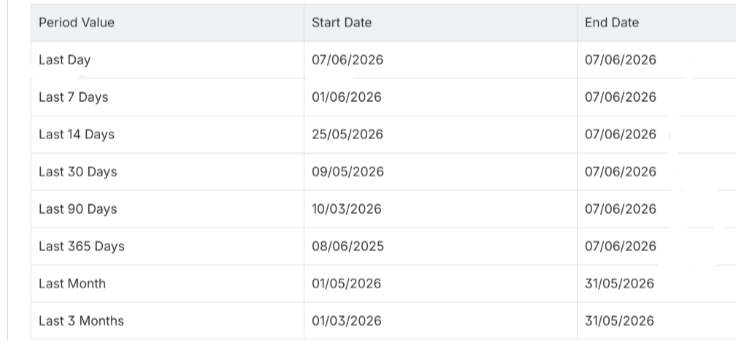
Summary: Patch Compliance Report – Date Range Calculation Corrected Issue: Resolved an issue where relative date period options in the Patch Compliance Report were calculating incorrect date ranges. Fix: The report header now reflects accurate ranges aligned with each option's expected definition. For example, if today is 08/06/2026, the following date periods apply.
|
DV-8854 |
| API | ||
| API | Summary: Corrected pagination links returned by the active-issues API. | NCCF-1522953 |
| Issue: Pagination links were missing required parameters, preventing navigation through results. | ||
| Fix: Updated API responses to include complete pagination parameters. | ||
| Backups | ||
| Core | Summary: Resolved active exports not being detected during backup operations. | NCCF-1702570 |
| Issue: Backup operations could proceed while an export was already running. | ||
| Fix: Updated backup processing to detect active exports before starting a backup. | ||
| Core | Summary: Restored secure FTP backup transfer support after upgrades. | NCCF-1300319 |
| Issue: SSL/TLS FTP backup transfers could stop working after upgrading the N-central server. | ||
| Fix: Updated backup transfer handling so secure FTP transfers work as expected after upgrade. | ||
| Reporting | ||
| Core | Summary: Improved stability of the Detailed Status Report in large environments. | NCCF-1484854 |
| Issue: Loading large amounts of report data could cause slow performance or browser instability. | ||
| Fix: Updated report data handling to improve performance and stability. | ||
| Performance & Stability | ||
| Core | Summary: Improved stability of warranty update processing. | NCCF-1842761 |
| Issue: Warranty updates could overwhelm the server and impact stability. | ||
| Fix: Added processing limits to prevent resource exhaustion during warranty updates. | ||
| Core | Summary: Improved performance when downloading automation policy files. | NCCF-1805490 |
| Issue: Downloads could trigger short-term CPU and disk usage spikes on the server. | ||
| Fix: Updated download handling to reduce resource usage spikes. | ||
| Core | Summary: Improved performance when loading Active Issues on large servers. | NCCF-1001741 |
| Issue: Loading the Active Issues page could be slow in large environments. | ||
| Fix: Updated validation and processing logic to improve responsiveness. | ||