
2026.2 Release Notes
| Build Number: | 2026.2.0.17 |
| Version 2026.2 is not currently available for N-central for CMMC Compliance | |
| Last updated: | 31-July-2026 |
A high-risk issue has been identified in the 2026.2 GA release under a specific post-upgrade scenario. If the Windows Software Probe is installed or reinstalled and shares the same SMBios ID as another Agent or Probe, communication for the affected devices is blocked. Bug fix: NCCF-2028662.
To avoid this issue, upgrade the N-central server directly to 2026.2 HF1. Download 2026.2 HF1 from N-ableMe (login required).
This is a server-only hotfix. Agents are not upgraded and remain on their existing version. Only the N-central server is updated to 2026.2.0.17.
What's New in 2026.2
We’re introducing exciting new features, and critical fixes to improve usability and performance. Here’s what’s in the 2026.2 release:
AI Management & N-zo (Preview)
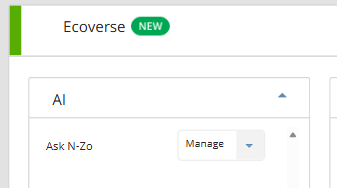
We are introducing AI Management in N-central, giving administrators full control over access to N-zo AI capabilities within Ecoverse. N-zo is our AI assistant that provides contextual guidance and answers using natural language.
This enhancement allows partners to manage which users can access AI-powered features, ensure controlled adoption while enabling technicians to quickly get contextual help, explanations, and guidance without leaving their workflow.
With this release:
A new AI Management section is available under Administration, providing a single place to configure and monitor AI capabilities.
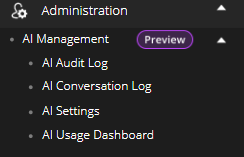
Access to N-zo is governed by role permissions:
To avoid this is
-
Default Administrators can enable AI, manage users, and control settings.
-
Default Technicians can access and use N-zo based on assigned permissions.
-
Users without access will not see AI features in the UI.
AI Audit Log, AI Conversation Log and AI Usage Dashboard will be implemented at a later stage and details will be provided.
Guided Activation Experience
Administrators can enable AI through a structured workflow that includes:
-
Activate AI capabilities: View the available AI capabilities, request limit and pricing implications for the feature.
-
AI Features Agreement: Review and accept the AI Features Agreement. Acceptance is required before AI can be activated.
-
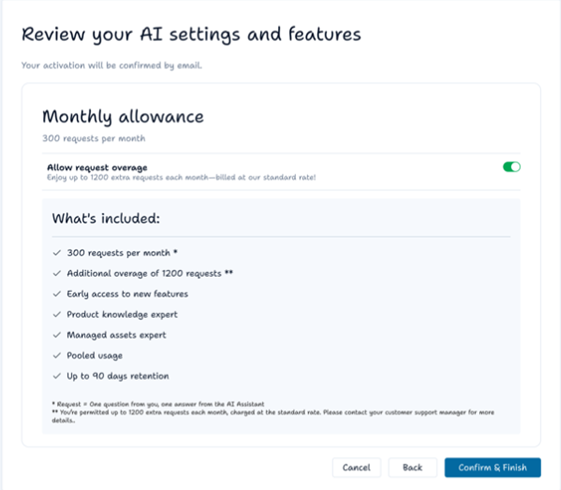
Review your AI settings and features: Review what’s included, choose whether to enable or disable request overage, and confirm activation.
-
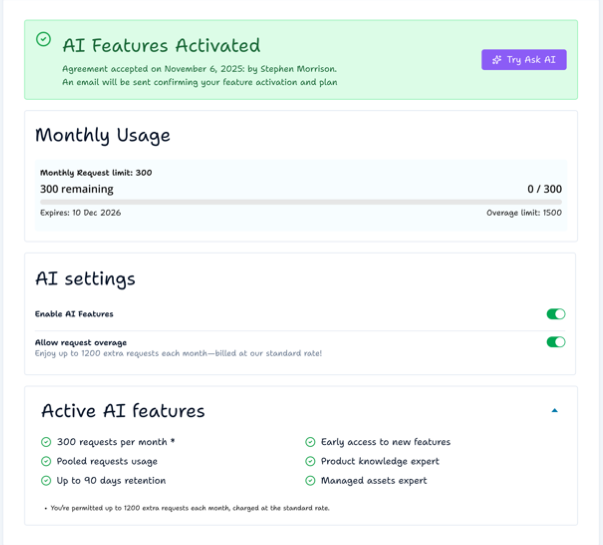
User who activated the AI and time and date.
-
Simple AI credit usage chart.
-
Toggle to disable AI.
-
Toggle to disable overage.
-
Description of AI settings and what’s included.
-
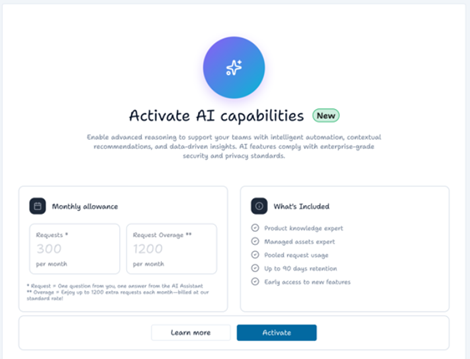
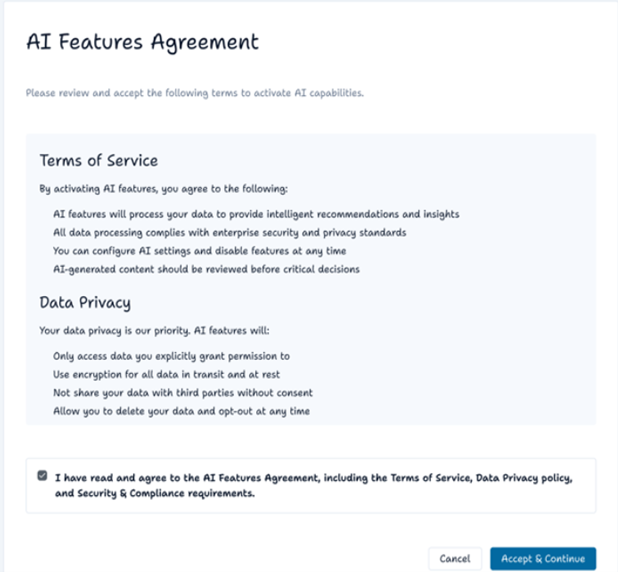
AI Features Activated: After activation, you are redirected to the AI settings page with an inline confirmation banner. Monthly request usage is shown (at 0).
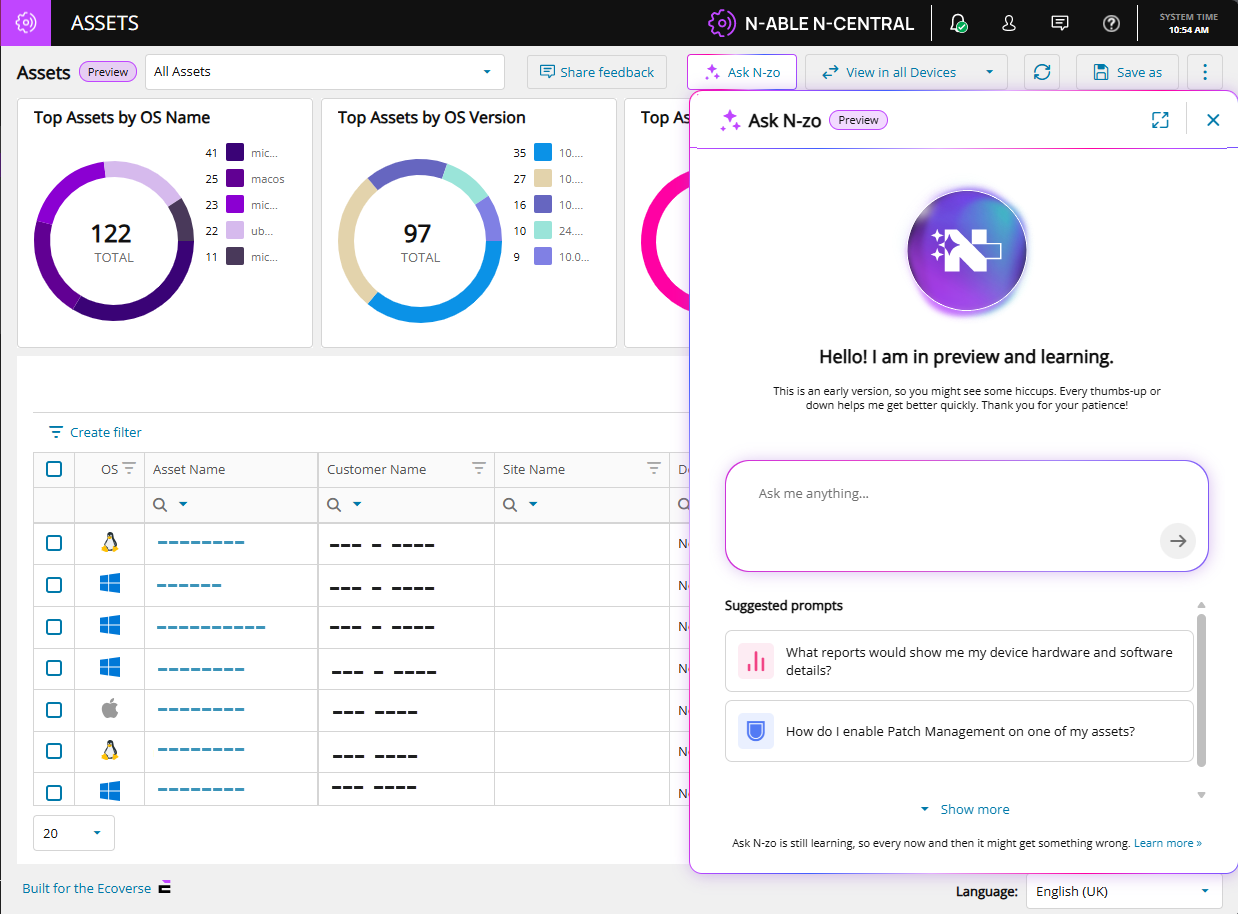
To test N-zo, select Try Ask AI. You are redirected to the Asset view page, where you can access N-zo from the top menu using the Ask N-zo button.
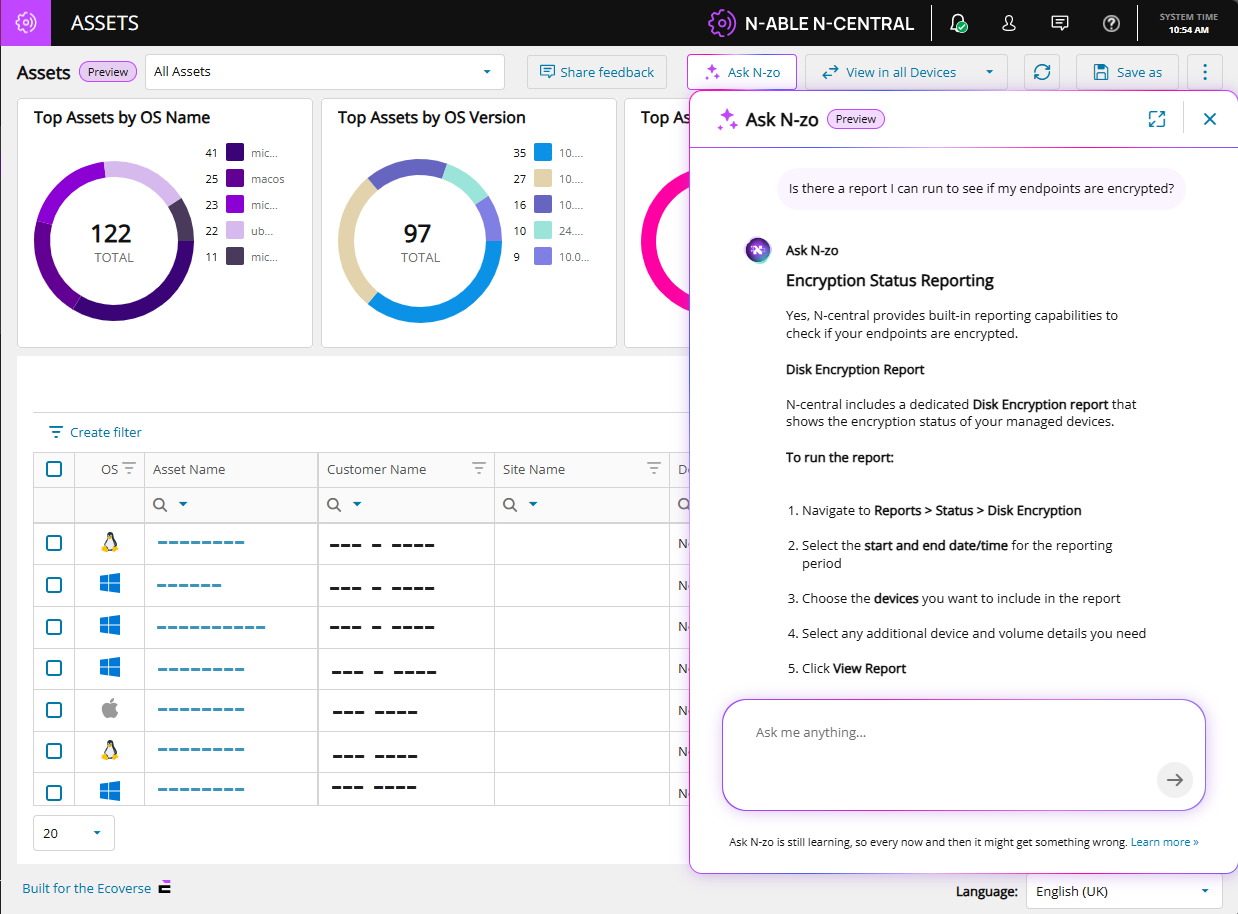
An example query and N-zo's response:
N-zo use cases
| Use Case | Scenario | Sample Prompt | Outcome |
|---|---|---|---|
| Pre-Meeting Executive Briefing | Before a QBR or client visit, an MSP technician asks N-zo for a summary of the client's environment. They arrive informed and prepared — no report-running required. | "I'm briefing a company tomorrow. Can you give me an executive summary of what's going on with their devices and flag any problems I should know about before my meeting?" | A structured briefing covering total devices, healthy systems, critical issues, vulnerabilities, talking points, areas of concern, and a proposed action plan. |
| Slow Server Troubleshooting | A user reports slow logins at their site. The technician describes the problem in plain language. N-zo identifies the device, diagnoses the root cause, and offers immediate recommendations. | "I just got a call from the Dundee site that their logins are slow. Their server is called Avery — can you see why it's running slow?" | Root cause analysis (e.g., critically high memory usage), specs review, Microsoft recommendations, and suggested remediation steps including whether a VM memory increase is feasible. |
| Active Threat Exposure Check | A headline breaks about a known CVE. The Admin needs to know immediately which — if any — devices are exposed. N-zo checks the environment in seconds and reports current exposure status. | "I'm worried about vulnerability CVE-2026-2760. Do any of my devices have this?" | A count of affected devices, confirmation of any that have already been remediated, and which still require action. |
| Vulnerability Risk Prioritization | A manager wants to quickly identify devices that fall below acceptable security thresholds. N-zo queries live asset data and returns a prioritized list with CVE numbers and recommended actions. | "Can you show me a list of devices that have a vulnerability risk score more than 95?" | A ranked device list with risk scores, CVE details, and recommended remediation steps. |
| Report Discovery | A technician needs to know which built-in reports cover hardware and software details. N-zo reads the documentation and returns the exact report name and where to find it — no manual searching required. | "What reports show me my device hardware and software details?" | The specific report name, its location in the product, and all relevant documentation sources. |
| Product Documentation Lookup | A technician wants to know how to automate recurring tasks without leaving the console. Instead of searching the documentation site, they ask N-zo directly and get a plain-language answer with source links in seconds. | "How can I automate recurring tasks in Central?" | Step-by-step instructions for scheduling tasks, formatted in plain language with clickable links back to the documentation source. |
See the N-zo (Preview) user guide for more information.
MCP Servers: Extending AI Workflows Beyond the Product
In addition to N‑zo, N-able also offers MCP (Model Context Protocol) Servers, which enable external AI tools, such as Copilot, Claude, or ChatGPT, to securely interact with live N-central data.
While N‑zo focuses on in‑product guidance and insights, MCP Servers enable advanced, cross‑system workflows by allowing external AI tools to query data and execute supported actions across connected systems.
MCP Servers are available in public preview.
See the MCP Server preview announcement for use cases and prerequisites.
Use the N-able MCP guide to learn how to work with our MCP servers.
Enhanced Device Filtering with Nested AND Conditions
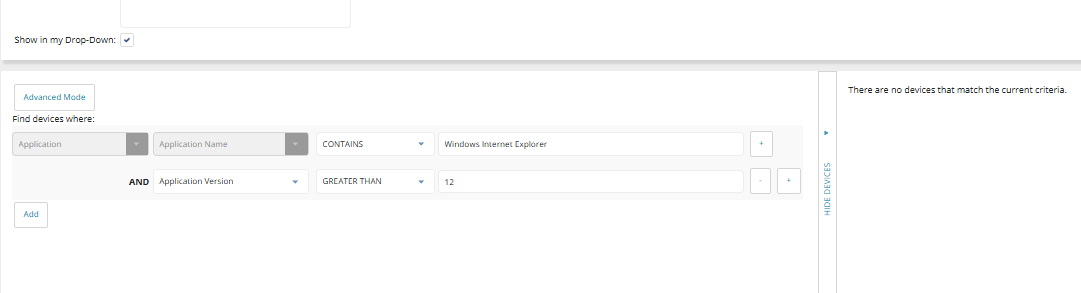
We’ve introduced a major improvement to device filtering in N-central by enhancing how AND conditions are evaluated. Many partners have reported inaccurate filtering results when using AND conditions across properties tied to the same entity (such as applications or services).
For example:
-
Filtering for Microsoft Office AND version 16.0 could return devices where Microsoft Office exists, but version 16.0 belongs to a different application.
-
Filtering for Firefox AND version 1.2.3.4 could return devices where Firefox is installed, but the version condition is satisfied by another application.
This occurred because:
-
Each condition was evaluated independently across multiple records per device
-
Results were combined at the device level rather than the object level
-
Leading to cross-row matches and false positives
What’s Changed
-
Same-object (Correlated) AND Evaluation
-
Nested Conditions (Sub-Conditions)
Users can now add sub-conditions to a filter using a simple UI. This allows precise targeting such as:
-
Application name AND version
-
OS type AND version
-
Service name AND status
-
Improved Filter Builder Experience
-
Clear property grouping (e.g., Device, Application, Custom Device Property).
-
More intuitive selection of properties, operators, and values.
-
Support for both simple and advanced filtering scenarios.
-
-
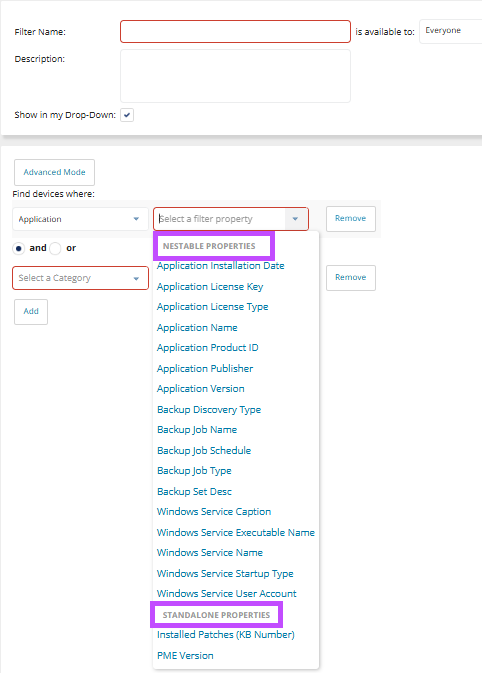
Nestable vs Standalone Properties
-
Nestable properties allow for complex, multi-layered queries by grouping conditions using logical operators.
-
Standalone properties represent already contain complex relationships and cannot be nested.
-
The UI now helps guide users on which properties support nested conditions.
-
-
Improved OS Filtering
-
OS version comparisons now use numeric, version-aware logic instead of string comparison
-
New OS Type selector simplifies filtering across platforms (Windows, Linux, macOS, etc.)
-
-
New System Filter for UFA:
A new predefined filter “Modern Agent Eligible Windows Devices” (System Filter 103) identifies Windows 10+ devices running N-central Classic Agent 23.5+, supporting Unified Agent rollout and reporting.
Enhanced SSO Security with Back-Channel Logout
We’ve enhanced our Authentication Services within the N-able SSO infrastructure by introducing Back-Channel Logout, a new capability designed to strengthen session security and provide more consistent logout behavior across connected applications.
This feature, powered by our Identity Server and aligned with OpenID Connect (OIDC) standards, enables secure server-to-server notifications when a user’s SSO session ends ensuring that all connected applications are automatically logged out without relying on browser activity.
As part of this enhancement, N-central users will now be required to review and acknowledge consent each time they log in, as session tokens are tied directly to this consent.
When a logout is initiated either by the user or another connected application the Back-Channel Logout endpoint is triggered by the identity provider, and all configured client applications receive a logout request.
This ensures that sessions are consistently terminated across the ecosystem, reducing the risk of lingering authenticated sessions and improving overall security posture.
Legacy EDR Upgrade Restrictions
As part of the transition away from our legacy Endpoint Detection and Response(EDR) integration, N-central introduces additional safeguards to guide on-premises customers toward our enhanced EDR integration.
Why this matters
-
Supports the End-of-Life transition from legacy EDR to our enhanced EDR integration.
-
Prevents upgrades in unsupported or unstable configurations.
-
Improves platform stability and upgrade success rates.
What’s changing
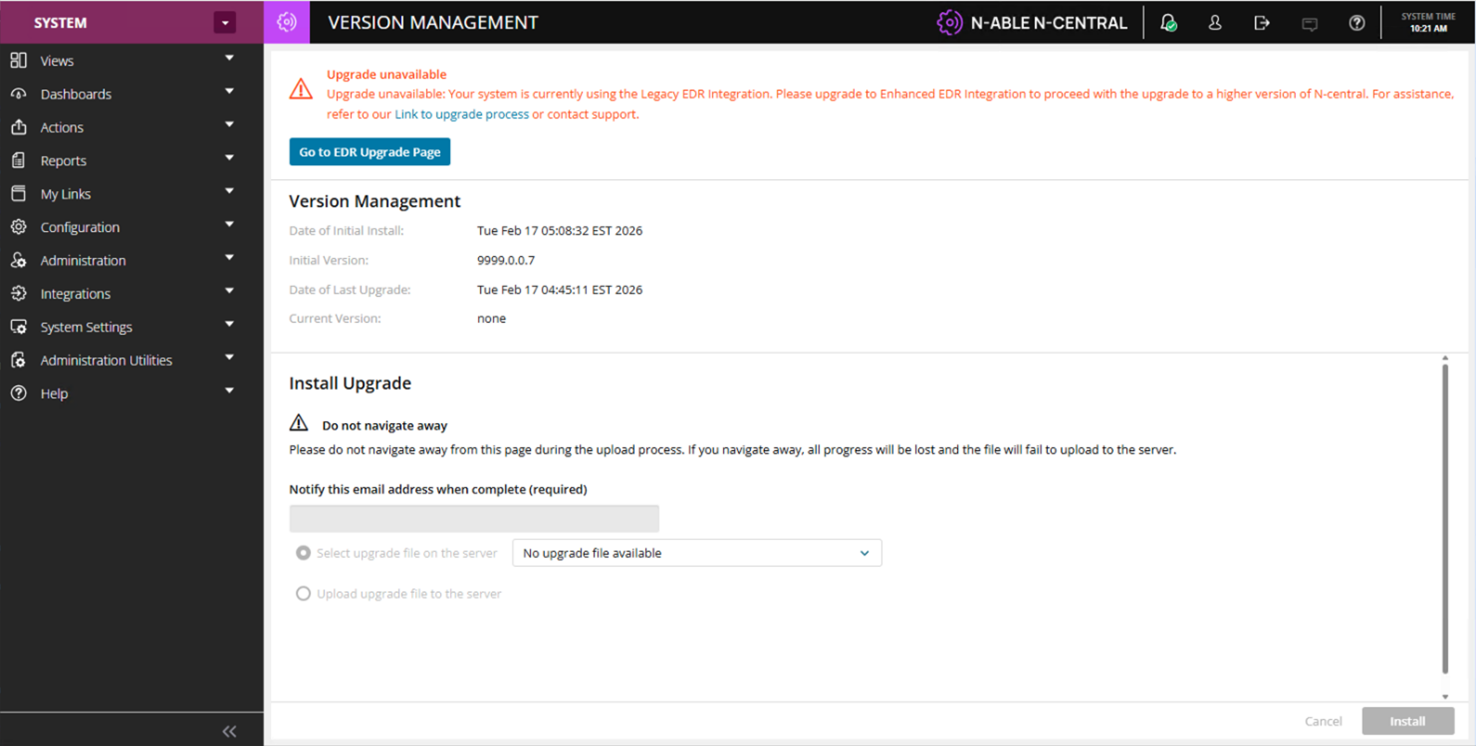
Systems currently using legacy EDR will now have upgrade restrictions applied to prevent unsupported configurations.
-
Upgrade Protection Enforcement
-
Guided Migration Experience
When legacy EDR is detected, system upgrades are restricted and a notification is displayed to inform administrators that the current configuration is not supported for upgrade.
These safeguards are designed to help partners transition to our enhanced EDR solution before proceeding with upgrades, ensuring platform stability and compatibility.
Additional Upgrade Safeguards
-
Clear messaging is displayed when an unsupported configuration is detected
-
Administrators are informed of potential risks associated with proceeding without transitioning
-
Additional confirmation steps are required during the upgrade process to ensure awareness
Help Desk Manager End-of-Life (EOL)
Help Desk Manager, N-central’s legacy ticketing capability, has reached End of Life and is being phased out as part of our ongoing platform modernization efforts.
Originally designed to provide lightweight ticketing for smaller MSPs, Help Desk Manager has seen decreased adoption as most partners have transitioned to dedicated PSA (Professional Services Automation) and ITSM (IT Service Management) solutions. These modern tools offer deeper functionality and integrate seamlessly with N-central.
As part of this change:
-
Help Desk Manager will no longer be available to new customers or environments where it was not previously enabled.
-
Existing customers who are currently using or licensed for Help Desk Manager will continue to have access during the transition period.
-
Help Desk Manager UI elements will be removed for customers without access.
-
Partners are encouraged to transition to supported PSA integrations such as Halo PSA, ConnectWise, or Autotask for ongoing ticketing needs.
New REST APIs for Agent Deployment & Organization Limits Management
We’ve introduced new REST API capabilities in N-central to improve automation, streamline agent deployment, and enable programmatic management of organization limits.
What’s new:
Agent Download API (Unauthenticated Link)
A new REST API endpoint allows partners to generate a direct download link for an N-central Agent, scoped to a specific organization unit.
-
Generate agent installers for:
-
Service Organization.
-
Customer.
-
Site.
-
-
Supports unauthenticated download links, enabling seamless integration with external tools and deployment workflows.
-
Ideal for automated provisioning, scripting, and large-scale deployments.
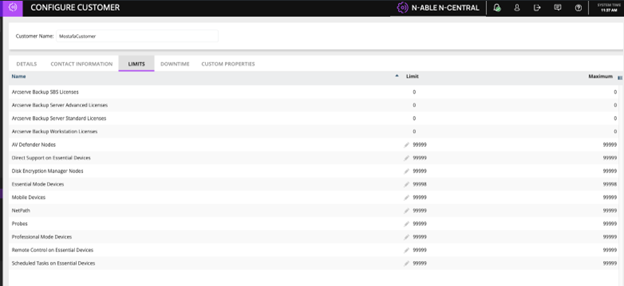
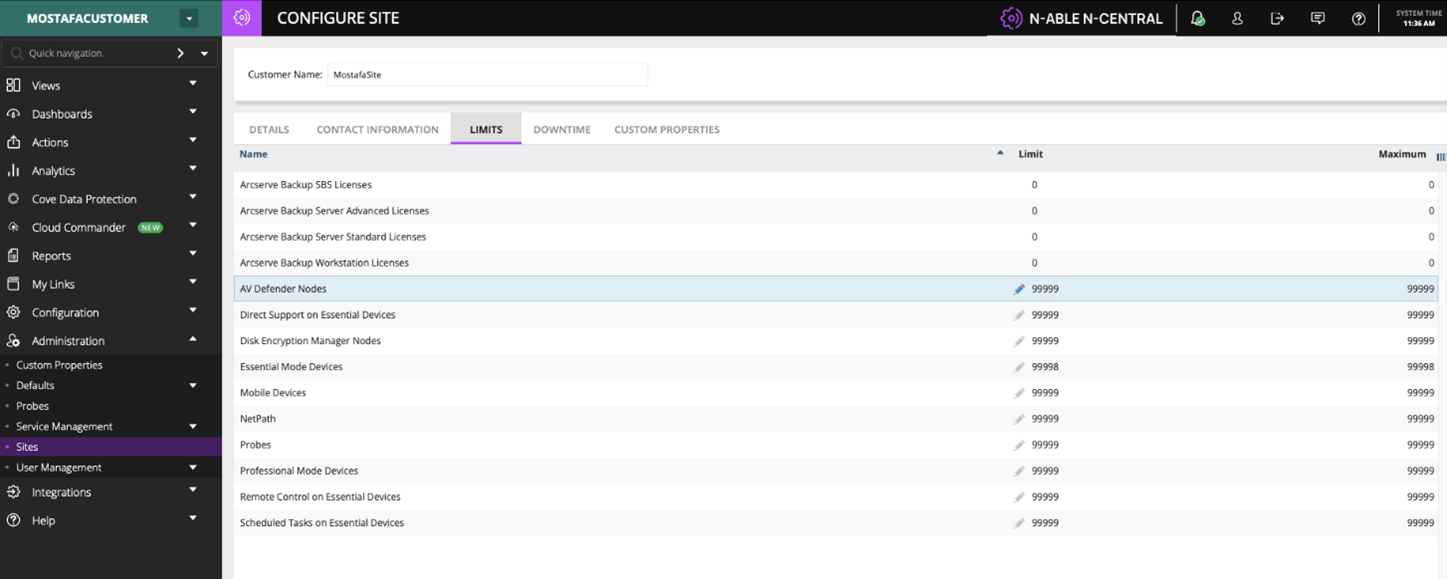
Organization Unit Limits API
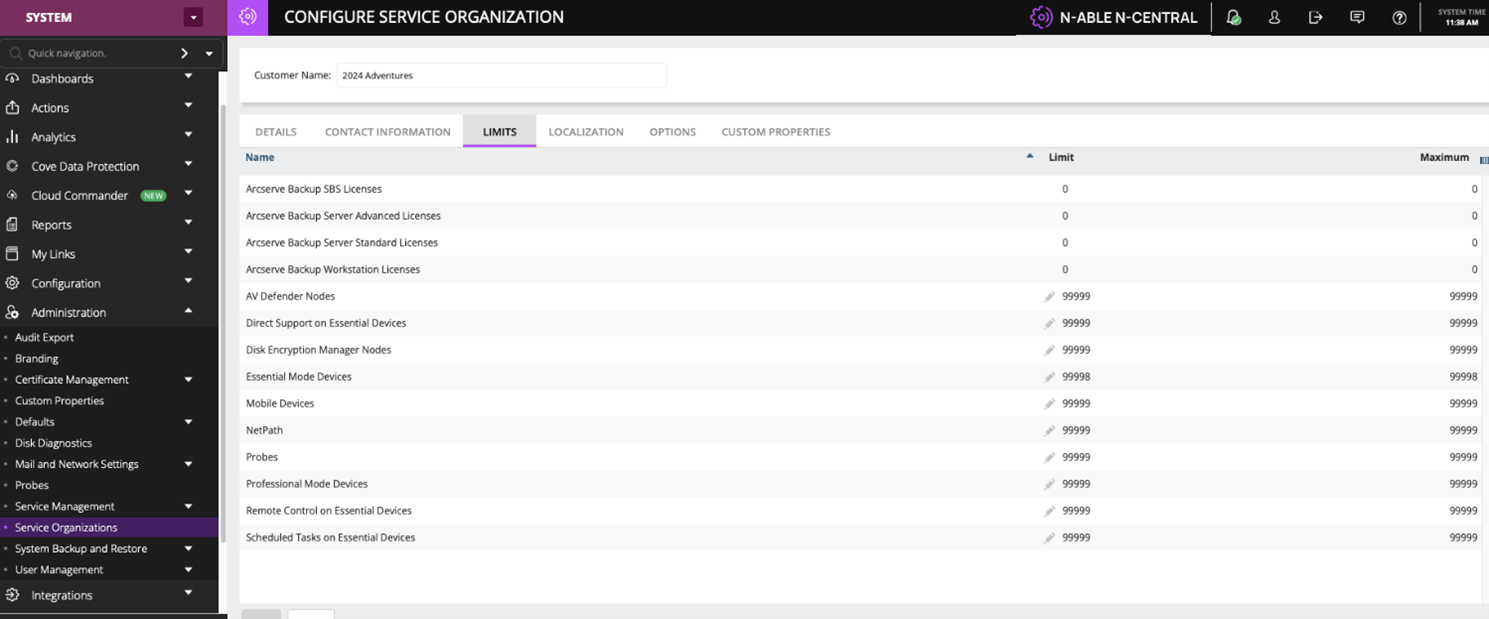
New REST API endpoints enable partners to retrieve and update limits across organization units:
-
Supported levels:
-
Service Organization (SO).
-
Customer.
-
Site.
-
-
GET endpoints.
Retrieve current limits configuration.
-
PATCH endpoints
Update limits such as:
-
Device counts.
-
Feature/license allocations (e.g., AV Defender, Backup, Probes, etc.).
-
-
Designed for partial updates, allowing specific limits to be modified without impacting other settings.
API service logging enhancements
Problem
-
Limited visibility into API usage.
-
No clear trace of who is calling APIs or from where.
-
Slower debugging and reduced auditability.
What's new:
-
API logs now capture:
-
Username (API caller)
-
External IP address
-
-
Available in api-service.log for every request.
-
No impact to existing functionality.
Default monitoring for Adlumin on Windows devices
N-central now includes built-in, out-of-the-box monitoring for the Adlumin security platform through a new service and default template, available in the service repository:
-
Monitoring service: Adlumin Status
-
Default service template: Adlumin Monitoring
When enabled, the Adlumin Monitoring template automatically applies the appropriate Adlumin monitoring service to supported Windows devices, including laptops, workstations, and servers.
This addition provides standardized visibility into Adlumin’s operational state and helps ensure consistent monitoring across customer environments.
Agent Improvements (15th May 2026)
Introduced the new /dms/services2/ServerMMS3 API endpoint for agent communication after agents are updated. This update strengthens communication security and reliability and lays the groundwork for future platform enhancements.
Post GA releases
Add your logo to Analytics reports (04 June 2026)
You can now upload a single logo that automatically appears in all supported Analytics report exports. The logo displays in the top-right corner of each page in PDF and Excel reports, giving your reports a consistent branded look.
N-central Mac agent v1.14.5 (30th July 2026)
Added support for the SNI extension during the TLS handshake, resolving an issue that prevented the N-central Mac agent from registering with servers behind TLS-terminating proxies, including Cloudflare.
Supported Upgrade Paths
Direct upgrade to 2026.2:
-
2025.4.0.16
-
2025.4.1.2
-
2026.1.0.518
-
2026.1.0.527
For all other versions, upgrade to 2025.4.1.2 before upgrading to 2026.2.
Bug Fixes
A range of high-impact bugs have been resolved in this release. Be sure to review the full list included below for more details.
| Category | Updated Summary | Issue Key |
|---|---|---|
| Core Platform | ||
| Core | Summary: Improved remote control connectivity reliability. | NCCF-1634941 |
| Issue: Remote control sessions could fail when SSH tunnel validation behaved incorrectly, preventing proper failover to HTTP connections. | ||
| Fix: Restored a stable SSH tunnel validation process and ensured correct HTTP fallback when SSH connections are unavailable. | ||
| Core | Summary: Improved Windows OS detection accuracy. | NCCF-1441572 |
| Issue: Certain Windows NT 6.x devices could be misidentified due to incorrect OS detection logic. | ||
| Fix: Corrected the OS detection logic so affected Windows versions are identified correctly. | ||
| Core | Summary: Improved device history reliability. | NCCF-1216350 |
| Issue: Some devices appeared without corresponding device history records even though audit events existed. | ||
| Fix: Updated device history processing to ensure records are created and retained properly. | ||
| Core | Summary: Improved stability when opening Agent Settings. | NCCF-1048144 |
| Issue: Accessing Agent Settings could result in a system error under certain conditions. | ||
| Fix: Corrected underlying handling to prevent the error and allow Agent Settings to open reliably. | ||
| Core | Summary: Improved propagation of custom device property changes. | NCCF-1001737 |
| Issue: Changes to customer custom properties were not pushed to agents until another configuration update occurred. | ||
| Fix: Updated configuration handling to ensure custom property changes are pushed to agents as expected. | ||
| Core | Summary: Improved reliability of threat routing and processing. | NCCF-1001645 |
| Issue: Delays in message routing could cause some threat checks to be discarded before processing. | ||
| Fix: Improved routing timing to ensure threat checks are processed reliably. | ||
| Core | Summary: Improved service availability calculations across daylight saving changes. | NCCF-622091 |
| Issue: Availability calculations for a service running on multiple devices could be inaccurate during daylight saving transitions. | ||
| Fix: Corrected time handling to ensure accurate availability reporting. | ||
| Core | Summary: Corrected role visibility when NAC integration is disabled. | NCCF-1767348 |
| Issue: Disabling the NAC integration could inadvertently hide the System Settings role. | ||
| Fix: Updated role handling so System Settings remains visible when NAC integration is disabled. | ||
| Core | Summary: Resolved missing audit log entries for Remote Control Command Prompt sessions. | NCCF-1302767 |
| Issue: Audit exports omitted session start entries for Command Prompt sessions initiated through Remote Control, even though Command History entries were logged. | ||
| Fix: Updated audit logging to correctly capture and export Command Prompt session start events initiated through Remote Control. | ||
| Core | Summary: Resolved an issue where custom server performance settings were reset during upgrades. | NCCF-1433638 |
| Issue: Custom server thread limit settings were overwritten during upgrades, reverting to defaults and requiring partners to contact Support to reapply the configuration after each upgrade. | ||
| Fix: Updated the upgrade process to preserve custom thread limit settings, eliminating the need to reapply them after upgrading. | ||
| Core | Summary: Summary: Resolved a Windows UAC hang on devices managed by the N-central agent. | NCCF-1620486 |
| Issue: Windows UAC operations could hang on devices managed by the N-central agent, preventing users from completing UAC prompts. | ||
| Fix: Updated the Windows agent to resolve the internal conflict causing UAC operations to hang, ensuring UAC prompts complete successfully. | ||
| Core | Summary: Resolved Physical Drive (HP) service mapping changes not applying after upgrade. | NCCF-1724321 |
| Issue: Updated service mappings for the Physical Drive (HP) service were not applied during upgrade because the service XML version was not incremented. | ||
| Fix: Updated the Physical Drive (HP) service XML version so that revised drive status mappings are correctly applied on upgrade. | ||
| Core | Summary: Resolved an issue where Remote Control sessions unexpectedly went offline. | NCCF-1608235 |
| Issue: Remote Control could become temporarily unavailable without warning, causing Take Control icons to switch from active (green) to warning (orange). | ||
| Fix: Resolved an internal session management issue to ensure Remote Control remains available and status icons reflect the correct state. | ||
| Core | Summary: Submit Queue Thread Assignment Improvements. | NCCF-88115 |
| Issue: Data submission through the submit queue is a heavy process specially with many devices involved. Optimizations are needed to make this heavy process as efficient as possible. | ||
| Fix: By spreading the payloads across different threads we are able to utilize Java threads efficiently to process more payloads and speed up the submission. | ||
| Automation & Task Execution | ||
| Core | Summary: Improved reporting for automation task execution. | NCCF-1533752 |
| Issue: Tasks configured to run as “Currently Logged on User” appeared in the UI as executed by “Local System.” | ||
| Fix: Updated reporting logic to correctly display the user identity executing the task. | ||
| Core | Summary: Improved PowerShell detection accuracy. | NCCF-1504077 |
| Issue: PowerShell could be incorrectly reported as missing when legacy registry entries existed on modern Windows systems. | ||
| Fix: Updated detection logic to prioritize valid registry entries and correctly detect installed versions. | ||
| Core | Summary: Improved automation task cleanup. | NCCF-1373077 |
| Issue: Tasks deleted in N-central could continue running on agents due to synchronization issues. | ||
| Fix: Updated task synchronization logic so deleted tasks are properly removed from agents. | ||
| Agents & Device Management | ||
| Core | Summary: Improved Linux agent upgrade compatibility. | NCCF-1522323 |
| Issue: Linux agent modules could be removed during server upgrades, causing monitoring services to stop working for agents that have not yet upgraded. | ||
| Fix: Updated the upgrade process to retain required modules and maintain monitoring functionality. | ||
| Core | Summary: Added DDR5 memory monitoring support. | NCCF-1380645 |
| Issue: DDR5 memory modules were not previously recognized or monitored by N-central. | ||
| Fix: Added support for DDR5 memory detection and monitoring. | ||
| Core | Summary: Improved asset data updates for video controllers. | NCCF-862919 |
| Issue: Video controller asset data updates could be ignored when certain values were reported as zero. | ||
| Fix: Updated asset data processing logic so valid updates are stored correctly. | ||
| Core | Summary: Resolved a maintenance thread hang during Apple Business Manager device retrieval. | NCCF-1255333 |
| Issue: A maintenance thread could hang indefinitely while retrieving enrolled Apple Business Manager devices, blocking new task processing until the server was restarted. | ||
| Fix: Updated the Apple Business Manager device retrieval process to prevent thread blocking without requiring a server restart. | ||
| Core | Summary: Server reactivation on 2026.2 could result in credentials not updating as expected. | NCCF-1983444 |
| Issue: In some reactivation scenarios, credential updates were not consistently applied during the reactivation process. | ||
| Fix: Reactivation handling was corrected to ensure credential updates are reliably applied. | ||
| Core | Summary: Improved scheduling behavior for delayed agent installations. | PMCM-10116 |
| Issue: When a probe delay was configured, a later scheduling window could replace the current installation window. | ||
| Fix: Updated scheduling logic to preserve the intended installation window. | ||
| UI & User Experience | ||
| Core | Summary: Improved scheduled task creation experience. | NCCF-1495918 |
| Issue: Fields on the Scheduled Tasks page could become disabled or greyed out until the page was refreshed. | ||
| Fix: Corrected UI logic so scheduled task fields remain editable without requiring a page refresh. | ||
| Core | Summary: Improved Job Status page stability. | NCCF-1403787 |
| Issue: Large environments loading tens of thousands of job records could experience slow performance or browser crashes. | ||
| Fix: Implemented pagination to limit records loaded at once and improve performance. | ||
| Core | Summary: Improved login session stability. | NCCF-1251372 |
| Issue: Some users encountered a 500 error during login redirects due to a null user profile reference. | ||
| Fix: Updated login session initialization to ensure user profile data loads correctly. | ||
| Core | Summary: Corrected the Take Control icon status for accounts with limited role permissions. | NCCF-1411065 |
| Issue: For accounts with limited role permissions, the Take Control icon displayed as active (green) when the agent was in a failed state, instead of warning (orange). | ||
| Fix: Updated the Take Control icon status logic to correctly reflect the agent state for accounts with limited role permissions. | ||
| Patch | ||
| Core | Summary: Patch Monitor V2 - "An item with the same key has already been added." | PMCM-11186 |
|
Issue: This edge case occurred when duplicate patch identifiers were introduced during Windows Update Agent scan, causing this failure. |
||
| Fix: Updated logic to merge duplicate patches, prevent duplicate GUIDs, and improve matching. | ||
| Core | Summary: Improved accuracy of patch install status reporting. | PMCM-11306 |
| Issue: Patch install status could be set incorrectly when matching KB data across different sources. | ||
| Fix: Refined matching logic to ensure install status is reported correctly. | ||
| Core | Summary: Improved patch detection consistency across GUID changes. | PMCM-11359 |
| Issue: Patch information such as install status could be missing when a patch was detected with a different GUID. | ||
| Fix: Updated detection logic to reconcile patch data across differing identifiers. | ||
| Backups | ||
| Core | Summary: Restored SSL FTP backup support. | NCCF-1300319 |
| Issue: SSL FTP backup transfers stopped working after upgrading to version 2025.4 due to stricter validation that blocked the required SSL FTP configuration settings. | ||
| Fix: Restored support for SSL FTP configuration settings in the backup process so SSL-based transfers work as expected after upgrading to 2025.4 or later. | ||
| Core | Summary: Resolved active exports not being detected during backup operations. | NCCF-1702570 |
| Issue: A trailing newline in the export status variable prevented correct comparison, causing backups to proceed concurrently with active database exports. | ||
| Fix: Updated the backup process to strip trailing newline characters from the export status value before comparison, ensuring active exports are detected before a backup starts. | ||
| Discovery & Asset Collection | ||
| Core | Summary: Improved credential validation for discovery jobs. | NCCF-1388715 |
| Issue: Mac and Linux credentials containing spaces in usernames triggered system errors instead of validation errors. | ||
| Fix: Added validation checks to prevent invalid usernames and provide clear error messaging. | ||
| Core | Summary: Improved asset discovery performance. | NCCF-1222713 |
| Issue: Legacy TeamViewer configuration logic caused unnecessary database contention during asset discovery. | ||
| Fix: Removed outdated TeamViewer update logic to reduce database locking. | ||
| Core | Summary: Improved asset job processing efficiency. | NCCF-826285 |
| Issue: Frequent scans using “Update Asset Info When Finished” created excessive asset jobs and degraded server performance. | ||
| Fix: Optimized asset job creation to prevent unnecessary job generation. | ||
| PSA & Integrations | ||
| Core | Summary: Improved ConnectWise PSA customer mapping. | NCCF-1634249 |
| Issue: Customer mappings could display “Invalid Entry” when toggling mappings in the PSA customer mapping interface. | ||
| Fix: Updated mapping refresh logic to prevent validation errors. | ||
| Core | Summary: Improved PSA export queue stability. | NCCF-1511047 |
| Issue: The PSA export queue could become locked and block submit queue processing. | ||
| Fix: Improved queue handling logic to prevent locking and maintain queue processing. | ||
| Core | Summary: Improved Halo PSA discovery notification handling. | NCCF-1371235 |
| Issue: Discovery notifications using Halo PSA ticket recipients could trigger null pointer exceptions when device context was missing. | ||
| Fix: Updated notification processing to safely handle recipients without device IDs. | ||
| Core | Summary: Improved Halo PSA ticket recipient management. | NCCF-1260135 |
| Issue: Halo ticket recipients could not be deleted due to session validation errors. | ||
| Fix: Corrected permission and session validation handling. | ||
| Core | Summary: Improved Halo PSA ticket closure handling. | NCCF-1260099 |
| Issue: Tickets were not automatically closed when monitored services returned to a normal state. | ||
| Fix: Updated ticket cleanup logic to correctly process return-to-normal events. | ||
| Core | Summary: Improved Halo PSA recipient name synchronization. Issue: | NCCF-1255378 |
| Renaming ticket recipients did not update related display names in all areas of the system. | ||
| Fix: Updated synchronization logic so renamed recipients update consistently. | ||
| Core | Summary: Improved Autotask API endpoint handling. | NCCF-975716 |
| Issue: API requests could fail when sent to incorrect Autotask zone endpoints. | ||
| Fix: Updated integration logic to use the correct API zone endpoint. | ||
| Core | Summary: Corrected PSA export behavior when devices are deleted. | NCCF-265726 |
| Issue: Device deletion events could trigger exports across multiple PSA profiles instead of only the configured profile. | ||
| Fix: Updated export logic to ensure only the correct profile processes deletion events. | ||
| Core | Summary: Resolved the HaloPSA "Do not reopen" setting not being applied on recurring issues. | NCCF-1473706 |
| Issue: When the ticketing recipient was set to Do not reopen, recurring issues still triggered ticket reopening in HaloPSA. | ||
| Fix: Updated the HaloPSA integration to correctly apply the Do not reopen setting when an issue reoccurs. | ||
| Core | Summary: Resolved HaloPSA ticket creation failures caused by mandatory field validation. | NCCF-1718037 |
| Issue: Ticket creation and exports to HaloPSA failed with a 500 error when the HaloPSA instance had mandatory field settings configured. | ||
| Fix: Updated the HaloPSA integration to include the required validation override parameter in the request payload, ensuring ticket creation succeeds when mandatory fields are configured. | ||
| Authentication & SSO | ||
| Core | Summary: Improved MSP SSO notification settings handling. | NCCF-903946 |
| Issue: Editing notification methods for MSP SSO users could invalidate sessions and log users out. | ||
| Fix: Updated session handling to prevent session destruction during configuration updates. | ||
| Core | Summary: Improved MSP SSO auto-provisioning reliability. | NCCF-799206 |
| Issue: Some auto-provisioned users were created with an invalid customer ID. | ||
| Fix: Updated provisioning validation to ensure users are assigned to the correct organization. | ||
| Notifications & Alerting | ||
| Core | Summary: Improved notification deletion behavior. | NCCF-1275775 |
| Issue: Deleting notifications at the Service Organization level did not always remove related child notifications. | ||
| Fix: Updated deletion logic to properly cascade notification removals. | ||
| Core | Summary: Improved notification template compatibility. | NCCF-1263720 |
| Issue: HTML escaping changes broke JSON-based PSA notification templates used in integrations. | ||
| Fix: Updated template processing to preserve JSON formatting. | ||
| Core | Summary: Improved notification count reconciliation. | NCCF-486698 |
| Issue: Incorrect notification counts could remove active notifications or prevent return-to-normal events from triggering. | ||
| Fix: Corrected notification count logic to maintain accurate states. | ||
| Performance & Stability | ||
| Core | Summary: Improved handling of task semaphore delays. | NCCF-1094691 |
| Issue: Some processes could pause for extended periods while acquiring semaphores, delaying queue processing. | ||
| Fix: Optimized semaphore handling to reduce wait times. | ||
| Core | Summary: Improved remote control property lookup performance. | NCCF-1035009 |
| Issue: Database contention could occur during remote control property lookups in large environments. | ||
| Fix: Optimized query logic to reduce lock contention. | ||
| Core | Summary: Improved operational data storage management. | NCCF-1140520 |
| Issue: Prometheus and NATS services stored operational data in uncontrolled directories which could fill system storage. | ||
| Fix: Updated configuration to store data in managed directories. | ||
| Core | Summary: Improved stability of warranty update processing. | NCCF-1842761 |
| Issue: Warranty update processing could create excessive threads due to missing limits. | ||
| Fix: Added thread generation limits to prevent resource exhaustion. | ||
| Core | Summary: Resolved a server-side memory leak that could cause performance degradation on versions 2025.4 and 2026.1. | NCCF-1713374 |
| Issue: N-central servers running versions 2025.4 and 2026.1 could experience gradual memory growth and performance degradation over time. | ||
| Fix: Updated internal server components to correctly manage resource allocation, preventing memory accumulation and restoring consistent server performance. | ||
| Core | Summary: Improved performance when loading active issues. | NCCF-1001741 |
| Issue: Validation of remote control types could slow the loading of active issues. | ||
| Fix: Streamlined validation logic to reduce delay and improve responsiveness. | ||
| Core | Summary: Performance issues could cause services to appear stale for some customers. | NCCF-1989795 |
| Issue: In certain situations, service updates were delayed, causing services to appear stale. | ||
| Fix: Performance improvements were made to service data processing to reduce backlog and ensure services update correctly. | ||
| Reporting | ||
| Core | Summary: Improved license usage report accuracy. | NCCF-956676 |
| Issue: Scheduled emailed license usage reports sometimes showed zero usage values even when usage existed. | ||
| Fix: Updated report generation logic so emailed reports display accurate totals. | ||
| Core | Summary: Resolved inconsistent timezone formatting in the lastApplianceCheckinTime REST API field. | NCCF-1594571 |
| Issue: The lastApplianceCheckinTime field returned inconsistent timezone information depending on the endpoint used — /api/devices/{deviceId} returned UTC, while /api/org-units/{orgUnitId}/devices returned local time without a timezone offset. | ||
| Fix: Updated the REST API to return a consistent timezone-aware format for lastApplianceCheckinTime across all endpoints. | ||
| Intune | ||
| Core | Summary: Intune devices could remain stuck in the Importing tab. | INTUNE-579 |
| Issue: In some scenarios, issues within the import workflow prevented the Intune import process from completing. | ||
| Fix: The Intune import workflow was improved to correctly handle setup state and prevent conditions that blocked devices from completing the import. | ||
| Core | Summary: Intune devices getting stuck in Importing. | INTUNE-580 |
| Issue: Microsoft Intune Agent app not updating to the latest version on N-central upgrade. Intune Compliance Service not updating / Failed Intune Compliance Service. | ||
| Fix: Microsoft Intune Agent now updates during N-central upgrades. | ||